VPC-Native Dev Environment Setup for Internal App Teams Using Kubernetes and Persistent Workspaces
How to build persistent, secure dev workspaces inside Kubernetes without burdening developers.
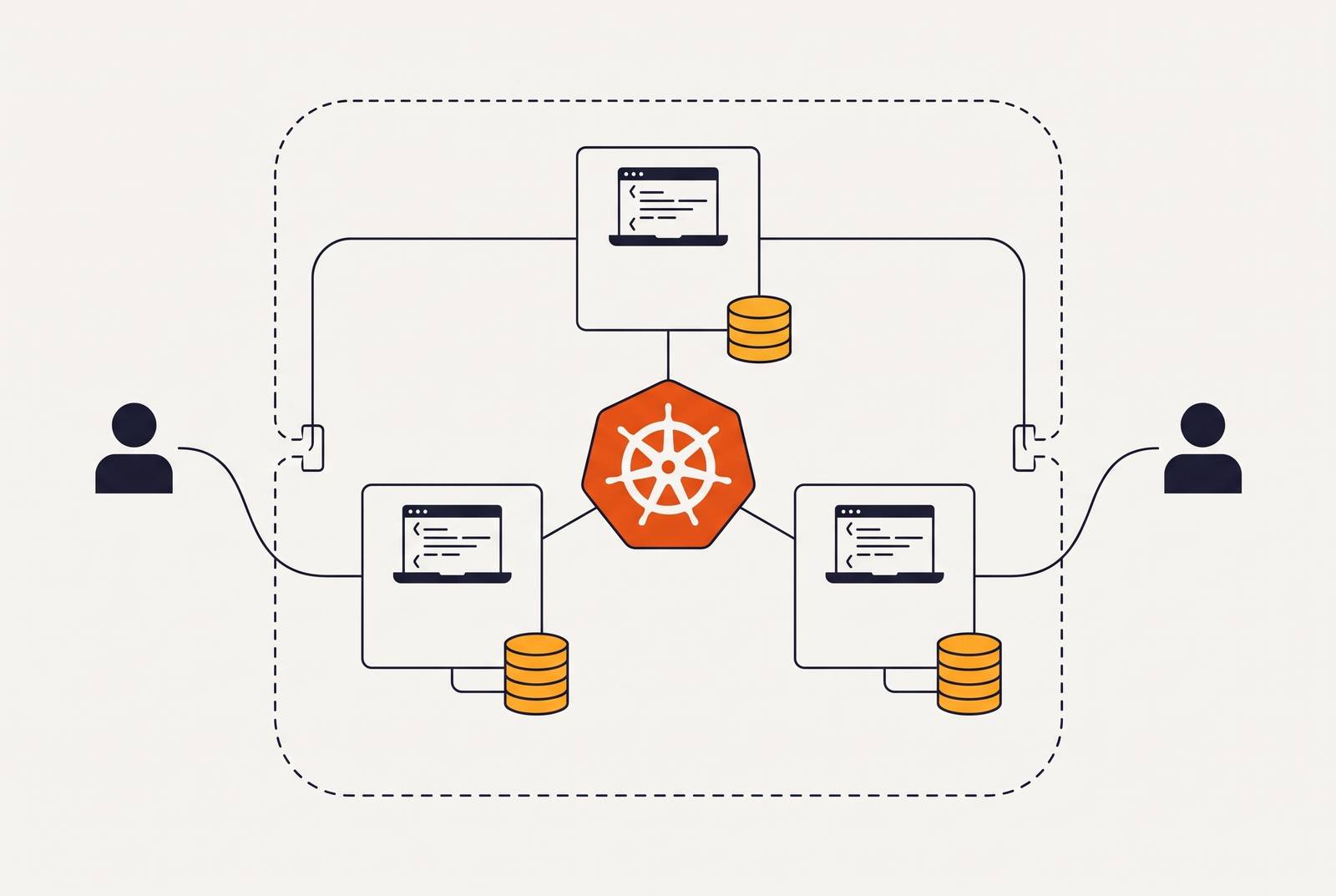
A VPC-native development environment needs more than Kubernetes running in a private network. It needs network boundaries, persistent workspaces, and an abstraction that keeps application developers out of cluster configuration. The platform only helps teams ship when security, storage, and self-service work as one system.
Why local development breaks down as internal teams scale on Kubernetes
Local development drifts away from production as Kubernetes-backed applications grow. ARM laptops and x86 production clusters differ in how they are configured, even before application dependencies come into play. Modern microservices systems can require tens, hundreds, or thousands of containers, databases, and message brokers running together. A laptop cannot faithfully reproduce that cluster. The gap is architectural.
That gap also creates security and onboarding problems. Proprietary source code sits on endpoint devices outside the VPC, while new developers spend days assembling working environments. Distributed teams add the burden of securing endpoints and shipping hardware across geographies. The question is what a layered VPC-native architecture looks like, and how its layers fit together.
What VPC-native dev environments are and how they differ from generic cloud dev setups
A VPC-native development environment is a reproducible, containerized workspace inside the team’s own network boundary, with persistence and access controls that match its production posture. Developers connect through VS Code or SSH as thin clients. Source code, secrets, and workspace compute stay inside the corporate VPC. A VM in a shared SaaS tenant or a container that discards its state on restart does not meet the same definition.
The workspace combines a persistent volume, a development container with pre-installed tools, a StatefulSet, a Service for consistent network access, and remote access. Coder is the leading open-source platform for provisioning cloud development environments through Terraform on Kubernetes, virtual machines, container platforms, and other infrastructure. DevContainers provides the standard for configuring development containers through devcontainer.json, including tools, runtimes, and dependencies. Coder provisions the workspace infrastructure, while DevContainers describes how to prepare the container for development.
The three-layer architecture that holds a VPC-native dev environment together
The infrastructure layer contains the VPC, subnets, security groups, managed Kubernetes cluster, registry, identity configuration, and secret stores. The platform layer adds declaratively installed services, including GitOps, the service mesh, policy enforcement, and observability. The application/workspace layer holds developer environments that are each managed on their own. Each layer needs a clear boundary around what it handles. CNCF’s internal developer platform design documents significant maintenance complexity from collapsing them early.
Network isolation starts in infrastructure and is enforced through platform controls. Persistence connects cluster storage to each workspace, while developer abstraction exposes those capabilities without exposing their configuration. The layers work together, but each can have its own deployment schedule. With that separation, developers can use their workspaces for routine sessions without someone having to run cluster operations by hand.
Configuring the VPC and cluster network boundaries that keep workspaces inside the perimeter
Terraform modules should spell out where the network and cluster boundary lies. The modules cover VPCs or Virtual Networks, subnets, Network Security Groups, the managed cluster, registry, identity and access settings, and secret stores. Inside the cluster, workspaces belong in a dedicated dev-workspaces namespace, separated from platform components and production through both network policy and RBAC. Calico enforces namespace-level network policies so that workspaces cannot reach production services without explicit permission.
Istio adds traffic routing, service-level observability, and mTLS encryption between services. Its rollout order needs care, however. Enabling Strict mTLS across the cluster before every workload has a sidecar causes connectivity failures. The safe sequence starts with Permissive mode. After confirming full sidecar injection within a namespace, the platform team can apply PeerAuthentication in Strict mode there.
Using StatefulSets and persistent volumes to give each developer a workspace that survives pod restarts
Without persistence, it behaves more like a CI runner, forcing developers to rebuild their working state whenever the container disappears. StatefulSets provide stable pod identity and volume attachment across restarts or rescheduling. The workspace pattern uses one PersistentVolumeClaim, or PVC, per workspace in dev-workspaces. The pod mounts that claim at /home/coder, so the home directory and workspace files can outlive the pod.
The PersistentVolume and PVC lifecycle provides persistence, while CSI drivers provision and mount the storage. When a session ends, the pod can be destroyed while the retained PVC and its data remain ready for the next login. The volume outlives the process that uses it. This also lets auto-sleep release idle compute without discarding saved work. Karpenter can provide Spot or preemptible capacity, with the retained volume reattached when an interrupted workspace is rescheduled.
Defining workspace templates so application developers never touch YAML or cluster configuration
A private, persistent workspace is still unusable as a team platform if only its builders can provision it. Self-service is a product decision. Coder templates use Terraform to define the underlying infrastructure, and developers select environments through a web UI. The platform team encodes the base development image, PVC size and storage class, namespace, resource requests and limits, and required environment variables or secrets. Those defaults prevent routine workspace creation from becoming a cluster administration task.
Opinionated templates provide golden paths for backend services, ML workloads, and frontend applications. Developers can use an approved pattern instead of choosing each infrastructure setting on their own. Backstage lets teams find services and see who owns them through its service catalog, while Software Templates can set up workspaces, databases, or caches without an ops ticket. The repository’s devcontainer.json is where the application team defines its runtimes, drivers, and CLI tools, while the platform team owns the base image and infrastructure.
The GitOps and CI/CD pipeline that keeps workspace templates versioned, validated, and safe to update
Git should define the state the platform should be in, rather than just record changes someone has made through kubectl. Argo CD uses automated sync and self-heal to reconcile the cluster with that state and revert manual drift. Changes then follow a versioned path into the platform. This removes the dependency on someone making routine cluster edits. It also gives templates and platform configuration a common operational discipline.
CNCF’s pipeline design starts with source build and compilation, then uses Trivy for dependency scanning, creates the container image, signs it with Cosign, and publishes it to the registry. Cosign uses keyless signing through OIDC to establish image integrity and provenance. KubeSec checks manifests for insecure configuration before deployment. Admission policy provides the next checkpoint. Kyverno can reject untrusted registries or non-compliant signatures before pods schedule, but CVE enforcement needs integration with a scanner such as Trivy.
The repository also supports recovery of declared platform configuration. Argo CD can reconcile a replacement cluster from the same Git repository if the original cluster is lost.
Network policy and RBAC controls that satisfy compliance requirements without adding developer friction
The workspace namespace should use namespace-scoped Roles rather than cluster-admin access, dedicated ServiceAccounts per template, and periodic access reviews. These least-privilege controls cover the requirements in CIS 5.1.x and SOC 2 CC6.1–CC6.3. They also partially support HIPAA 164.312(a), but RBAC alone does not provide the unique user identification and emergency access procedures that requirement includes. Compliance needs that distinction stated plainly. A configured permission model is not proof that every requirement has been met.
The existing network and pipeline controls cover other parts of the same security posture. Calico namespace isolation contributes to network segmentation, while MFA and least-privilege access support control over entry and permissions. Trivy scans images before publication, and Kyverno enforces admission rules at deployment. Developers encounter these controls through approved templates. Compliance becomes an output of the architecture to assess and audit.
Observability for the workspace platform itself — knowing when a developer's environment is unhealthy
The platform team needs to see which environments are running, consuming excess resources, or sitting on unhealthy compute. CNCF’s design treats observability as a core platform capability and uses Prometheus for metrics and alerts, Grafana for dashboards, and Loki for centralized logs. These tools belong in the platform layer, where they are managed declaratively. Otherwise, workspace health remains a blind spot.
Workspace monitoring should track pod creation, sleep, and destruction, and alert on PVC utilization, node resource saturation, and Argo CD sync problems that indicate drift. Per-developer storage visibility helps distinguish a workspace problem from cluster-wide pressure. Node metrics help even more as the number of workspaces on each node grows. Connectivity needs a different view of the same platform. Istio’s service-level telemetry helps investigate workspace-to-service calls when a developer cannot reach a downstream dependency.
Cost controls that make persistent workspaces financially sustainable as the team grows
Coder’s auto-sleep releases workspace compute after inactivity while retaining the PVC, so developers can resume without losing saved work. This is the primary cost control. Karpenter adds Spot capacity for workloads that can tolerate interruption and resume with their volumes attached. Together, these choices separate the cost of preserving a workspace from the cost of keeping its pod running.
P95 usage provides the target baseline for CPU and memory sizing, rather than oversized requests that consume cluster capacity and increase instance costs. Teams can also schedule scale-down for non-production environments outside business hours. Infracost can report the cost delta on each Terraform pull request, exposing increases in per-workspace cost before they merge.
PVC storage is cheaper than leaving workspace pods running overnight. Auto-sleep, Spot capacity, and right-sizing thus make persistent workspaces cheaper than keeping pods running all the time to preserve their state.
What the platform team builds versus what the application team touches, and how to draw that boundary
The platform team owns VPC and cluster provisioning, namespaces, network policy, base images, StatefulSet templates, GitOps, the service mesh, observability, compliance controls, and audit logging. The application team owns its repository’s devcontainer.json, application code, and personal PVC contents. That division is the operating contract between the teams. The platform team publishes versioned templates, and application developers select them and customize their development dependencies. Neither side needs to take over the other’s configuration.
This boundary reduces cognitive load only when routine operations respect it. Developers should not need YAML, cluster-state knowledge, or kubectl to start and use their workspaces. If they do, the abstraction remains incomplete. CNCF’s design separates infrastructure, platform, and applications into three repositories or directory hierarchies, with Argo CD managing their relationship. The developer portal or catalog then becomes the visible interface to that otherwise hidden architecture.
Running the platform on your own cloud account rather than a shared PaaS tenant
VPC networking, StatefulSets, Argo CD, Istio, Kyverno, and Prometheus are implementable, but each becomes part of a system the platform team must maintain. Teams without that capacity risk building a setup they later abandon. The decision is therefore partly about who operates Kubernetes. It is not just about whether Kubernetes can support the workspace design.
A shared PaaS tenant does not meet the own-VPC requirement because workspace compute and source code sit outside infrastructure the team controls. The alternative to building everything internally is a platform that deploys Kubernetes environments directly into the team’s AWS, GCP, or Azure account and handles cluster management, upgrades, and compliance controls. That preserves the required boundary without requiring the team to build the substrate from scratch. Resource-based pricing, auto-sleep, and Spot scheduling follow the same model, where costs depend on what teams use. The operating arrangement can change without giving up ownership of the environment where development happens.