Heroku to AWS Migration Walkthrough
Learn the five-stage migration sequence to move off Heroku without a dedicated DevOps hire.
Heroku's trajectory made the decision for most teams before they made it themselves. In early 2026, Salesforce moved Heroku into a sustaining engineering phase: no new features, no new Enterprise contracts for new customers. That is the corporate vocabulary for maintenance mode. Combined with the removal of the free tier in 2022, compounding price increases, and a high-profile outage in June 2025, the signal is unambiguous. Teams still on Heroku should be planning their exit. Moving to AWS is a well-defined process, and what follows gives engineering teams a concrete sequence to execute it without a dedicated DevOps team.
Migrating from Heroku to AWS without a dedicated DevOps team follows a concrete sequence. First, map every Heroku component to its AWS equivalent: dynos become ECS tasks, Heroku Postgres becomes RDS, config vars become AWS Secrets Manager or Parameter Store, and the Heroku router is replaced by an Application Load Balancer. Second, containerize the application with Docker and push the image to ECR, then define an ECS task definition that mirrors the Heroku Procfile. Third, provision a VPC with public and private subnets, configure security groups, and write the IAM policies the task needs; attach the ALB in front of the ECS service and point DNS at it. Fourth, migrate the database by taking a Heroku pg:backups capture, restoring it into RDS, and running a brief parallel-write period before cutting over. Finally, set up CloudWatch alarms and an autoscaling policy so the service scales on CPU or request count the way Heroku's dyno scaling did, then remove the Heroku app once traffic is stable on AWS.
Heroku's value has always been abstraction. Networking, scaling, server provisioning, runtime management: all of it sits behind a clean CLI and a dashboard. You push code, Heroku figures out the rest. That convenience is real, and it costs something real in return.
AWS exposes every layer Heroku concealed. You design your own VPCs, configure security groups, write IAM policies, define autoscaling behavior. None of this is inaccessible, but none of it is automatic. The operational responsibility shifts from Heroku to your team, completely and immediately. It is the difference between renting a furnished apartment and buying a house. More control, more space, more freedom, and now you are the one who fixes the pipes.
The DevOps knowledge gap is the central risk. What once required a single git push heroku main now requires fluency in container registries, task definitions, and load balancer configuration. That gap is closeable, but it needs to be planned for before cutover night, not discovered during it.
Two failure modes are common. Teams that underestimate the complexity rush the migration and hit production incidents because they skipped foundational steps. Teams that overestimate it stall indefinitely, continue paying the Heroku cost premium, and watch the migration live permanently on the backlog. The sequence below addresses both.
What Are the AWS Equivalents for Each Heroku Component?
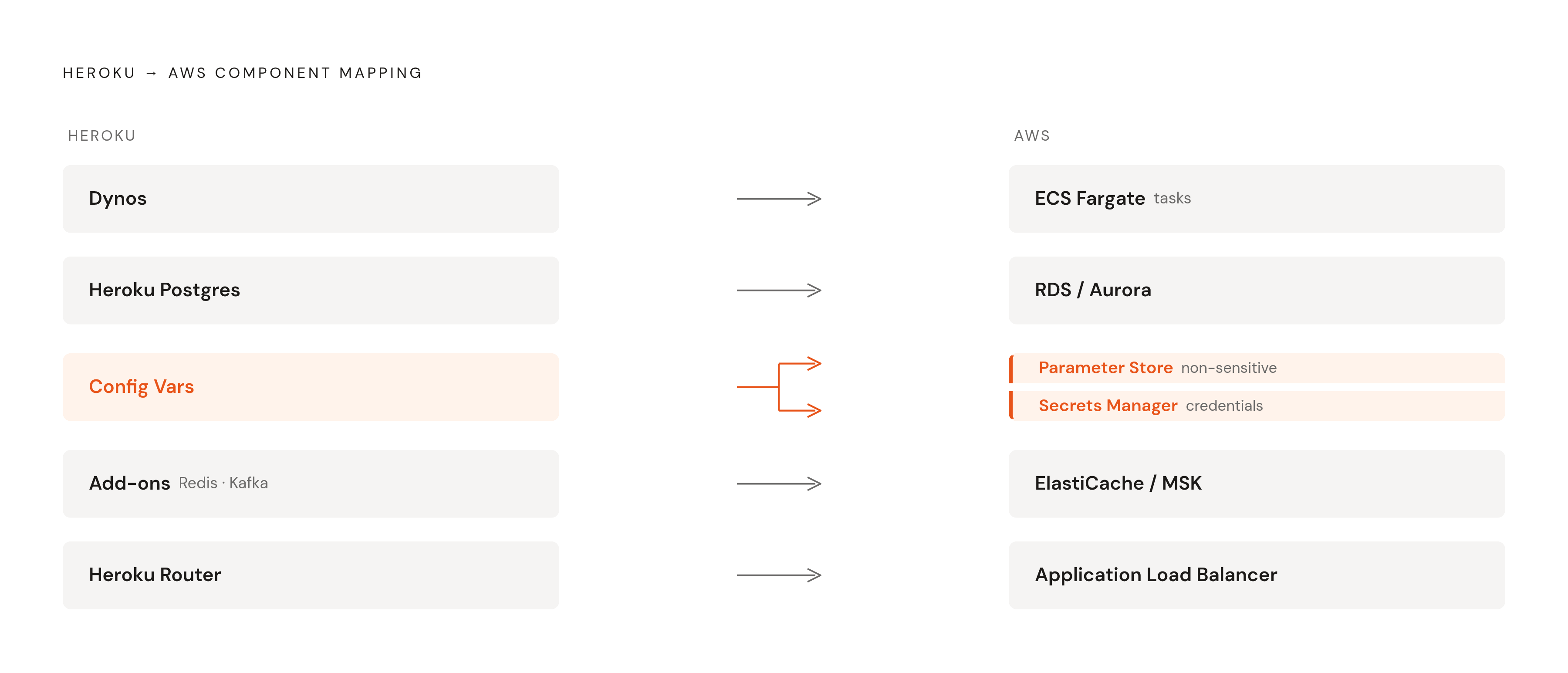
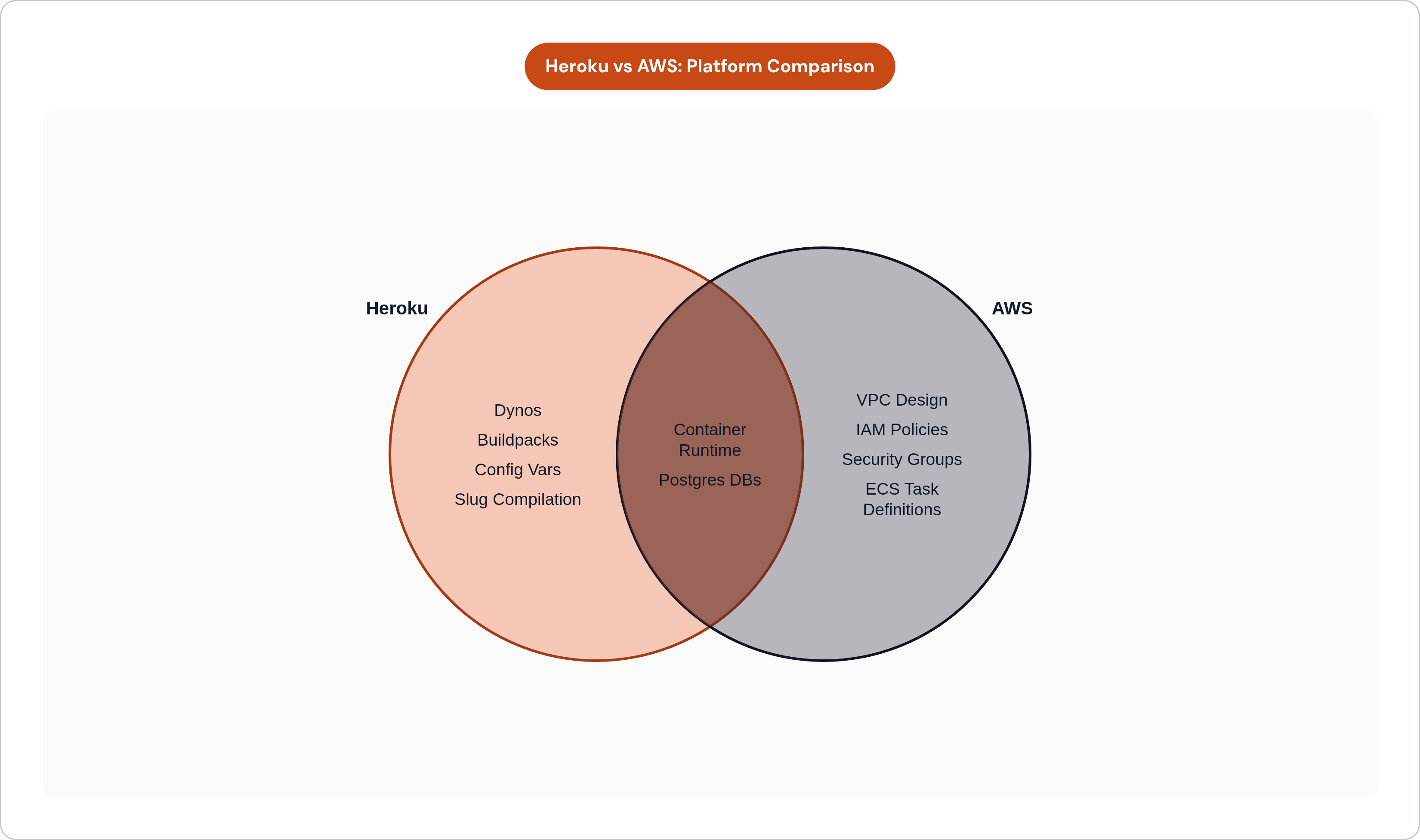
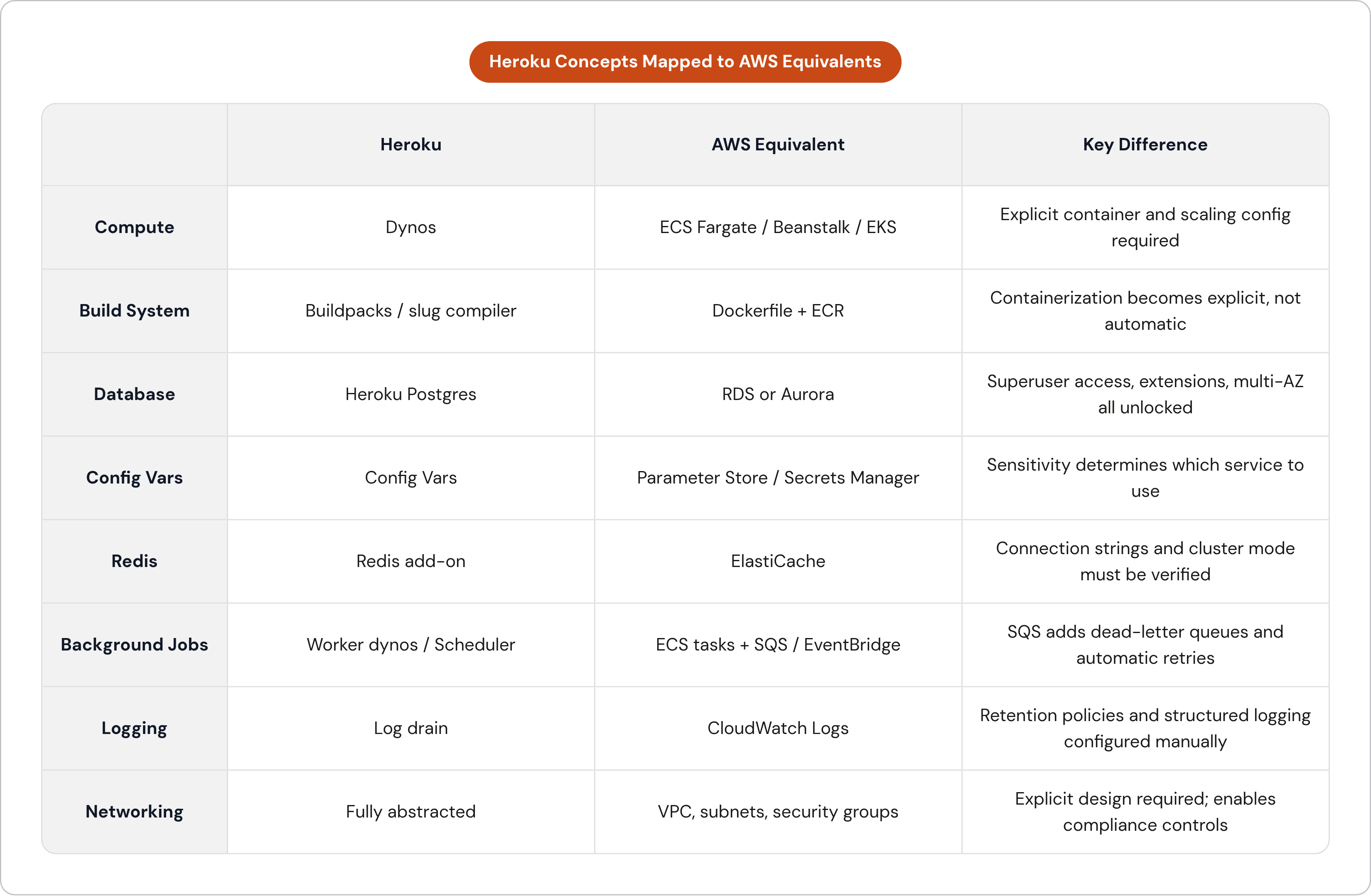
Before making any decisions, get the vocabulary straight.
Dynos to Compute
Heroku dynos are process containers. AWS offers several equivalents, and the right choice depends on your team's familiarity and tolerance for operational surface area.
ECS with Fargate is the closest analog to the Heroku model: container-based, no server management, scales by task count. Elastic Beanstalk is the most Heroku-like experience overall, handling deployment, scaling, and basic monitoring with minimal configuration. For teams that want to minimize the operational delta during the transition, Beanstalk is a pragmatic entry point. EKS is appropriate if your team already has Kubernetes experience or needs multi-tenant workload isolation at scale, but it carries significantly more overhead and is rarely the right first move for a Heroku migrator. EC2 gives you maximum control at maximum responsibility, and it is almost never the correct starting point here.
Buildpacks to Dockerfiles
Heroku's slug compilation does not translate to AWS. You need to containerize your application. The buildpack abstraction did that work invisibly; a Dockerfile makes it explicit. Slug size limits that occasionally constrained Heroku deployments disappear entirely, and the containerization investment pays forward well beyond this migration.
Heroku Postgres to RDS or Aurora
Heroku Postgres withholds superuser access, limits the extension ecosystem, and makes version upgrades genuinely painful. RDS and Aurora remove all three constraints. RDS offers multi-AZ deployments, read replicas, and fine-grained parameter tuning. Heroku does offer follower read replicas, but true multi-AZ failover and parameter-level control are not part of its offering.
Config Vars to Parameter Store and Secrets Manager
Heroku Config Vars map to two AWS services depending on sensitivity. Parameter Store handles standard configuration values with hierarchical naming and a free tier. Secrets Manager handles encrypted credentials with automatic rotation, which makes it the correct choice for database passwords and API keys.
Add-ons to AWS Native Services
Redis becomes ElastiCache. Kafka becomes MSK. Worker processes and background jobs map to SQS with Lambda or ECS tasks, with SNS/SQS for pub/sub patterns. Monitoring and logging move to CloudWatch, with optional forwarding to third-party observability tools.
Networking: Invisible to Explicit
Heroku abstracts networking almost entirely. AWS requires intentional design: public subnets for load balancers, private subnets for application and database tiers, security groups as the primary traffic control mechanism. That explicitness is also precisely what makes compliance achievable. SOC 2 and HIPAA controls require network isolation that Heroku's shared runtime structurally cannot provide.
Before You Touch Anything: The Pre-Migration Audit
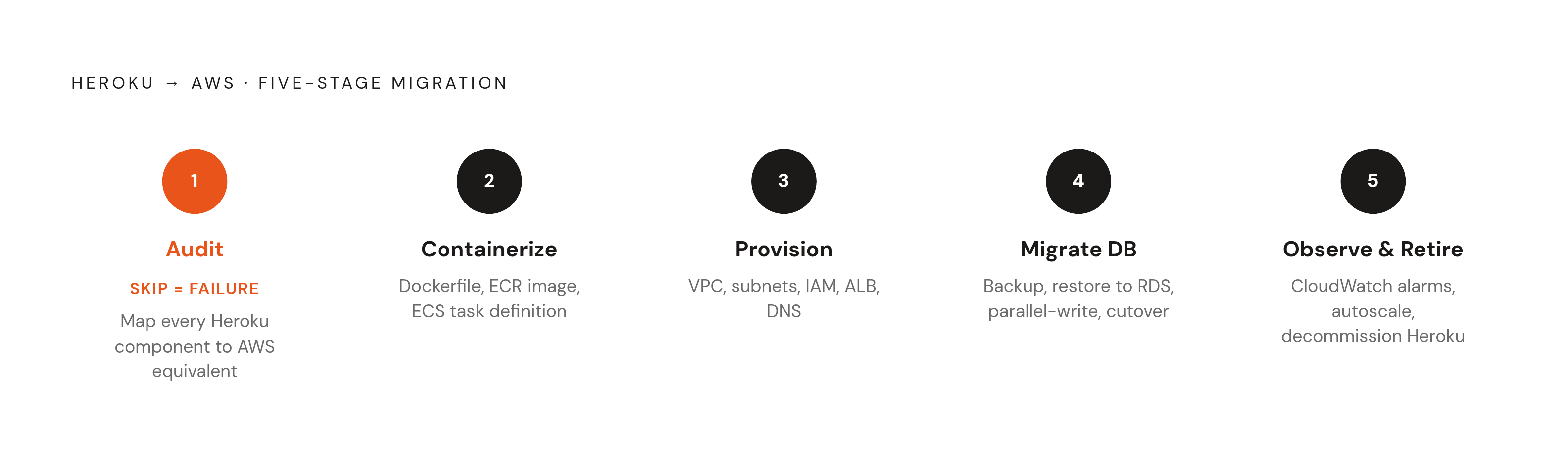
The most common mistake in a migration like this is starting to build before finishing the inventory. Write a line of Terraform before you know what you are replacing and you will be rewriting it. Do the audit first.
The inventory needs to cover every dyno and its type, because this determines which compute service you are targeting. Every add-on and its tier, because this maps to your AWS service selections. Every Config Var, because this becomes your checklist for Parameter Store and Secrets Manager. The contents of the Procfile, because this defines the process model your container setup must replicate exactly. The database size, connection count, and extension usage, because these drive RDS sizing and compatibility checks.
Identify your acceptable downtime window early. It is not an implementation detail; it determines which database migration path you take, and those two paths diverge significantly in complexity and cost.
Flag compliance requirements now. HIPAA, SOC 2, PCI-DSS: these affect VPC design, encryption settings, and logging configuration from the beginning. Retrofitting compliance controls is substantially more expensive than building for them upfront.
Assess team familiarity with Docker and AWS IAM honestly. These are the two areas where Heroku teams most consistently hit friction. Docker because buildpacks made containerization invisible, and IAM because permission management at the AWS level has no real Heroku analog.
Decide on Infrastructure as Code from day one. Terraform or CloudFormation, pick one and commit. Doing this retroactively is painful in ways that are difficult to fully convey until you have lived through it.
The output of this phase is a written migration scope document. Every service being replaced, its AWS equivalent, the migration method, the responsible owner. If it is not written down, it does not exist.
Setting Up the AWS Environment and VPC Foundation
Start by creating a dedicated AWS account, or use AWS Organizations to isolate the production environment. Do not deploy into a shared development account. The isolation is not bureaucratic hygiene; it is a compliance and blast-radius consideration.
VPC design follows a consistent pattern for this use case. Public subnets hold load balancers and NAT gateways only. Private subnets hold application containers and database instances, with no direct internet exposure. Use at minimum two availability zones in production; this enables multi-AZ RDS and distributes ECS tasks across independent failure domains.
Security groups should be defined intentionally, not permissively. Start from least-privilege and open only what services actually need. New AWS users consistently create unnecessary exposure here, often without realizing it until an audit catches it.
For IAM, create service roles for ECS tasks rather than distributing broad access keys. Enable MFA on all human accounts without exception. Treat the root account as a break-glass credential, not a working one.
Enable CloudTrail from day one. It is simultaneously a compliance requirement and an indispensable debugging asset. The first time you need to reconstruct what happened during an incident, having it already running is the difference between a two-hour postmortem and a two-day one.
Containerizing the Application and Setting Up the Deployment Pipeline
Write a Dockerfile that replicates what the Heroku buildpack was doing automatically. Match the language runtime version exactly. Replicate the dependency installation that happened during the build phase. Translate each Procfile entry into a container CMD or ENTRYPOINT. Do not bake secrets into the image; reference them from Parameter Store or Secrets Manager at runtime.
Push images to Amazon ECR, AWS's managed container registry. It integrates tightly with ECS and removes credential friction between a third-party registry and your deployment pipeline.
ECS task definitions translate the Procfile into deployable units. Create one task definition per process type: one for the web process, one for each worker type. Each task definition specifies the container image, resource allocation, environment variable injection, and logging configuration.
For the CI/CD pipeline, GitHub Actions or AWS CodePipeline both work. The trigger is a push to the main branch; the pipeline builds the Docker image, pushes it to ECR, and updates the ECS service. This replaces the git push heroku model with a more explicit pipeline that is also more auditable and more portable.
Place an Application Load Balancer in front of the ECS web service. It handles HTTPS termination, health checks, and routing. Configure the health check path explicitly. Heroku had an implicit health check on the web dyno; ECS requires you to define the path and threshold. Get this wrong and the load balancer will route traffic to unhealthy tasks. That is not a problem you want to diagnose under pressure.
Migrating the Database with Minimal Downtime
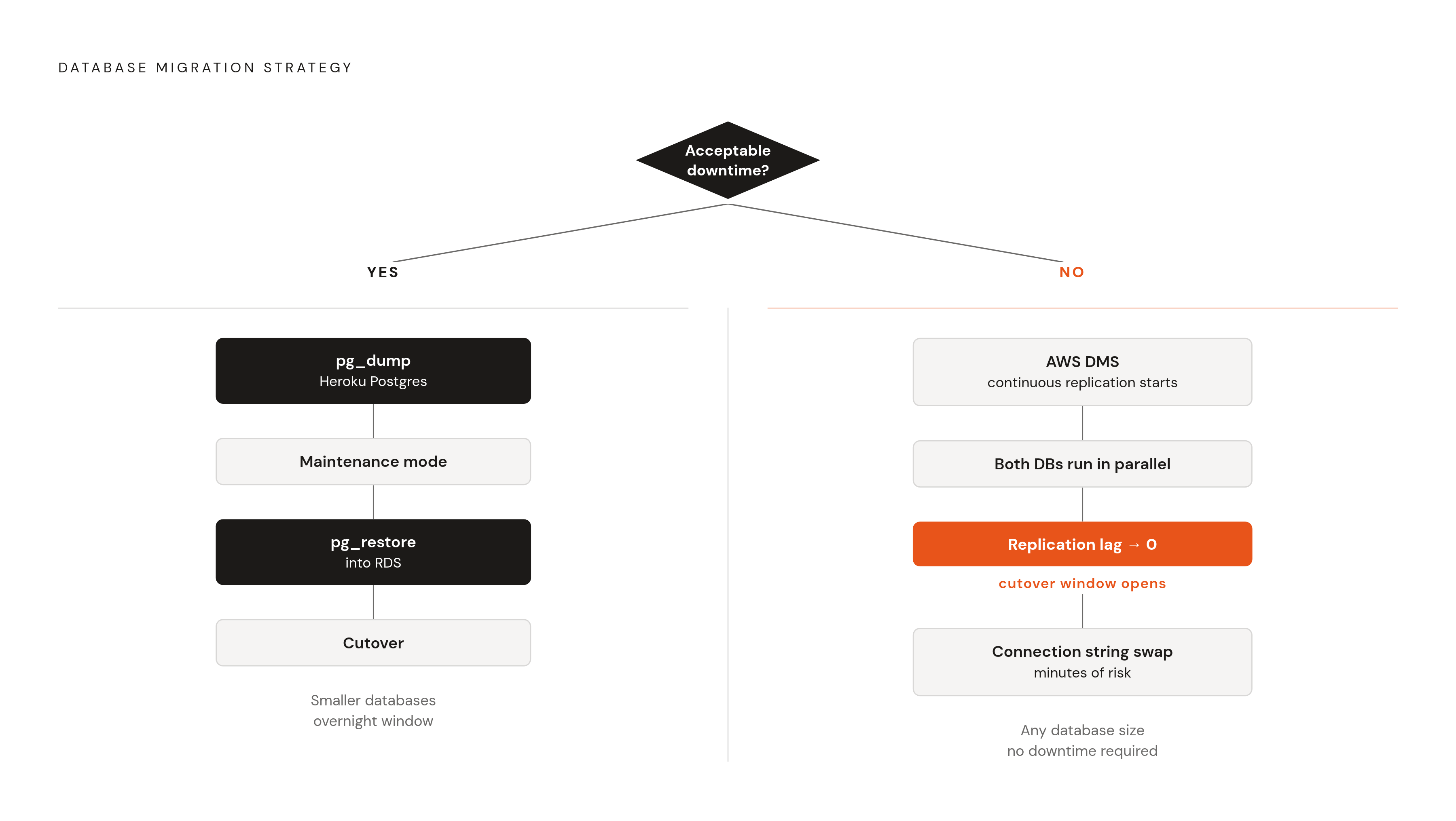
Database migration is where the acceptable downtime decision made during the audit becomes consequential.
If some downtime is acceptable, the path is straightforward: take a pgdump from Heroku Postgres, restore into RDS using pgrestore, put the application in maintenance mode during the window. This works for smaller databases and non-critical overnight windows.
If the system runs continuous production traffic and downtime is unacceptable, use AWS Database Migration Service. DMS replicates data continuously from Heroku Postgres to RDS while both databases run in parallel. When replication lag approaches zero, the cutover is a connection string change measured in minutes. The complexity cost is higher, but so is the reliability of the outcome.
On instance sizing: overprovision deliberately. Start larger than the current Heroku Postgres plan, validate performance over one to two weeks, then rightsize using AWS Cost Explorer or Trusted Advisor recommendations. Downsizing after the fact is easy. Performance degradation on cutover day is not.
Verify extension compatibility before migration begins. Heroku Postgres's restricted extension ecosystem may have led your team to work around missing extensions in ways that deserve revisiting on RDS, which supports a considerably broader set.
Add connection pooling. Heroku Postgres manages connection limits at the platform level; RDS does not. Without PgBouncer or RDS Proxy, connection exhaustion under load is a real risk. It tends to surface quietly at first, then becomes a crisis without much warning, and rarely at a forgiving moment.
Run the application against the new RDS instance in staging before any production cutover. This is not optional.
Migrating Add-ons, Config Vars, and Worker Processes
Redis and ElastiCache
Export Redis data from Heroku's Redis add-on and import it into ElastiCache. Update connection strings in Secrets Manager. If your application uses Redis in cluster mode, verify the cluster mode settings explicitly during this step.
Config Vars
Export all Heroku Config Vars before the migration begins. Categorize them: non-sensitive configuration goes to Parameter Store, credentials go to Secrets Manager. For the application code, you have two options. Update it to read from the AWS SDK directly, which is the more explicit and auditable approach. Alternatively, use ECS task definition environment injection to preserve the environment variable interface your application already expects, minimizing code changes during the migration. The right choice depends on how much code churn your team can absorb during the transition.
Worker Processes
Heroku worker dynos map to ECS tasks running in the same cluster but without a load balancer in front of them. For job queues backed by Redis, migrate the queue connection to ElastiCache and verify that worker task definitions consume from the correct endpoint. For event-driven patterns, SQS is a more durable alternative to Redis queues: built-in dead-letter queues, automatic retries, and no Redis instance as a single point of failure.
Heroku Scheduler jobs have a direct replacement in Amazon EventBridge Scheduler or ECS scheduled tasks. Map each scheduled job during the audit phase and configure the replacements before cutover.
For logging, Heroku's log drain maps to CloudWatch Logs. Configure log groups with appropriate retention policies. If the application does not already use structured logging, add it now. It will make the first week on AWS noticeably less painful.
Cutover, DNS, and the First Week on AWS
Run both environments in parallel until AWS is fully validated. Do not decommission Heroku until traffic has been stable on AWS for at least several days. A week of dual-environment costs is trivial compared to the cost of needing to roll back to a platform you have already terminated.
Before initiating the cutover, confirm the following: the application is running cleanly in AWS staging against a production data snapshot; database replication lag is at or near zero if you are using DMS; all Config Vars are confirmed present in Parameter Store and Secrets Manager; health checks are passing on the load balancer.
Lower your TTL values several days in advance of the DNS cutover so the propagation window after the switch is minimal. After the cutover, monitor error rates, latency, and database connection counts closely. The first 72 hours on a new infrastructure platform surface the issues that staging did not catch, and some of them will surprise you.
Keep the Heroku application running in maintenance mode for several days after cutover. Do not delete it. If something surfaces that requires a rollback, having the environment still available is worth a few extra days of dyno charges.
For teams that complete this migration and want to preserve some of the operational simplicity they are leaving behind, a middle-ground category of tooling exists, deploying production infrastructure directly into a customer's own AWS account and providing the network isolation and IAM granularity that compliance frameworks require while maintaining an operational experience closer to Heroku's.
Follow the sequence: audit first, build the foundation, containerize, migrate data carefully, validate in staging, cut over deliberately. Heroku's trajectory makes the urgency real. The sequence is what makes the outcome reliable.