bring-your-own-cloud PaaS platforms compared
How to separate real bring-your-own-cloud from vendor marketing.
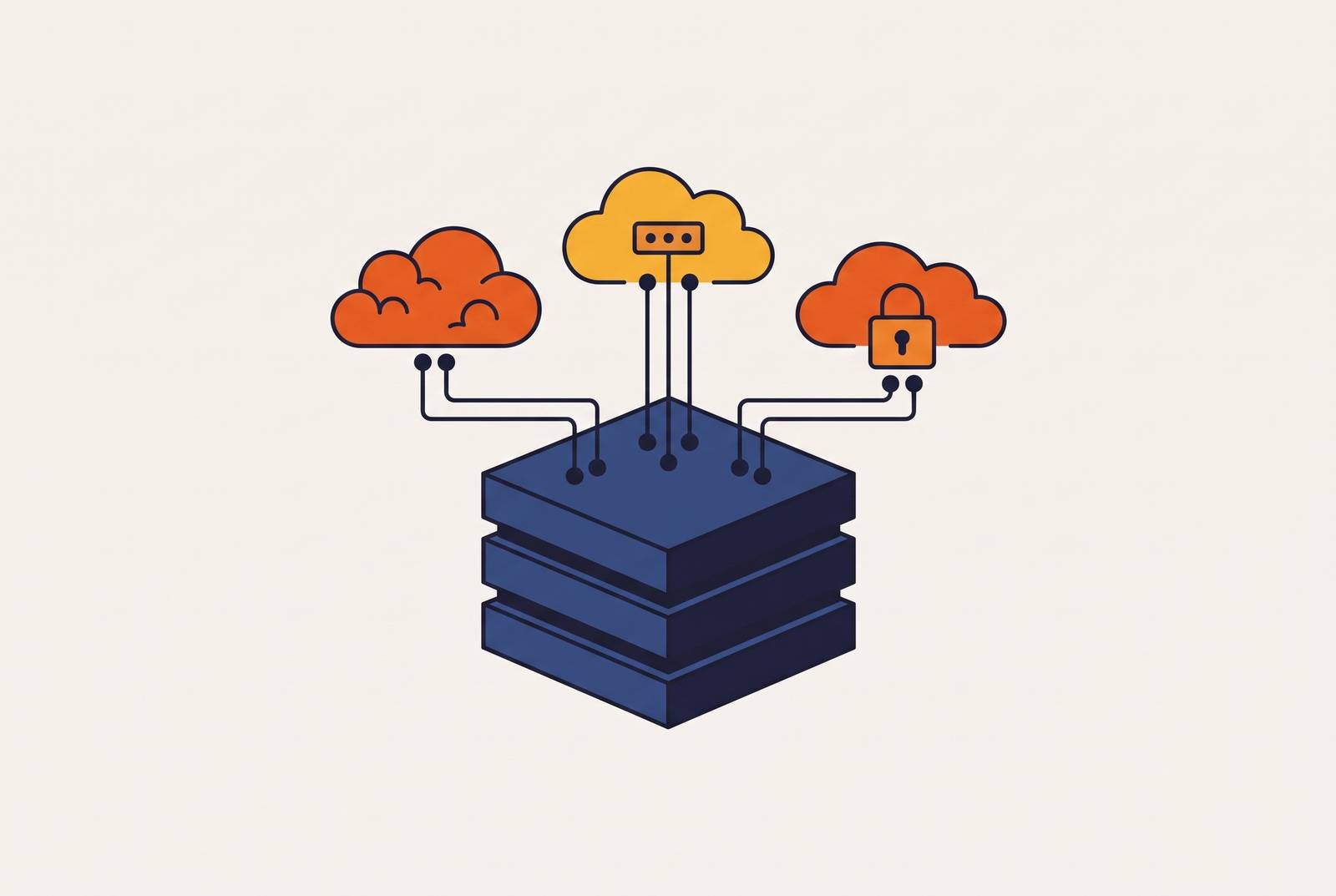
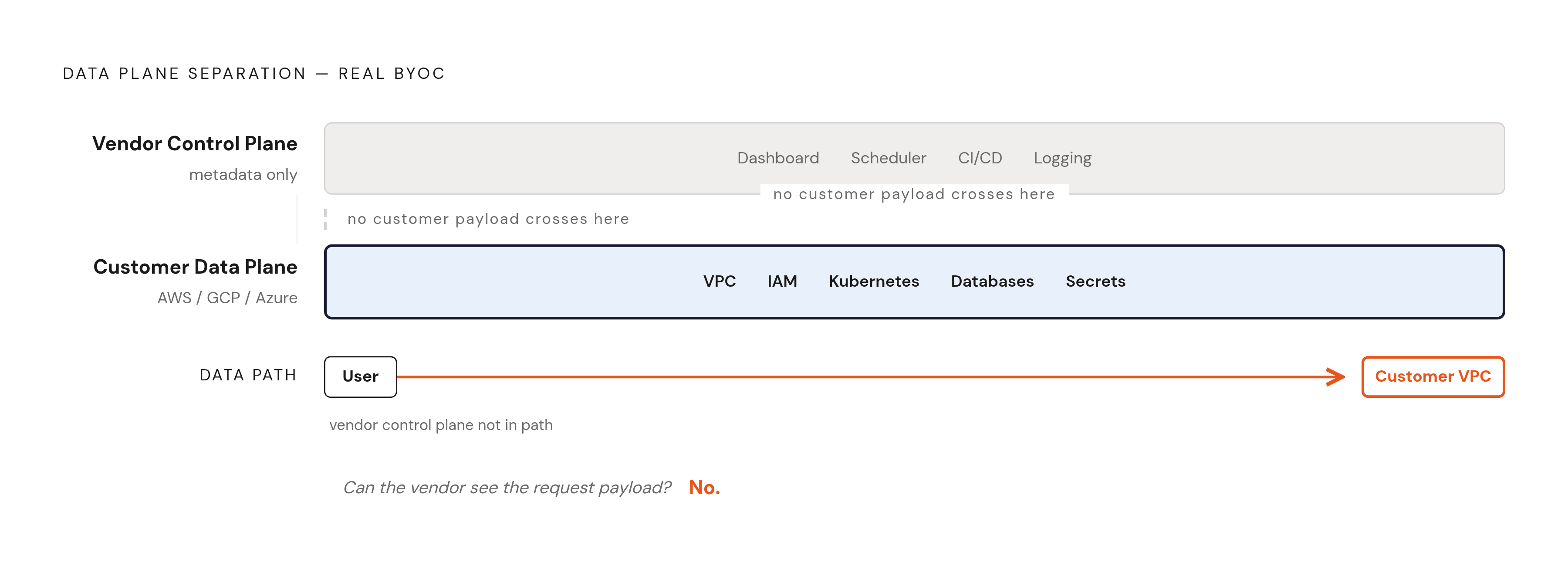
Bring-your-own-cloud is a specific architecture, not a marketing label, and it splits into three layers that have to stay separate for the term to mean anything. The control plane lives in the vendor's own cloud account. It handles the dashboard, the scheduler, the deployment pipeline, and the logging and monitoring tools, and it never touches customer data, only the metadata that describes jobs and deployments. The data plane lives in the customer's own AWS, GCP, or Azure account: the VPC, the subnets, the IAM roles, the Kubernetes nodes, the databases, the secrets. Everything a regulator or a security team actually cares about sits there, inside the walls the customer already built and controls.
The data path is what separates a real BYOC setup from an imitation. User traffic has to enter the customer's VPC directly, with the vendor's control plane nowhere in the request path. There's a simple test for this: can the vendor see the payload of a request to the application? In a real BYOC architecture, the answer is no. A platform that calls itself BYOC but routes traffic through its own load balancer before forwarding it into the customer's VPC is running a SaaS product with a private connection bolted on, and the difference matters the moment an auditor asks where the data actually traveled.
Porter is one working example of how the split plays out in practice. Its control plane runs in Porter's own account and handles scheduling and CI/CD, while the data plane, the VPC, the nodes, the databases, and the secrets, lives entirely inside the customer's own AWS, GCP, or Azure account. Traffic reaches the customer's VPC directly and never passes through Porter's infrastructure.
Three forces pushed BYOC from a niche enterprise request into a mainstream choice for growing engineering teams. GDPR enforcement, building since roughly 2018, made a SOC 2 badge an insufficient answer for customers who needed proof that their data physically stayed in a given country or region. Mid-market companies holding seven- and eight-figure multi-year contracts with AWS, GCP, or Azure found they couldn't justify paying a separate SaaS vendor to run workloads on its own cloud bill. BYOC routes that spend back through the contract the company already committed to. And AI workloads added a third force: reserved GPU capacity, the H100s and B200s locked into a specific region, can't be picked up and moved. A control plane that can target that exact footprint, without asking a team to migrate its hardware commitments, is the only shape that fits.
None of this makes BYOC the right default. A team running stateless web services with no special compliance needs and no exotic hardware will find a standard PaaS operationally simpler in every way that counts. BYOC is complexity a team takes on deliberately, in exchange for control over the data plane, a cleaner compliance story, or lower costs once spend gets large enough to matter.
Four situations where BYOC is the structurally correct choice
BYOC answers four distinct problems. A team that doesn't have at least one of them is likely paying in operational overhead for protections and savings it will never use.
Regulated industries need a tenant boundary the customer controls, not one the vendor merely promises to respect. Healthcare under HIPAA, defense contractors under CMMC and ITAR (with FedRAMP Moderate equivalency required for cloud services under DFARS), and payment processors under PCI-DSS (Level 1 applying to the largest merchants) share one requirement: data can't cross a tenant boundary the customer doesn't control. Shared-tenant infrastructure often fails this test because the audit trail simply doesn't hold up when workloads sit on infrastructure the customer can't inspect directly, regardless of whether the vendor can be trusted. Porter's one-click SOC 2 and HIPAA compliance turns what is often a months-long audit project into an operational checkbox for teams in this position.
Teams with committed cloud spend have a straightforward financial reason to route SaaS workload costs through their own contract. At low monthly spend, the gap between standard PaaS pricing and cloud-direct pricing barely registers. At real scale, that gap becomes a margin the team hands to a vendor instead of keeping for itself. Reserved instances, committed-use discounts, and credit programs like AWS Activate stop being accessible the moment a vendor owns the cloud bill instead of the customer, though Google for Startups credits can still be redeemed through an authorized reseller in some cases.
Data residency obligations tie workloads to a specific geography, and shared platforms run wherever the vendor chose to put its servers. BYOC deploys into whatever region the customer's own account is already configured for, which settles the residency question without a separate negotiation.
AI and ML teams holding reserved GPU capacity can't afford to let that capacity sit idle while a vendor runs its own shared infrastructure somewhere else. Training and inference workloads tied to reserved GPUs can't migrate to wherever is convenient for the platform. A BYOC control plane targets the GPU footprint the team already committed to, directly, with no migration step in between. Porter's support for deploying workloads across AWS, GCP, and Azure means reserved GPU instances keep doing productive work instead of sitting unused while a team waits on a different cloud.
One event from earlier in 2026 sharpened the stakes for any team still depending on a cloud-managed container service it doesn't control: AWS App Runner announced maintenance mode on March 31, 2026, and stopped accepting new customers on April 30, 2026. The lesson applies regardless of the specifics: a platform fully owned and operated by the vendor can be retired or frozen on the vendor's timeline, not the customer's.
How the four leading BYOC platforms differ
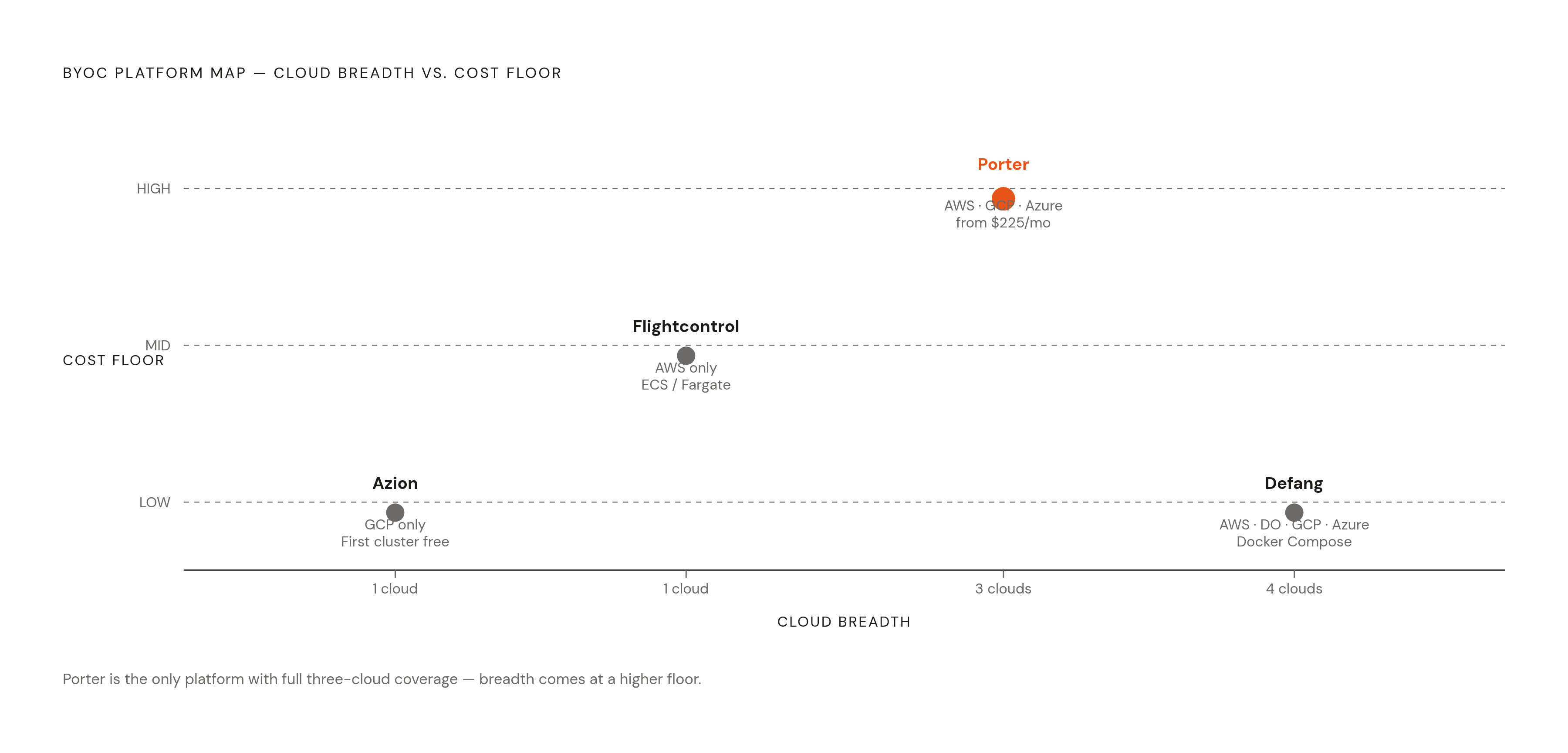
Four platforms stand out in current BYOC comparisons, diverging on cloud coverage, the orchestration layer, the cost floor a team should expect, and how ready each one is for compliance work. These aren't cosmetic differences. They decide which platform actually fits a given team's situation.
Porter provisions managed Kubernetes clusters directly inside the customer's own cloud account, supporting AWS through EKS, GCP through GKE, and Azure through AKS. It's the only platform in this group covering all three major clouds today. That breadth matters for a team that might start on AWS and later need an Azure footprint for a specific customer or region, without switching platforms to get there. Porter covers the full deployment lifecycle: VPC provisioning, CI/CD, networking, autoscaling, GPU workload support, and one-click SOC 2 and HIPAA compliance, so the undifferentiated DevOps work gets handled by the platform instead of landing back on the team's own engineers. Pricing is resource-based and transparent, with a minimum viable AWS setup running around $225 a month in cluster infrastructure (the EKS control plane plus nodes) before any actual workload gets deployed. That floor reflects the real cost of running Kubernetes rather than a markup Porter adds on top. It's the honest price of the full power that comes with managed orchestration, GPU scheduling, and the ability to move across clouds without re-architecting. A team that doesn't need those capabilities yet may well find a lighter platform cheaper at low scale, and that's a fair trade to make consciously. Porter fits teams that need multi-cloud flexibility, GPU workload support, or compliance readiness without standing up a dedicated DevOps function, along with fast-scaling AI products likely to outgrow a single-cloud or non-Kubernetes setup within a year or two. A dedicated startup program also lowers the barrier for early-stage teams that need production-grade infrastructure before they have the headcount to run it themselves.
AZIN takes a narrower path, supporting GCP only today, with AWS and Azure listed on its roadmap. It deploys through GKE Autopilot, where the first cluster is free and customers pay only for the pod resources they actually use, with no cluster overhead and no cost from idle nodes. For a GCP-first team, that gives AZIN the lowest cost floor of any platform in this group. It uses Railpack, an open-source builder, and handles TLS and networking automatically, with everything visible directly in Google Cloud Console. The fit is clean for teams already committed to GCP who want the simplest possible BYOC entry point at the lowest price, and just as clearly not a fit for any team that needs AWS or Azure right now.
Flightcontrol commits entirely to AWS, deploying through ECS and Fargate using IAM AssumeRole and CloudFormation, which are standard AWS primitives that leave a clean audit trail and work across all major AWS regions. It skips Kubernetes entirely, which removes both the Kubernetes base cost and the operational complexity that comes with running it. ECS doesn't offer the GPU scheduling, multi-cloud portability, or orchestration depth that a managed Kubernetes platform does. Its free tier supports one user working from personal repositories with unlimited deploys, though preview environments require moving to the Business plan. Flightcontrol suits AWS-native teams running straightforward container workloads who want zero Kubernetes overhead and are confident they won't need GCP or Azure down the line.
Defang takes a different entry point altogether: it reads Docker Compose files and deploys them to AWS, GCP, or Azure accounts directly. For a team whose local development already runs on Docker Compose, Defang offers the fastest route to production, since there's no stack definition to rewrite. It fits teams built around that workflow who want to move to their own cloud account with minimal setup, and it's a weaker fit for anything needing Kubernetes-level orchestration or multi-cloud compliance features.
How cloud choice and cost structure interact inside BYOC
Because BYOC sends the cloud bill straight to the customer, choosing AWS, GCP, or Azure has a direct effect on what the platform costs to run month to month, a difference that standard PaaS pricing hides behind one flat number. GCP often prices lower than AWS for equivalent Kubernetes workloads, and Azure's AKS also offers a free control plane, matching one of GKE's traditional advantages over EKS. But total cost varies by workload, and GCP's higher storage and egress rates can offset its advantages in compute and control-plane pricing. A three-node cluster with four vCPUs per node, for instance, tends to run cheaper on GKE Autopilot than on an equivalent EKS or AKS setup. That gap widens at Series A scale, once multiple databases, caching layers, a CDN, and monitoring tools are added to the bill, and AWS and GCP spend can diverge meaningfully from there.
Part of the GKE cost advantage comes directly from Google's pricing structure: the first cluster is free under GKE's free tier, available for both Autopilot and zonal Standard clusters, which removes the control-plane fee that makes AWS EKS comparatively more expensive at low workload volumes. AZIN, running on GKE Autopilot exclusively, inherits that advantage directly.
Commitment discounts exist on all three clouds, but none of them carry over between providers. AWS Savings Plans flex across instance families, but you have to lock in a baseline utilization level. GCP Committed Use Discounts apply at the project level, and a three-year commitment yields substantial savings over on-demand pricing. Azure Reservations scope to the subscription level. A team already holding a committed-spend contract on one cloud should weigh that commitment heavily when picking a BYOC platform: the platform that supports the cloud already under contract captures the discount, and the one that doesn't, simply can't.
Spot and preemptible instances, meaning AWS Spot, GCP Preemptible, and Azure Spot VMs, cut compute costs sharply for workloads that can tolerate interruption: CI/CD pipelines, batch jobs, development environments. Using them well requires the BYOC platform to handle interruption gracefully so a job doesn't fail. Teams running GPU training on spot capacity should confirm the platform supports checkpointing or restart logic before betting a long training run on spot pricing.
Startup credit programs change the math substantially in the early stages. Google Cloud for Startups offers up to $350,000 for AI-first teams through Series A, covering H100, A3 Ultra, and TPU v5e instances. In a BYOC model, those credits flow directly through the team's own cloud account instead of subsidizing a vendor's shared infrastructure, so every dollar of credit buys infrastructure the team actually keeps.
GPU and AI inference workloads on BYOC infrastructure
AI startups run into a GPU infrastructure problem shared PaaS structurally cannot solve. Reserved GPU capacity is tied to a specific cloud account. Inference latency suffers under multi-tenant contention, where other customers' workloads compete for the same hardware. Compliance requirements in health and finance applications often demand a clear data boundary around every inference call. All three point in the same direction: toward infrastructure that runs in the team's own account rather than a vendor's shared pool.
Training and inference place different demands on infrastructure, and treating them as one problem leads directly to overspending. Training runs episodically: a large GPU cluster spins up for a fixed training run, then sits idle until the next one. That pattern makes spot or preemptible instances a reasonable choice for training workloads, since the interruption risk is tolerable when the job can checkpoint and resume. The more effective strategy is to spend Google and AWS credits on the peak training workloads first, since that's where the per-hour cost gap between hyperscalers and GPU neoclouds does the most damage at scale. Once those credits run out, shifting development, iteration, and inference work to a lower-cost neocloud keeps costs down without touching the training budget.
Thunder Compute's 2026 guide lays out GPU options by stage of company, and the progression tracks closely with how both compute needs and credit access change over time. At the pre-seed or idea stage, an RTX A6000 or an A100 40GB on Thunder Compute or Google Colab Pro covers early experimentation. At seed stage, an A100 80GB or a single H100 PCIe handles training runs on 7-billion to 13-billion parameter models, the range most seed-stage teams are actually working in. By Series A, teams training larger models typically move to multi-node H100 SXM clusters on AWS or GCP, often running against the credits mentioned above, or they move to CoreWeave for the largest runs.
What ties this back to the BYOC architecture is the account boundary. A reserved GPU cluster, a training credit, and a compliance requirement around patient or financial data all live inside one account the team controls. A BYOC platform that can deploy against that account directly, rather than asking the team to move workloads onto shared infrastructure somewhere else, keeps the GPU capacity in use and the compliance boundary intact at the same time.
Sources
- Top 6 Bring Your Own Cloud (BYOC) Platforms in 2026 - Technology Org
- What is Bring Your Own Cloud?
- Bring Your Own Cloud (BYOC) - Pinecone Docs
- Bring Your Own Cloud: What the Model Means and Why It - lowcloud
- Bring Your Own Cloud (BYOC): Is it the best of both worlds?
- On the future of cloud services and BYOC — Jack Vanlightly
- Cloud Computing Cost: AWS vs. Azure vs. GCP Pricing in 2026
- Control Plane vs Data Plane Separation in Streaming Systems - Streamkap