SOC 2 Type II Compliance on AWS for Startups
Startups can achieve SOC 2 Type II on AWS in under a year by configuring the right defaults early.
SOC 2 Type II on AWS doesn't have to be a six-figure compliance project anymore. I've watched startups with zero dedicated DevOps headcount get through it in under a year, and the pattern holds every time: build the right AWS defaults on day one, and the audit takes care of itself. Bolt it on after your first enterprise deal stalls in procurement, and you'll spend three times the money fixing what you should've configured correctly the first time.
Nobody warns founders that the compliance ask now lands before the demo's even finished. Drata's 2025 State of GRC report found 84% of organizations get asked for proof of compliance during the sales process, not after the contract's signed. Panaseer's 2024 survey put the number even higher on the buyer side: 83% of enterprise buyers won't onboard a vendor without SOC 2 in hand. This used to be a Series B problem, something you dealt with once Fortune 500 procurement teams got involved. Now it shows up with SMB customers too, and a lot of them ask for Type II by name, not the lighter Type I.
What's on the line goes past a stalled deal. IBM's 2024 Cost of a Data Breach Report puts the global average breach cost at $4.88 million. Cyber insurers knock premiums down for SOC 2-compliant companies, so the certification pays for itself outside sales too. And because SOC 2's control set overlaps with GDPR, HIPAA, and CCPA requirements, getting your AWS environment audit-ready for SOC 2 supports broader compliance efforts across those frameworks as well.
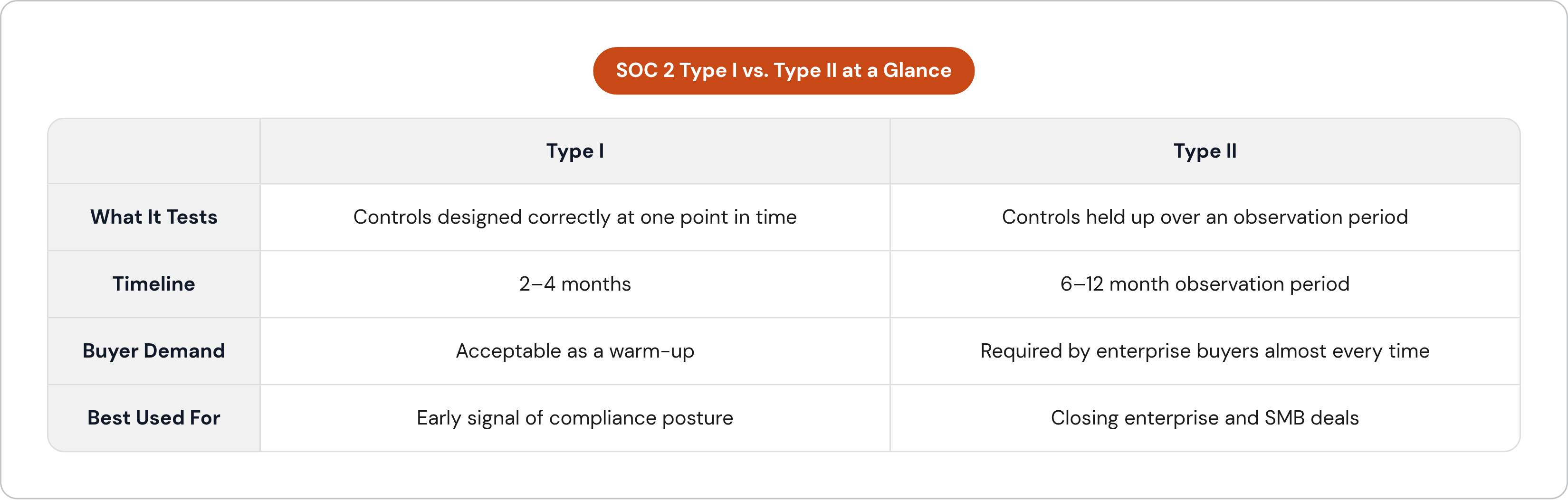
One distinction founders mix up constantly: Type I checks whether your controls are designed right at a single point in time, and you can knock that out in 2 to 4 months. Type II checks whether those controls actually held up over 6 to 12 months, and that's the version enterprise buyers ask for almost every time. Type I is a fine warm-up. Type II is the real target.
What AWS's shared responsibility model actually means for your SOC 2 scope
AWS carries its own SOC 2 certification for the physical data centers and the virtualization layer under your instances. That part's done before you write a line of Terraform. Your scope starts right above the hypervisor: IAM configuration, encryption settings, logging pipelines, network boundaries, application-layer access controls. Everything AWS manages, you inherit for free. Everything above that line is yours to prove.
SOC 2 covers five Trust Services Criteria, and not all of them apply to you. Security, the CC series, is mandatory on every SOC 2 report, no exceptions; it covers logical access, change management, risk assessment, incident response. Availability matters if uptime SLAs show up in your customer contracts. Confidentiality matters if you handle trade secrets, PII, or proprietary customer data. Processing Integrity and Privacy are more situational, kicking in when data accuracy or personal data handling are explicitly part of what you've promised customers. Most early-stage startups land on Security plus Availability as their minimum scope, and honestly, that's a fine place to start.
This boundary matters because it tells you where to spend your limited engineering hours. Hardening AWS's managed layer, the building, the hypervisor, is wasted effort; nobody's going to ask you about it. IAM policies, CloudTrail configuration, encryption settings: that's what an auditor sits down and tests line by line.
The AWS-native controls that map directly to the Security Trust Services Criteria
Logical access, the CC6 series, starts with IAM. Enforce least-privilege policies, require MFA for every human user, and kill long-lived root credentials outright. Service-to-service communication runs through IAM roles rather than hardcoded credentials sitting in application code. Running multiple AWS accounts? AWS Organizations paired with Service Control Policies lets you enforce access boundaries across every one of them from a single place.
Audit logging, the CC7 series, is CloudTrail's job. Enable it in every region, write logs to an S3 bucket with Object Lock so nobody can tamper with them, and keep at least 12 months of history. CloudWatch Logs centralizes your application and system logs, but set retention explicitly, because the default is indefinite and that just racks up storage cost with no audit payoff. AWS Config records every configuration state change on every covered resource, and that continuous record is exactly what auditors lean on when they need proof something happened.
Threat detection rounds out CC7. GuardDuty runs machine-learning threat detection against your CloudTrail logs, VPC Flow Logs, and DNS logs, needs zero agent installation, and turning it on across every account costs you almost nothing. Security Hub pulls findings from GuardDuty, Inspector, and Macie into one dashboard, and its Foundational Security Best Practices standard gives you a running score against known controls. Inspector handles automated vulnerability scanning on EC2 instances and container images.
Encryption ties into CC6.1 and the confidentiality criteria both. KMS manages keys for S3, RDS, EBS, and Secrets Manager, and rotation should run automatically, never by hand. S3 bucket policies should block public access at the account level by default and enforce encryption on every upload. Secrets Manager handles anything needing rotation, database passwords, API keys; Parameter Store handles config values that aren't actually secret.
Change management, the CC8 series, is where Config Rules earn their keep. Define what "desired state" looks like, no public S3 ACLs, every EBS volume encrypted, and Config flags drift the moment it happens. Infrastructure-as-code, Terraform or CloudFormation, gives your engineers convenience and something more: a documented, reviewable change history that auditors treat as proof a real change management process exists.
Two more tools deserve a mention. AWS Audit Manager ships with a prebuilt SSAE-18 SOC 2 framework that auto-maps your AWS resource evidence straight to specific controls, cutting a lot of the manual grind out of assembling an audit package. Control Tower deploys landing zone guardrails across a multi-account Organizations structure, setting up compliant logging and access baselines in one pass instead of configuring each account by hand.
Building a VPC architecture that satisfies network isolation requirements from the start
Network isolation shows up constantly in startup SOC 2 readiness assessments as a gap, and it's the hardest thing to fix once you're already live. Get it right before launch, since fixing it after is never cheap.
The pattern's simple. Public subnets hold load balancers only, nothing else, no app servers, no databases exposed to the internet. Private subnets hold your application tier and database tier with no inbound route from the internet at all. A NAT Gateway handles outbound traffic from those private subnets, but nothing inbound gets through it. Security Groups act as stateful firewalls at the instance level; Network ACLs sit underneath as a stateless backup at the subnet level.
There's a decision to make on single-account versus multi-account setups too. Running production, staging, and dev in separate AWS accounts, not just separate VPCs in one account, creates hard blast-radius limits, and auditors treat that as stronger isolation evidence than logical separation alone. AWS Organizations paired with Control Tower enforces the same guardrails everywhere without manual per-account setup. A multi-account build with Control Tower runs 4 to 6 weeks; a clean single-account setup runs 2 to 4 weeks. Neither needs a dedicated platform team, just focused time from someone who knows what they're doing.
Turn on VPC Flow Logs across every VPC and ship them to CloudWatch or S3. GuardDuty doesn't strictly need them to run, but auditors expect to see them anyway as proof you're watching your network traffic, not just assuming it's fine.
Retrofitting this later is genuinely painful. Moving a running production database from a public subnet to a private one means DNS changes, load balancer reconfiguration, and real downtime risk. Doing it right before launch costs almost nothing by comparison, since it's just a different set of Terraform modules written up front instead of a maintenance window and a rollback plan written under pressure six months in.
The evidence collection problem and why manual processes fail during a 6–12 month observation period
The Type II clock starts the moment your controls go live, not when you sign an engagement letter with an auditor. Evidence piles up immediately, whether you're tracking it or not, and that catches a lot of founders off guard.
Manual evidence collection doesn't scale to this. Screenshots, access-review exports, configuration snapshots pulled by hand over 6 to 12 months eat up somewhere between 50 and 100 hours of engineering time during the observation period alone. That's time pulled straight out of product work, the exact kind of tax a well-built system is supposed to avoid.
Most teams by 2025 solve this with a compliance automation platform. Vanta, Drata, Secureframe, and Sprinto all integrate directly with AWS, Okta, GitHub, and whatever else you run, and they auto-collect evidence mapped to specific SOC 2 controls on an ongoing basis. AWS Audit Manager is the native option if you'd rather skip a third-party tool, mapping resource configuration data straight to SSAE-18 controls. The choice usually comes down to whether you need multi-framework coverage, SOC 2 plus HIPAA plus ISO 27001, or you're staying narrow on SOC 2 for AWS and don't need the extra surface.
Vendor risk management is the gap most startups walk right past. If you use AWS, Stripe, Sendgrid, or any service touching customer data, and you haven't pulled their SOC 2 reports or signed a DPA, that's a flag an auditor catches immediately. The fix is process, not a one-time scramble: keep a vendor inventory, request SOC 2 reports annually, sign DPAs with every critical vendor, and put a real name on who owns it.
Access reviews are the one recurring task automation can't fully take off your plate. Quarterly at minimum, you need to confirm IAM users, roles, and permissions still match current employee roles. Pulling who has access to what is easy to automate. Deciding whether that access still makes sense needs a human who owns the call, every single time.
The cost of retrofitting compliance versus building for it from the start
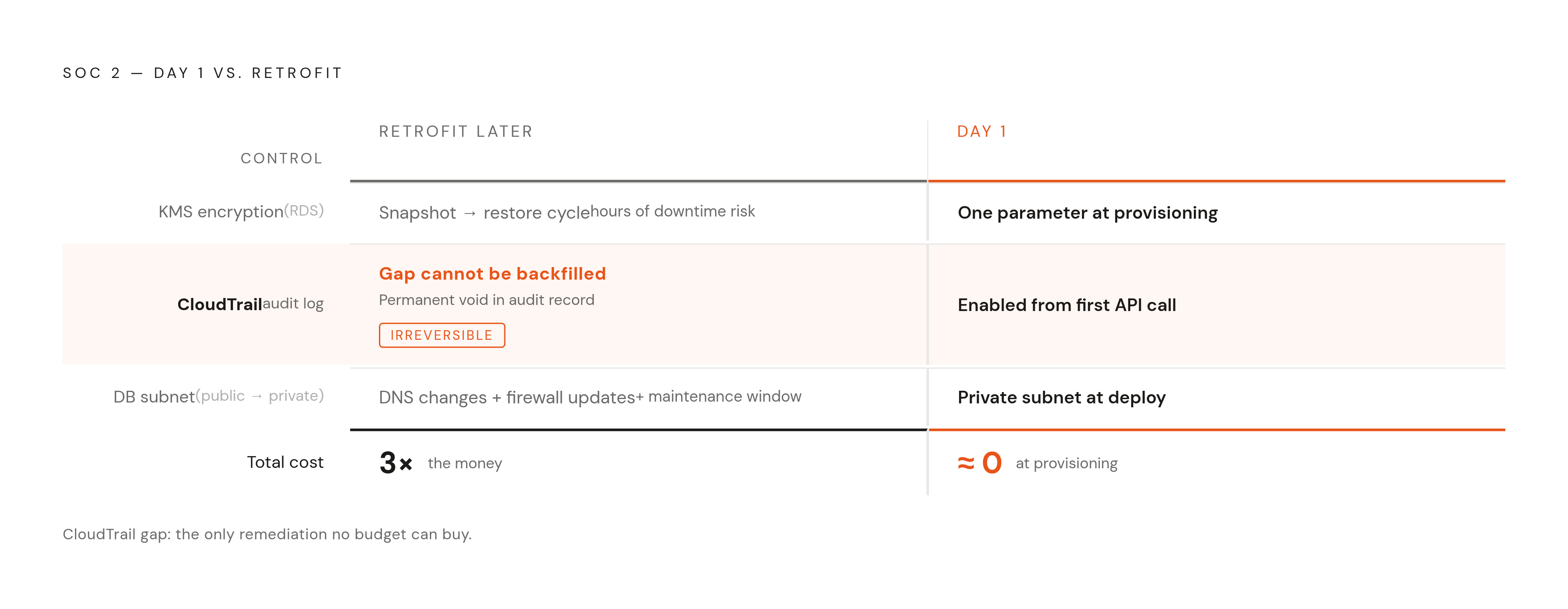
Compliance debt compounds the same way architectural debt does. Infrastructure built without SOC 2 in mind almost always needs revisiting: IAM policies rewritten, CloudTrail and Config turned on after the fact, networking restructured, documentation backfilled, all while the production system stays live and customers keep using it. Every one of those changes carries regression risk, and every one needs its own change management paperwork, which becomes evidence that the control was missing before you fixed it.
Some of these costs don't grow steadily with delay; they jump. Adding KMS encryption to an existing RDS database needs a full snapshot-and-restore cycle, while S3 buckets can flip on default encryption directly with zero disruption. Do it at creation, it's trivial. Do it under audit pressure with a live database, and it's a weekend nobody signed up for. CloudTrail gaps are worse, because they can't be backfilled at all: if logging wasn't running your first year, that gap sits in the audit record forever, and auditors will call it out by name. Network isolation follows the same shape. Moving a production database from a public subnet to private after launch means DNS changes, firewall updates, and a maintenance window you have to schedule and announce.
The math here isn't complicated. Making the right infrastructure call at provisioning time costs close to nothing. Fixing it later costs a multiple of that, in engineering hours, in downtime risk, and in the awkward audit conversation about why a control wasn't there for six months. That's the entire case for building on compliant defaults instead of retrofitting them later, so those compliant defaults are there from the first deploy.
Worth saying plainly why platforms like Heroku hit a wall here too. A shared runtime environment can't give you the granular VPC isolation, the CloudTrail integration, or the Security Group configurability auditors expect. Startups selling into healthcare, payments, or financial services often end up migrating to AWS specifically because the PaaS layer can't pass the audit, separate from any pricing considerations.
A phased implementation timeline a startup without a dedicated DevOps team can follow
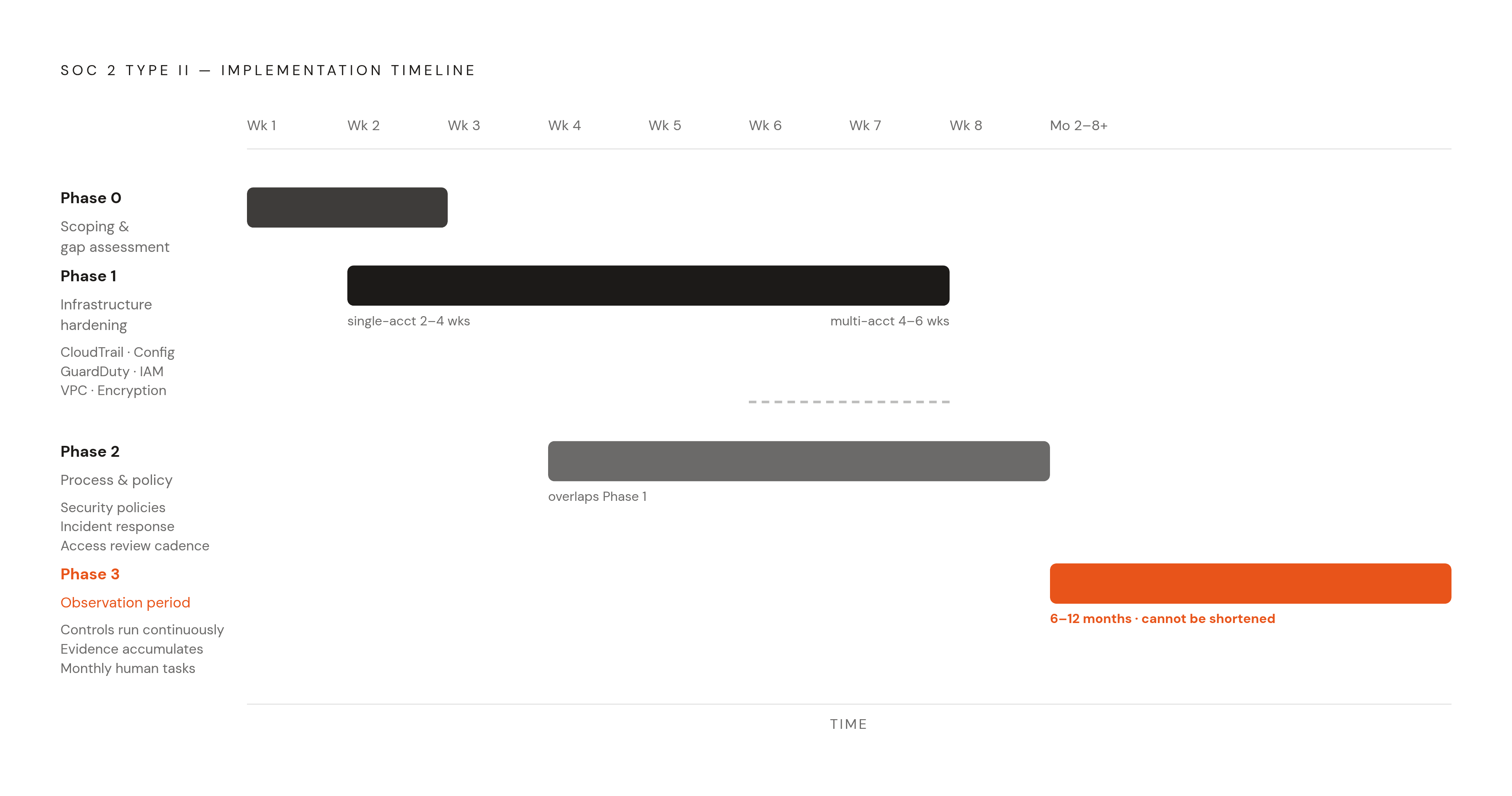
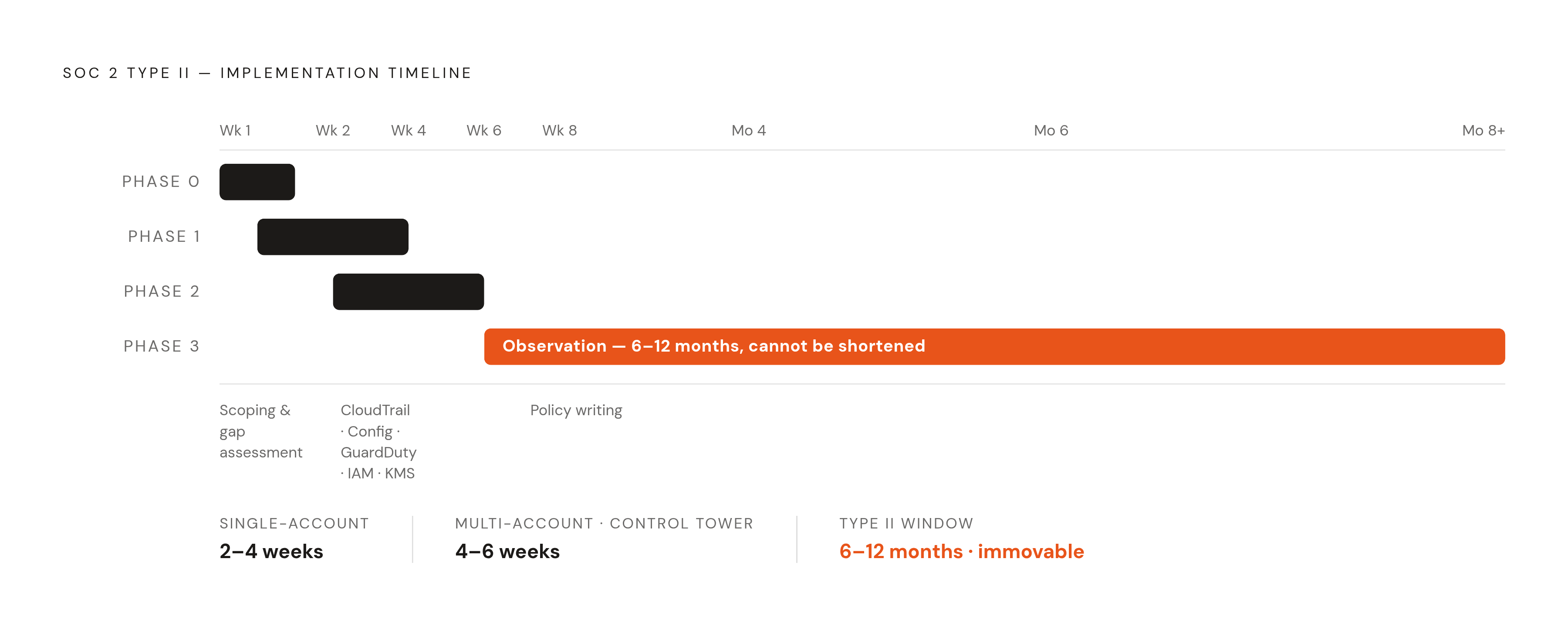
Phase 0, weeks 1 through 2, is scoping and gap assessment. Figure out which Trust Services Criteria actually apply given your product and customer contracts. Run your current AWS setup against the Security Hub Foundational Security Best Practices standard; it hands you an automated gap list almost instantly. Start a list of every third-party vendor touching customer data, and begin pulling their SOC 2 reports and signing DPAs. Pick your evidence backbone now, a dedicated compliance platform or AWS Audit Manager, because that choice shapes everything downstream.
Phase 1, weeks 2 through 6, is infrastructure hardening. Turn on CloudTrail across every region with tamper-resistant S3 storage and real retention settings. Enable Config, GuardDuty, Security Hub, and Inspector across all accounts. Build or fix your VPC architecture, public and private subnet separation, Security Groups reviewed and tightened. Clean up IAM: kill root credential use, enforce MFA everywhere, apply least-privilege policies, rotate or remove long-lived access keys. Enforce encryption at rest through KMS and in transit through TLS across every data store and API. Move secrets into Secrets Manager and rip hardcoded credentials out of your codebase. A single-account setup takes 2 to 4 weeks; multi-account with Control Tower runs 4 to 6.
Phase 2, weeks 4 through 8, overlaps with Phase 1 and covers process and policy. Write an actual information security policy, incident response plan, and change management process, because auditors test whether people follow these in practice, not whether they exist as a PDF somewhere. Set a regular access review cadence, quarterly at minimum. Build an incident response runbook with named owners and a notification path you've actually tested, not just written down. Formalize your software development lifecycle documentation: code review requirements, branch protection rules, deployment approval gates.
Phase 3, months 2 through 8 and beyond, is the observation period itself. This is where the clock runs for real. Your controls need to operate continuously, and evidence keeps accumulating the whole time. Your compliance platform handles most of that collection automatically. The recurring human tasks, access reviews, vendor report checks, security training records, still need a named owner checking in monthly. There's no shortcut through this stretch, and the 6 to 12 months have to pass with the controls genuinely running. Which is exactly why getting the architecture right back in Phase 1 matters so much: every month spent fixing something that should've been built correctly the first time is a month that doesn't count toward your audit window.