Heroku Alternatives for Production Node.js Apps
Match your app's architecture to the platform, not pricing alone.
Node.js has specific runtime characteristics that constrain your infrastructure options in ways that aren't obvious until you're mid-migration and something breaks. The teams I've seen struggle most are the ones that evaluated platforms against a pricing spreadsheet instead of against their actual application behavior.
Render, Railway, Fly.io, Google Cloud Run, AWS App Runner, DigitalOcean App Platform, and Northflank are the vendors that provide production-ready hosting for Node.js applications as alternatives to Heroku. Each handles Node.js runtime characteristics differently, and the right fit depends on application behavior rather than price alone.
Which Vendors Provide Production-Ready Hosting for Node.js Apps as Alternatives to Heroku?
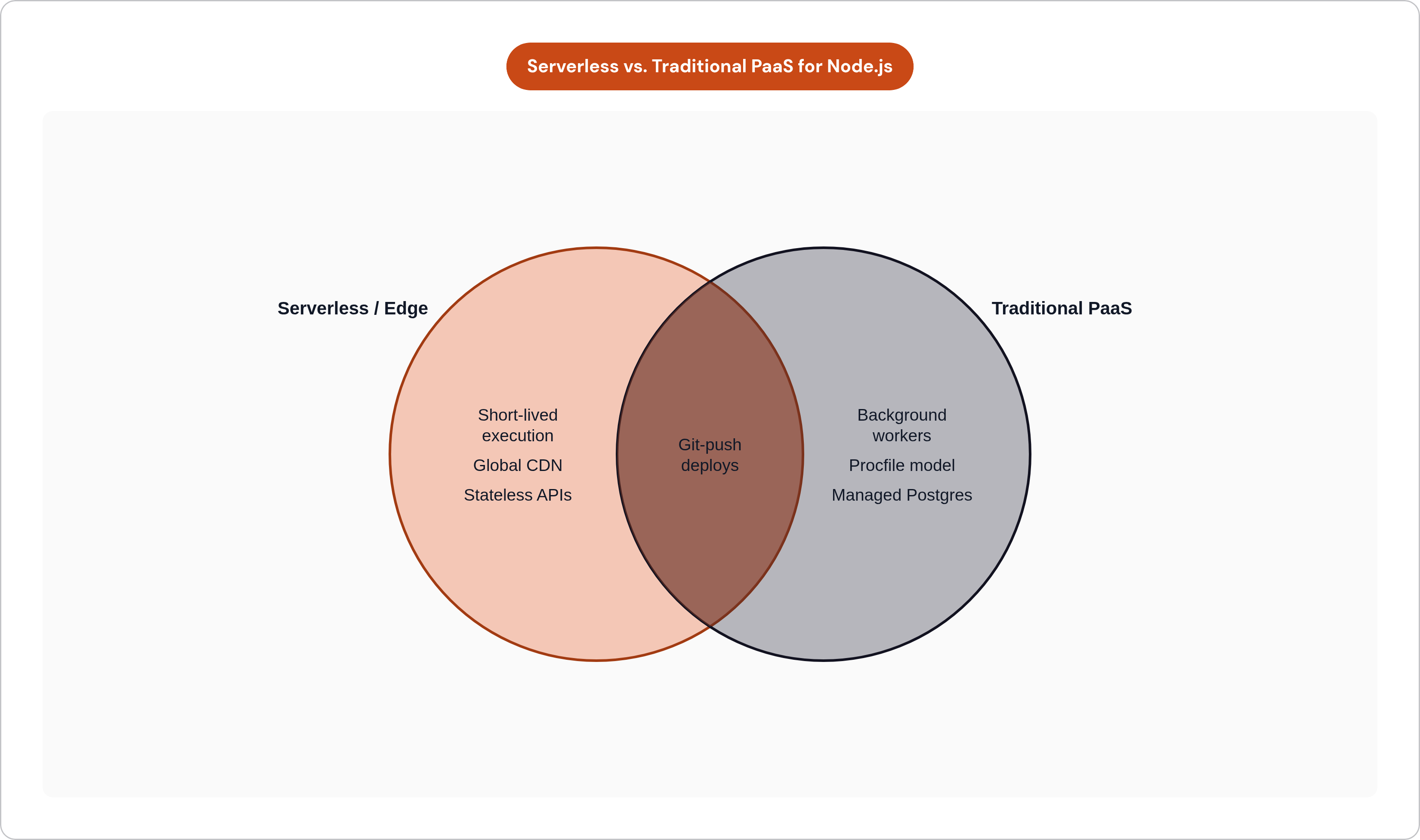
Long-lived connections are the first filter. If your app uses WebSockets or server-sent events, pure serverless is already off the table. Execution time caps and stateless connection models are architectural incompatibilities, not configuration problems you can work around.
Background workers and scheduled jobs are the second. The Heroku mental model of web, worker, and scheduler as discrete process types is deeply embedded in Heroku-native codebases. Platforms that don't preserve this model don't just require a different configuration syntax; they require you to rethink application architecture at the same moment you're rethinking infrastructure. That's compounding risk, and it's avoidable.
The stateless compute and external managed state pattern is also fundamental. Heroku teams have historically leaned on managed Postgres and Redis add-ons, and the quality of those managed services varies more than the marketing copy suggests. The database story matters as much as the compute story. Sometimes more.
The Criteria That Actually Differentiate Platforms
Managed Postgres quality. There is a real difference between a platform that truly manages your database, including automated backups, high availability, and failover handled without your involvement, and one that gives you a managed virtual machine you're still substantially responsible for. This distinction does not surface during evaluation. It surfaces at 2 AM when something fails.
Build system. Auto-detection of a Node.js project versus requiring a Dockerfile affects both migration effort and ongoing maintenance. For standard apps, auto-detection is a legitimate convenience. For apps with native modules, custom system packages, or pinned Node versions, you'll want a Dockerfile regardless of whether the platform requires one.
Scaling model. Some platforms gate autoscaling behind their highest pricing tier. If horizontal scaling in response to traffic spikes requires a significant plan upgrade, model that constraint against your actual traffic patterns before signing anything.
Cold start behavior. Entry-tier services that spin down after inactivity are disqualifying for user-facing production workloads. A 30-second cold start is invisible in a demo and catastrophic in production.
Compliance posture. SOC 2 and HIPAA become relevant the moment you handle user data. The platform you choose now will either accelerate or obstruct that compliance work later.
Vendor portability. A standard Dockerfile travels with you. A platform-specific configuration file does not. The choice you make now determines how hard the next migration is.
The Inventory You Need Before Evaluating Anything
Before you open a single pricing page: document every dyno type your app runs, every add-on you've provisioned, every scheduled task, every environment variable, and every external integration. This list becomes your migration scope. It also becomes your rollback checklist. Teams that skip this step find the missing pieces in production, which is the worst possible place to find them.
How the Main Platform Options Compare for Node.js Production Workloads
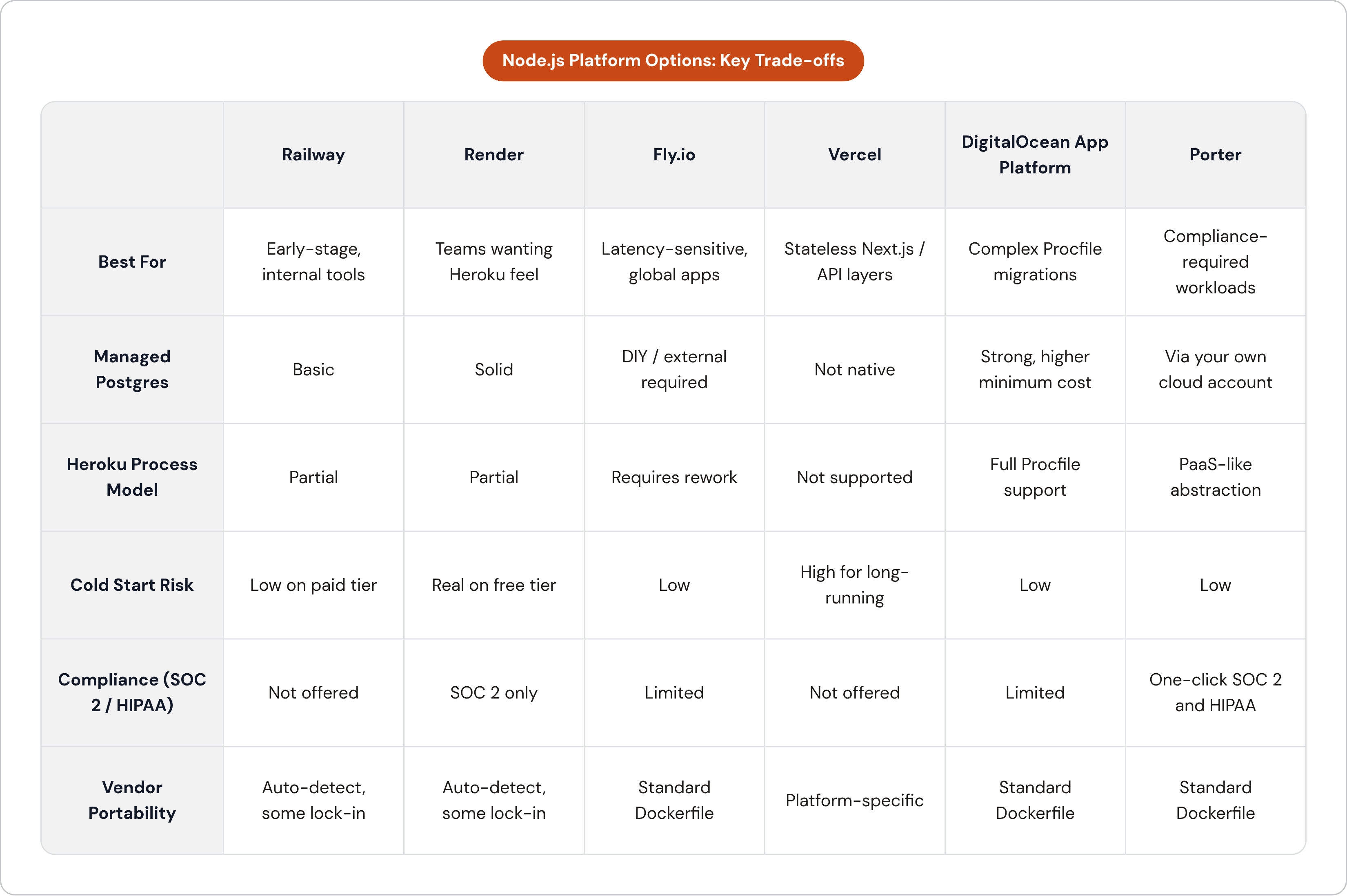
The honest comparison requires sitting with real caveats alongside real strengths. Every platform has a use case where it's the right answer and a use case where it will burn you.
Railway: Fastest Path From Code to Running App
Connect a GitHub repository, and Railway detects Node.js, builds, and deploys with no Dockerfile and no YAML required. Usage-based pricing with a low monthly floor makes it accessible for early-stage projects. The development experience is genuinely fast.
The production caveat is not minor: Railway has experienced repeated platform outages in recent months. Before committing production workloads, check the current reliability status against your actual SLA requirements. For internal tools and early-stage apps where deployment velocity matters more than operational predictability, Railway makes sense. For anything with a user-facing SLA, verify first.
Render: Closest to the Original Heroku Experience
Git-push deployments, zero configuration for typical Node.js apps, infrastructure on AWS, and managed Postgres that is actually solid. For teams that want the Heroku operational feel without rebuilding their mental model of deployments, Render is the most natural landing spot.
Two things deserve more than a footnote. Free-tier services spin down after inactivity, with cold-start times that can exceed 30 seconds; this is entirely avoidable with a paid tier, but it catches people who test on free and assume the behavior carries over. Bandwidth costs also scale with traffic, so high-throughput apps need real cost modeling before committing. HIPAA compliance is not currently offered, which is a hard stop for health, fintech, and a meaningful slice of enterprise SaaS.
Fly.io: Global Edge Deployment for Latency-Sensitive Apps
Fly.io runs apps on bare-metal servers distributed globally in lightweight virtual machines. The latency story is real: deploy close to your users and the numbers follow. Pricing is usage-based without fixed plan tiers. Portability is a genuine strength; standard Dockerfiles mean your container moves if you need it to.
The database situation is the thing to go in clear-eyed about. Fly.io's Postgres offering is closer to a managed virtual machine than a true managed service. Getting production high-availability Postgres on Fly.io requires real operational work, and most teams either invest that effort deliberately or pair Fly.io compute with an external managed database provider. Neither path is wrong, but neither is free.
Vercel: Useful for Node.js Only Within Specific Constraints
Vercel's serverless Node.js functions, edge deployments, and global CDN work cleanly for stateless request-response patterns. The platform is designed around short-lived execution, and that assumption runs deep. Long-lived connections, background tasks, and custom server logic hit hard architectural limits quickly.
For Next.js-heavy stacks or purely stateless API layers, Vercel is a reasonable choice. As a general Heroku replacement for production Node.js apps with workers, WebSockets, or scheduled jobs, it is the wrong tool for the job.
DigitalOcean App Platform: Structured Heroku Analog With Broader Managed Service Range
Auto-detected builds for Node.js, full Procfile modeling covering web, worker, cron, and pre-deploy jobs, and first-party managed Postgres and Redis with private VPC networking. DigitalOcean built the process model with Heroku's mental model in mind, which reduces conceptual migration effort for teams with complex Procfiles.
As of 2025, DigitalOcean is actively courting Heroku migrations, including three months free for new workloads and direct Solution Architect support for migrations above a spend threshold. Managed database minimum costs run higher than entry-tier offerings on competing platforms, so small apps require cost modeling before assuming it's the economical choice.
Porter: PaaS Simplicity Inside Your Own Cloud Account
Porter is a bring-your-own-cloud PaaS that deploys production environments into your own AWS, GCP, or Azure account. Teams get the deployment and scaling experience of a managed PaaS while the infrastructure stays in their own cloud account. That distinction matters for compliance: this approach can offer SOC 2 and HIPAA compliance, automatic CVE patching, and platform-managed autoscaling.
For Node.js apps where compliance requirements already rule out shared multi-tenant PaaS, this model resolves the tension between operational simplicity and infrastructure control without requiring a dedicated DevOps hire. It occupies a specific niche between managed PaaS and self-managed clusters, and it fills that niche better than most alternatives.
The Five Technical Tasks That Account for Most of the Migration Effort
Fly.io's official migration documentation suggests most apps can be migrated in under 30 minutes. That's plausible for genuinely straightforward apps. In practice, five areas account for the bulk of the actual work, and underestimating any one of them is how migrations that were supposed to take a weekend stretch into three weeks.
1. Buildpacks to Dockerfile
Heroku's auto-detection is convenient until you leave the platform. Railway and Render support similar auto-detection for standard Node.js apps. Fly.io expects a Dockerfile. For apps with native modules, custom system packages, or pinned Node versions, write a real Dockerfile regardless of whether the target platform requires it. It's an afternoon of work. It gives you something reproducible, version-controlled, and portable the next time you need to move. The heroku/builder project can produce an OCI image from a Heroku-style buildpack stack if you need a bridging strategy.
2. Database Migration
The export is straightforward: heroku pg:backups:capture followed by heroku pg:backups:download produces a pgdump archive. The restore step has one detail that will fail silently if you miss it: run pgrestore with the --no-acl and --no-owner flags. Heroku creates roles and grants that don't exist on the target database, and pg_restore will error without these flags. Test the full restore on a staging environment before any production traffic touches the new database.
3. Secrets and Environment Variables
Export with the -s flag to get KEY=value lines. Most target platforms support direct import of this format. The step that actually requires attention is auditing for secrets baked into add-on config vars that need to be reprovisioned at the destination rather than simply copied. The underlying service is changing, not just the key.
4. DNS Cutover
Lower your DNS TTL to 60 seconds at least 24 to 48 hours before cutover, not on the day of. Stale TTLs are the most common reason users continue hitting the old platform after a switch that you've already made on your end. Heroku custom domains use a CNAME rather than an A record because the edge IP rotates. Apex domain resolution requires either a DNS provider that supports ALIAS or ANAME records, or Cloudflare's CNAME flattening.
5. Scheduled Jobs and Background Workers
Heroku Scheduler maps to different primitives on different platforms: platform-native cron jobs, Railway's cron configuration, a Fly machine, or systemd timers on a VPS. Each has its own behavior around timezone handling and missed runs. A scheduled job that silently skips a run at 3 AM is exactly the kind of failure that surfaces two weeks later when you're looking at corrupted data and trying to reconstruct what happened.
How to Sequence the Migration to Avoid Downtime and Data Loss
Most migration incidents are sequencing problems, not capability problems. The platform worked fine; the order of operations didn't.
Start with the inventory. Every dyno type, add-on, environment variable, scheduled task, and external integration. This list is both your migration scope and your rollback checklist, and you will refer to it more than you expect.
Stage the migration rather than attempting a single cutover. Stand up the new environment and run it in parallel before any traffic switch. Migrate the database to the target and keep both databases in sync temporarily, preserving rollback viability. Switch workers and cron jobs before web traffic; the blast radius of a failed background worker is smaller and easier to validate than a failed web process.
DNS timing is the step teams skip most often under schedule pressure. The TTL reduction must happen 24 to 48 hours in advance. The consequence of skipping it is users stuck on the old platform after you've already pointed the database at the new one, which is a genuinely unpleasant situation to be in.
Validate the new environment under realistic load before the DNS switch. Cold-start behavior, connection pooling, and Postgres performance under concurrency surface issues that unit tests don't catch. These are not edge cases; they're the normal operating conditions of a production app.
Keep Heroku running until you have confirmed clean traffic on the new platform. A parallel period measured in days rather than hours is a reasonable safeguard for production workloads. The cost of running Heroku for an extra week is trivial compared to a botched rollback.
Matching Platform to Situation: A Practical Decision Framework for Node.js Teams
Three variables determine which platform fits: how much operational complexity the team can absorb, what the compliance requirements are, and whether the user base is regional or global.
Zero configuration and fast deployment above all else: Railway is one logical starting point. Verify its current reliability status before committing production workloads. Platforms offering managed Postgres with billing predictability are the more stable choice if those factors matter more than raw deployment speed.
Geographically distributed users where latency is a product concern: Fly.io is built for this. Go in prepared to manage the database layer separately, paired with an external managed database provider.
Compliance already a requirement or on the near-term roadmap: Shared-tenant PaaS platforms hit a ceiling. Shared-tenant PaaS platforms that do not offer HIPAA are eliminated for a meaningful segment of health, fintech, and enterprise SaaS apps. Running in your own cloud account via a bring-your-own-cloud platform is a path to SOC 2 and HIPAA compliance without a multi-month engineering project.
Outgrown shared PaaS but not ready to hire a DevOps team: A platform that deploys into your own cloud account gives you the compliance posture and cost control of owning your infrastructure without the operational burden of managing clusters, patches, and scaling.
One principle worth carrying regardless of which platform you choose: prefer platforms where your build artifact, a standard Dockerfile, travels with you. Trading one form of lock-in for another is a lateral move, not a migration. Staying on Heroku is also a choice, and it's not an irrational one for every team. It requires accepting a platform in sustaining-engineering mode, pricing that no longer reflects competitive market rates, and reliability that has visibly deteriorated. Those are the terms of that choice. The remaining question is which alternative fits your specific situation.