Fly.io vs AWS for Startup Production Workloads
Fly.io trades AWS flexibility for faster production deploys, with real tradeoffs.
Before any code runs on raw AWS, a team has already made dozens of decisions: VPC architecture, subnet allocation, security group rules, IAM roles and policies, ECS task definitions, ALB listener rules, CloudWatch log groups. Each one is a separate configuration artifact. Each one can be wrong in a way that stays invisible until something breaks in production. That list is not exhaustive. It covers only what comes before lunch on day one.
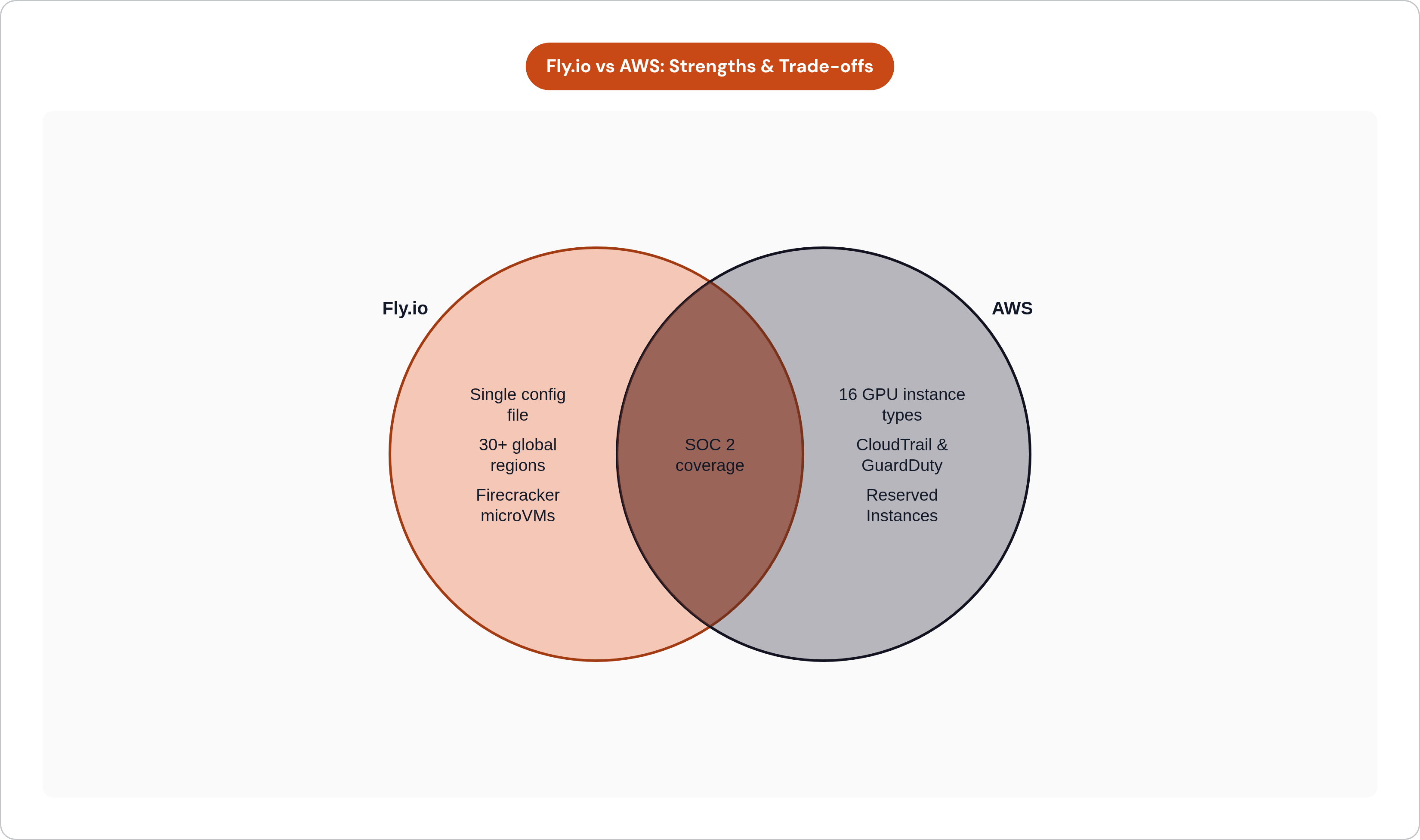
Before any code runs on raw AWS, a team has already made dozens of decisions: VPC architecture, subnet allocation, security group rules, IAM roles and policies, ECS task definitions, ALB listener rules, CloudWatch log groups. Fly.io replaces that entire surface with a single config file and a fly deploy command. No VPC to design, no IAM policy to debug for an afternoon, no load balancer to wire by hand. The underlying infrastructure is Firecracker microVMs, which boot in under a second, with private networking included by default and no manual network segmentation required on day one.
Fly.io's answer is a single config file and a fly deploy command. The CLI handles provisioning, scaling, and secret management across multiple global regions. No VPC to design, no IAM policy to debug for an afternoon, no load balancer to wire by hand. For teams that need production infrastructure before they can justify a DevOps hire, this reduces configuration overhead and frees engineering time toward the product instead.
The underlying technology is legitimate. Firecracker microVMs boot in under a second, private networking ships by default, and persistent NVMe volumes are included. Fly.io occupies a genuine middle tier: real VMs, real global regions, without Heroku's simplicity ceiling or AWS's configuration floor. Fly.io addresses deployment pipeline and cloud configuration overhead that commonly consumes a significant portion of infrastructure engineering time.
The global edge story holds up, too. Fly.io's 30-plus-region footprint is competitive for latency-sensitive workloads. For teams with globally distributed users who need regional placement without separately configuring a CDN and a multi-region cluster, that difference can show up in user-facing metrics.
Fly.io also introduced Sprites: hardware-isolated sandbox environments for running AI-generated or untrusted code. For early-stage teams building AI agents before infrastructure complexity is justified, it fills a real gap.
The workloads that fit Fly.io best are containerized, stateless or lightly stateful, and run by teams who prioritize time-to-production over operational configurability. That description is not a hedge; it is the whole point.
Where Does Fly.io's Simplicity Stop Working?
The constraints are real, and they surface at inconvenient moments, usually the moment after you have shipped something that matters.
Fly Postgres is not fully managed in the AWS RDS sense. Backups beyond Fly's basic snapshots, major version upgrades, and the ongoing operational weight of a production database stay with the team. Fly itself has begun recommending third-party managed Postgres providers, including Neon, Supabase, and Turso, for production workloads. When a platform recommends going elsewhere for a core primitive, that is worth noting.
Autoscaling is not automatic in the way teams sometimes assume. Metrics-based autoscaler configuration is the developer's responsibility. Cost monitoring and regional optimization require active management, not passive trust in defaults.
The observability ceiling creates consistent friction for teams migrating from mature tooling stacks. Fly.io ships basic logging and metrics. Production workloads reliably require third-party tooling for distributed tracing, per-request telemetry, and queue depth monitoring. Teams coming from Datadog or Grafana rebuild their dashboards from scratch. That is real time, and it compounds in ways that are easy to underestimate when you are evaluating platforms on a Friday afternoon.
There is also a memory default issue. Developers migrating from Heroku have reported out-of-memory kills because Fly.io provisions less memory by default than expected. Resolving it often means moving from buildpacks to a custom Dockerfile. Not a heavy lift technically, but the kind of surprise that erodes trust at a sensitive moment, when the team is already under pressure to ship.
The pattern across all of these is the same: Fly.io simplifies the path to production but does not eliminate the need for infrastructure knowledge. The complexity does not disappear. It concentrates into a smaller set of higher-stakes decisions, and when those go wrong, the debugging surface is narrower than it looks from the outside.
The GPU and AI Inference Situation on Fly.io
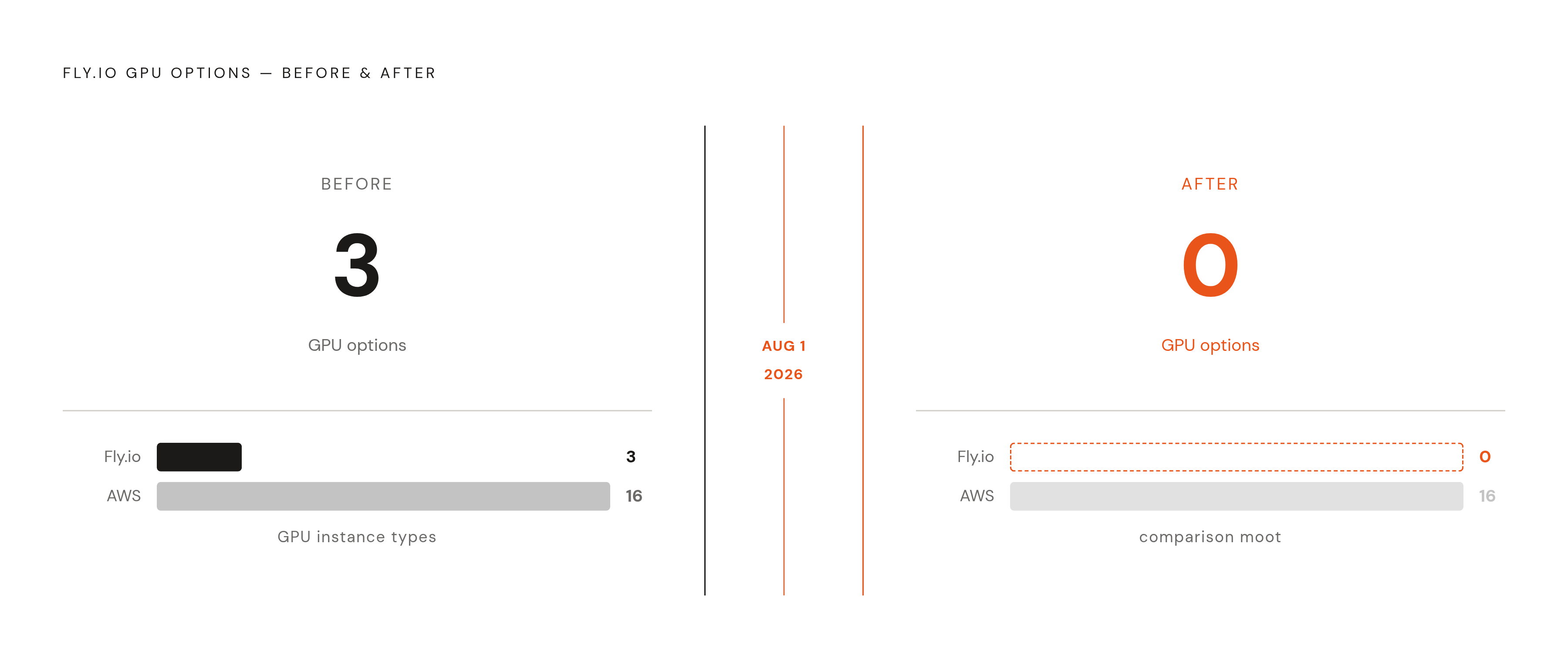
Fly.io is deprecating GPU Machines, with GPUs unavailable after August 1, 2026. Fly's own blog post, titled "We Were Wrong About GPUs," explains the reasoning directly. The bet was that application developers would want GPU acceleration for inline inference. The product did not fit the actual moment in the market, and Fly said so publicly.
Before deprecation, the platform performed adequately for small to mid-sized models. Practitioners running 7B to 13B parameter LLMs, Whisper, and embedding models reported p50 first-token latencies in the 200 to 400 millisecond range for same-region requests, with cross-region adding another 50 to 150 milliseconds. These figures reflect user reports rather than independently published benchmarks. Teams running 70-billion-parameter models or larger, or high-throughput batch jobs, found limits the documentation did not prepare them for.
The breadth gap with AWS was stark even before deprecation. Fly.io offered three GPU options; AWS currently offers sixteen GPU instance types. That difference is now absolute. Fly.io has no GPU story for workloads starting today or scaling into 2026 and beyond.
AWS's AI infrastructure, anchored by SageMaker and its range of instance types, provides a managed ML environment for teams that need tooling alongside compute. The broader market has also moved toward specialized providers. CoreWeave and Modal are among the providers that have raised substantial capital and serve production AI workloads, reflecting enterprise demand for dedicated GPU infrastructure.
For any team evaluating Fly.io specifically for AI inference in 2026: GPU support is gone. That is a planning constraint, not a nuance to weigh against other factors.
How the Cost Math Actually Works at Different Stages
The framing that Fly.io is cheaper than AWS misleads teams at critical decision points. The real answer depends on workload shape, team size, and whether DevOps labor gets counted as an infrastructure cost. Most teams do not count it. They should.
Raw AWS can offer lower per-resource costs than Fly.io for equivalent compute. But managing AWS without a platform layer means either an engineering distraction or a DevOps hire. At the early stage, that labor cost can dwarf most infrastructure bills. A senior DevOps engineer's fully-loaded annual cost against a startup's monthly cloud spend changes the comparison quickly, and Fly.io's higher per-resource rate may resolve in its favor until the business reaches a size where that labor gets amortized across genuine infrastructure complexity.
Fly.io's pricing is resource-based, with no per-seat or per-service platform charges. That predictability is valuable for teams that understand their compute shape. AWS's pricing is granular and theoretically optimizable at scale, but it requires active cost management. Idle resources on AWS accumulate silently; Fly.io's simpler surface area naturally resists that failure mode.
AWS's economics start to dominate under specific conditions: workloads large enough to benefit from Reserved Instances or Savings Plans, infrastructure complex enough that a DevOps hire pays for itself, or compliance requirements that already justify investment in AWS-native tooling. Before those thresholds, paying the Fly.io premium may be the rational choice.
One category deserves separate treatment. AI and analytics workloads have driven significant incremental cloud spend in recent years, and GPU compute economics are categorically different from general-purpose application hosting. Any cost comparison that elides that distinction is not useful.
Compliance, Security, and What Each Platform Offers Teams with Enterprise Requirements
Fly.io holds a SOC 2 Type II certification at the platform level. That covers the infrastructure layer. It does not provide customer-facing compliance tooling or audit export workflows. Demonstrating compliance for a team's own application, including audit logs, access controls, and data residency documentation, remains entirely with the engineering team.
AWS's compliance surface is broad, covering dozens of certifications and frameworks. CloudTrail, Config, Security Hub, and GuardDuty together provide the audit trail and control evidence that enterprise customers and auditors expect. These tools exist out of the box, they are maintained, and auditors are generally familiar with their output. That last part matters. When you are in the middle of a SOC 2 audit and your auditor asks for evidence of network segmentation, you want to hand them something they have seen before, not something you exported and reformatted yourself.
Network isolation illustrates the gap clearly. AWS VPCs provide granular, auditable segmentation. Fly.io's private networking is functional, but it offers fewer controls for teams that need to demonstrate isolation to a compliance auditor. AWS's controls were designed with the audit process in mind; Fly.io's networking was designed for operational simplicity. Those are different goals, and they produce different artifacts when an auditor starts asking questions.
Teams that go through SOC 2 or HIPAA audit processes may find that Fly.io's platform certification does not reduce their engineering work as much as anticipated. Compliance requirements are frequently the forcing function that moves teams from simplified PaaS-adjacent platforms toward AWS, not because AWS is easier, but because the audit evidence already exists there and the auditors already trust it.
How to Think About Migrating from Fly.io to AWS, or Skipping Fly.io Entirely
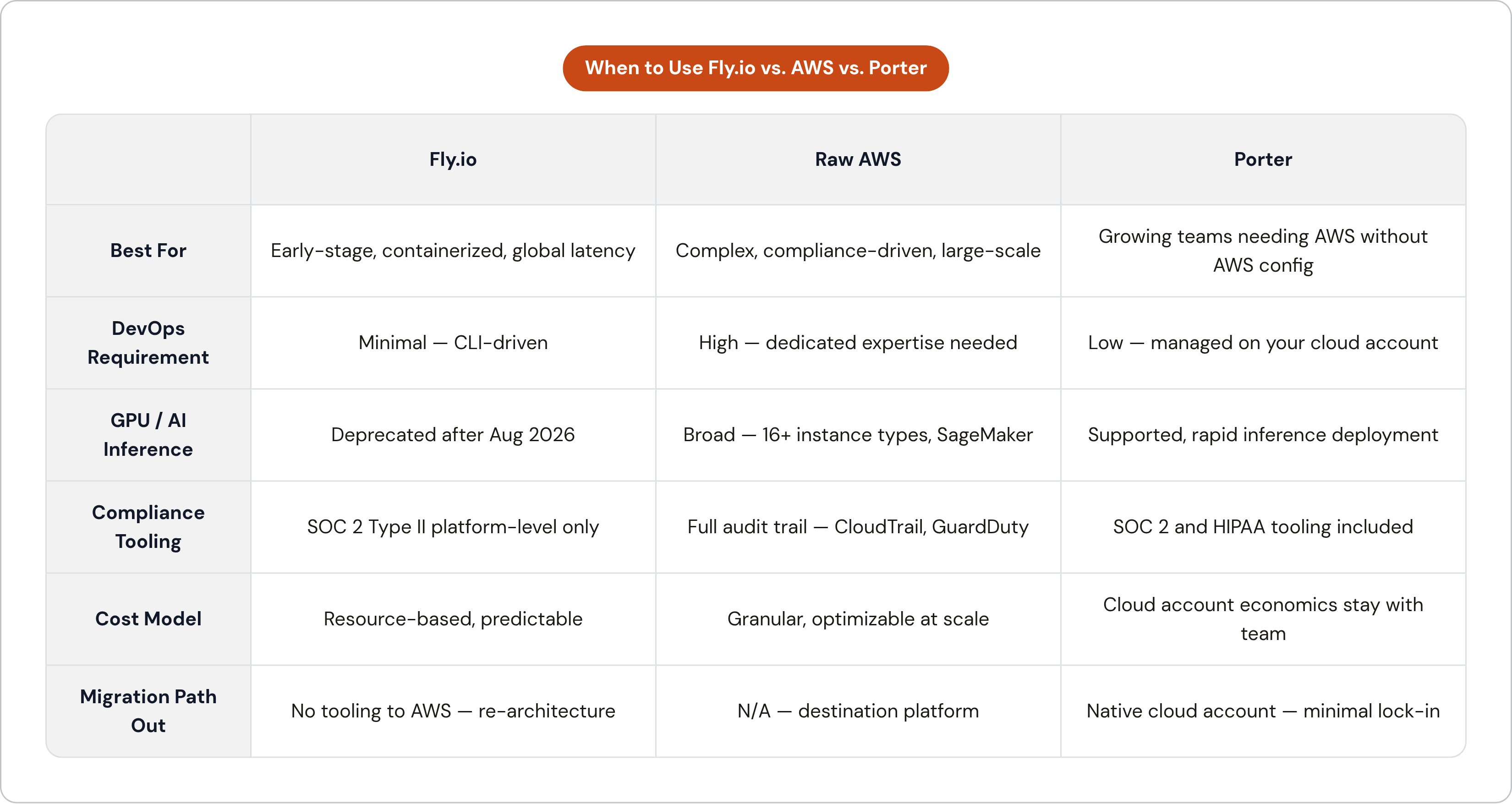
The migration question Fly.io leaves unanswered is what happens when a team outgrows its managed surface. Moving to AWS means VPC architecture, IAM policy design, ECS or Fargate wiring, RDS setup, and CI/CD reconfiguration all come due simultaneously. That is a re-architecture, not a migration in the conventional sense, and teams should scope it that way from the beginning rather than discover it midway through.
The case for skipping Fly.io entirely is strongest for teams that already know they need compliance, GPU infrastructure, or deep AWS service integration. Moving through Fly.io as an intermediate step adds migration cost without adding durable infrastructure equity. Nothing built on Fly.io transfers cleanly to AWS.
The case for using Fly.io now is strongest for teams with no DevOps hire, straightforward containerized workloads, and global latency requirements. Shipping faster on Fly.io and deferring AWS complexity until the business actually requires it is rational. Early-stage teams that spend weeks configuring AWS environments are often looking at mostly empty infrastructure six months later. Premature sophistication has a real cost, and it is paid in engineering hours that do not compound.
The Heroku-to-Fly.io path is well-documented. Fly.io's Turboku tool automates migration, including DATABASEURL secrets, and the CLI-based path covers secrets export, Postgres provisioning, and database import via pgdump and the fly mpg proxy. The Fly.io-to-AWS path has no equivalent tooling. Plan for that investment when scoping the initial Fly.io decision, not after it.
A few orientations by team profile. Solo developers and very early-stage teams should avoid over-engineering; Fly.io's simplicity and pricing fit this stage well. Teams of five to twenty people with scaling workloads and no compliance requirements yet may be well-served by staying on Fly.io, but should start mapping the AWS migration path now rather than later. Any team with GPU or AI inference requirements as of mid-2026 should treat Fly.io as unavailable for that use case and evaluate AWS, Modal, or CoreWeave directly. Teams approaching SOC 2 or HIPAA audits should either start on AWS or plan the migration timeline carefully, because the audit process will likely force the move regardless of preference.
Where Porter Fits for Teams That Want AWS Infrastructure Without the AWS Configuration Burden
This comparison keeps surfacing the same structural gap. Fly.io's simplicity breaks at compliance, GPU workloads, and scale. Raw AWS is inaccessible to teams without dedicated infrastructure expertise. Many growing startups live between those two positions, and neither platform was designed for that middle ground.
Some bring-your-own-cloud PaaS tools deploy production-ready environments directly into a team's own AWS, GCP, or Azure account, so the cloud account and its economics stay under the team's control. CI/CD, autoscaling, and preview environments can be included without requiring a dedicated DevOps hire, and certain options support GPU instances and SOC 2 and HIPAA compliance, with audit evidence living in the team's own cloud account rather than a shared platform layer, which is directly relevant for AI startups and compliance-bound teams that Fly.io can no longer serve.
The infrastructure decision that ages well is the one that matches actual complexity today while keeping tomorrow's migration path as short as possible. Fly.io is the right answer until it isn't, and knowing in advance where that line falls is the difference between a planned transition and an emergency re-architecture.