Migrating a Rails App from Heroku to AWS Without Downtime
A step-by-step approach to moving Rails off Heroku without losing a single request.
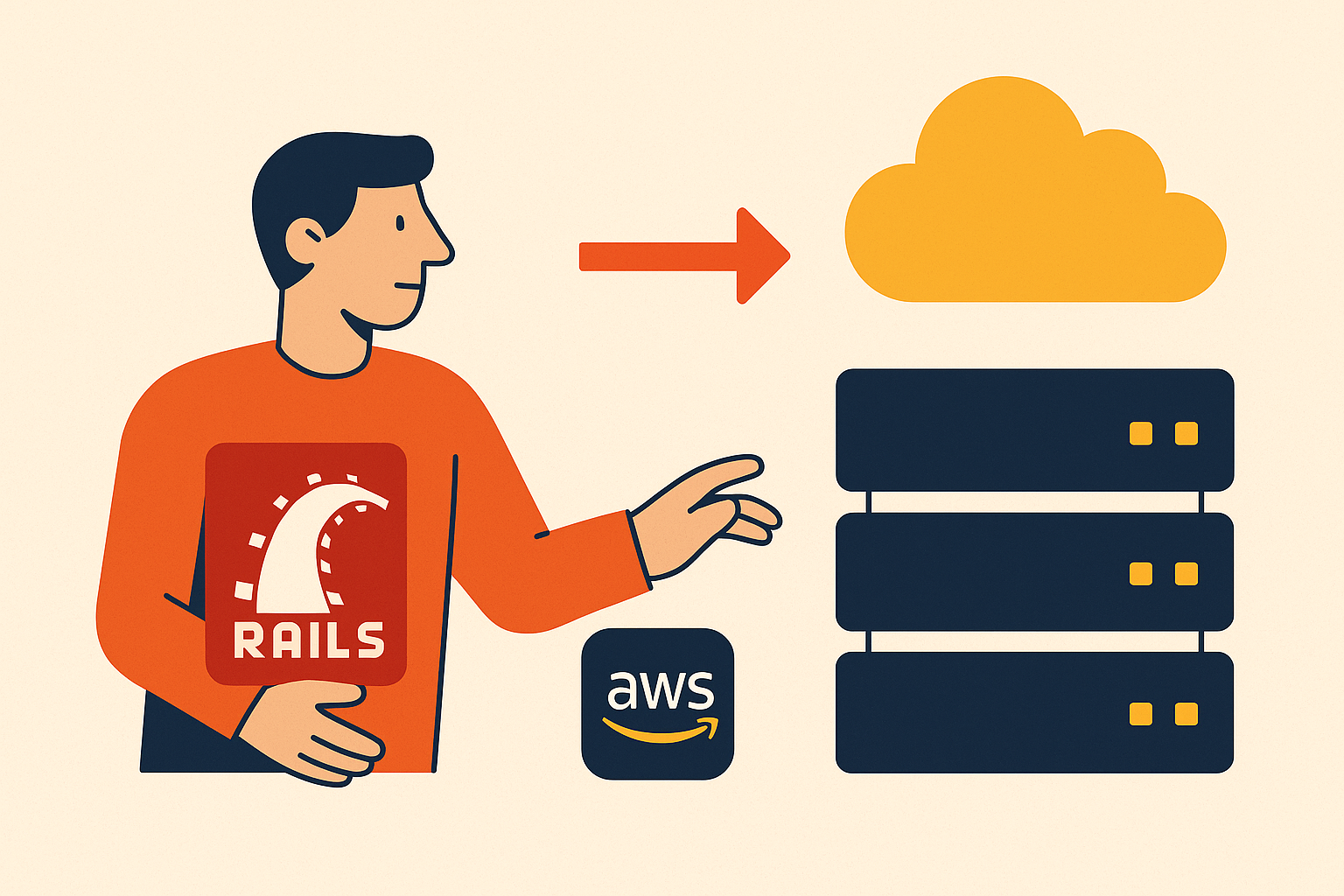
Migrating a Rails app from Heroku to AWS without downtime is doable for a small team. It takes a specific sequence: stand up AWS in parallel, replicate the database, cut over DNS in a single clean motion, then verify everything before you touch Heroku's off switch. I've watched teams treat this migration like surgery when it's really more like moving apartments while the movers and the old landlord are both on the phone with you at once. Skip a step and you'll feel it. Follow the order and it's almost boring.
Most teams that consider this move aren't doing it on a whim. The cost gap alone gets attention: what you pay for a Standard-1X dyno on Heroku buys several times the memory on a comparable EC2 instance. Heroku's June 2025 outages, which ran multiple hours, turned a theoretical reliability worry into something CFOs and CTOs actually brought up in the same meeting. And if you're chasing SOC 2, HIPAA, or PCI-DSS, Heroku's shared runtime just can't give you the network isolation, audit logging, and fine-grained controls, think VPCs, Security Groups, CloudTrail, GuardDuty, that those frameworks expect. Add the database quirks: no superuser access, a thin extension list, upgrade windows that make you wince, and no default support for logical replication slots (a detail that shapes everything in this guide's migration section). Even Heroku itself moved its Essential Postgres databases over to Amazon Aurora in early 2025. That's a company telling you, quietly, where it trusts its own data to live.
A lot of startups outgrow Heroku the way you outgrow a first apartment: nothing wrong with the place, you just need more room and a lease that lets you renovate.
What the target AWS architecture looks like for a Rails app
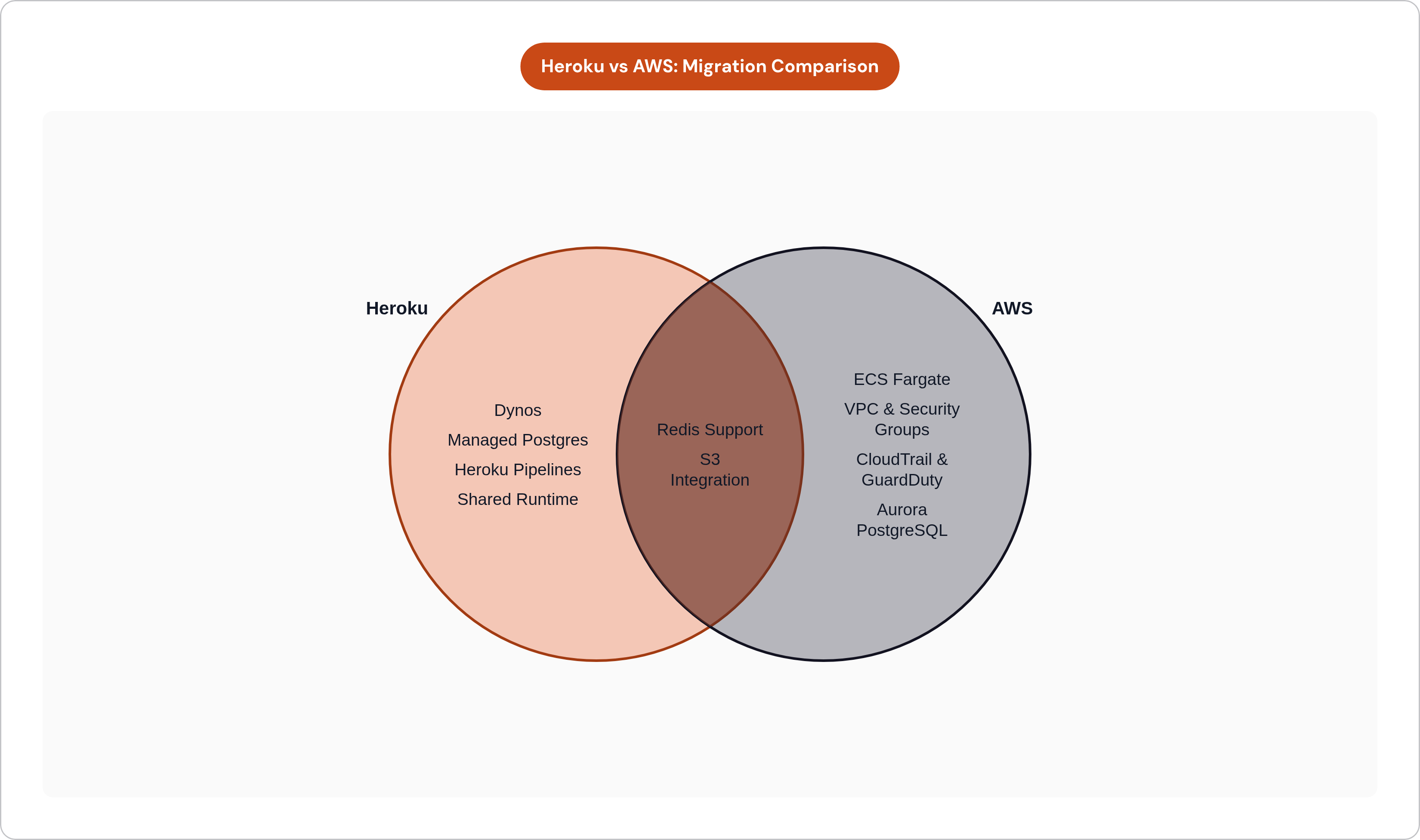
Almost every Heroku primitive has a direct AWS equivalent. This is a substitution exercise more than a reimagining of your app.
- Dynos map to ECS Fargate (serverless containers, autoscaling, no cluster to babysit) or Elastic Beanstalk if you want something that feels closest to Heroku's day-to-day operations.
- Heroku Postgres maps to Amazon RDS for PostgreSQL or Aurora PostgreSQL.
- Heroku Redis maps to ElastiCache.
- Config Vars split into AWS Secrets Manager for credentials and Parameter Store for everything else.
- Heroku Pipelines becomes GitHub Actions, ECR, and CodePipeline.
- S3 integration stays S3, since most Rails teams are already using it through Active Storage or Carrierwave.
A typical production stack, Rails web and API processes, Sidekiq workers, Redis, Postgres, custom domains with wildcard SSL, maps cleanly onto this list. I recommend ECS Fargate as the compute target for most migrations. You're not patching EC2 instances or guessing at right-sizing; autoscaling behaves close enough to Heroku dynos that your team won't need a new mental model. The goal is to get production-ready containers running in your own AWS account without needing to hire a dedicated DevOps team to keep the lights on.
If your app is high traffic, look at Aurora PostgreSQL over standard RDS. Aurora gives you notably higher throughput at a comparable price, and if you're already replatforming, it's worth the extra half hour of research.
Here's the part that should calm nerves: your application code doesn't change. Rails conventions stay the same. Sidekiq configuration stays the same. This is an infrastructure migration, and treating it like a rewrite is how teams talk themselves into six-month timelines that should take six weeks.
Standing up the parallel AWS environment before touching production
The rule that governs everything else: don't cut a single request of production traffic until AWS is fully running and fully checked out. Every later step assumes this is already true.
Start with networking. Build a VPC with public and private subnets spread across multiple availability zones. Set Security Groups on the principle of least privilege, meaning your Rails app, your RDS instance, and your ElastiCache cluster each get their own rules, not one shared free-for-all. This is also your compliance foundation; audit logging, network isolation, and GuardDuty all attach at this layer, so getting it right now saves you from redoing it under pressure later.
Next, containerize the app. Write a real production Dockerfile: pick a base image, install bundler dependencies, precompile assets, and run as a non-root user. Test that image locally against a Postgres and Redis container before it ever touches ECR. The most common failure I see here is subtle: assets or environment variable assumptions get baked into the image at build time, and then everything works locally but breaks in a way that's annoying to trace once it's in ECS.
Migrate your Config Vars next. Copy everything from Heroku into Secrets Manager (credentials) and Parameter Store (non-sensitive config), then update the app to read from those sources using the AWS SDK or a gem like aws-sdk-ssm.
Now deploy to ECS Fargate while still pointing at Heroku's live database. This is the pattern Flightcontrol uses, and it's smart: you're validating that your app runs correctly on AWS compute before you touch anything database-related. Set up GitHub Actions and ECR so your CI/CD pipeline matches what Heroku Pipelines gave you, build, test, push, deploy, so your team's daily workflow doesn't take a step backward on day one. Then check staging parity: same Rails version, same Ruby version, same environment variables, same background worker behavior. If staging doesn't match, production won't either.
Choosing the right database migration path based on your data size and downtime tolerance
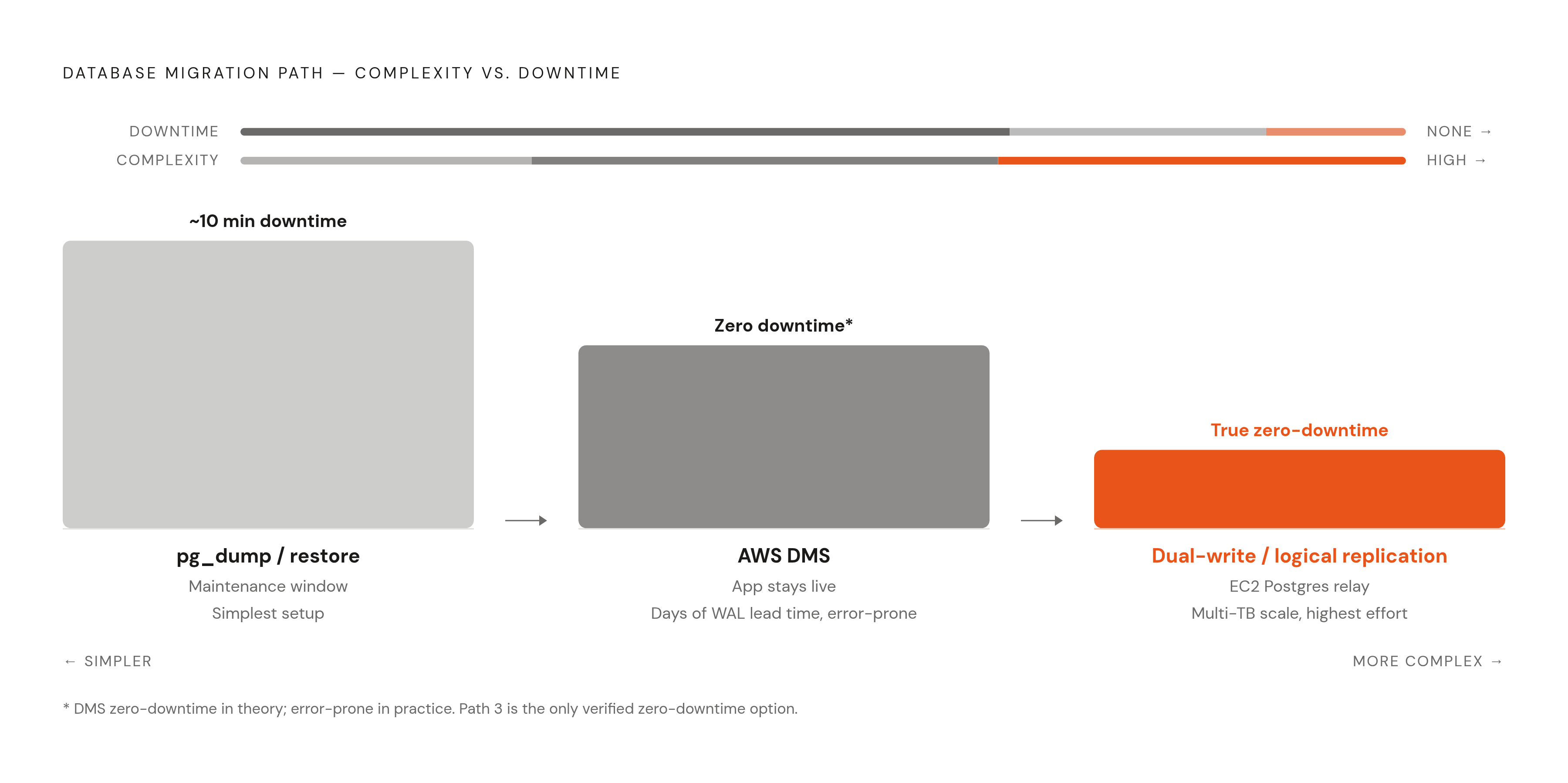
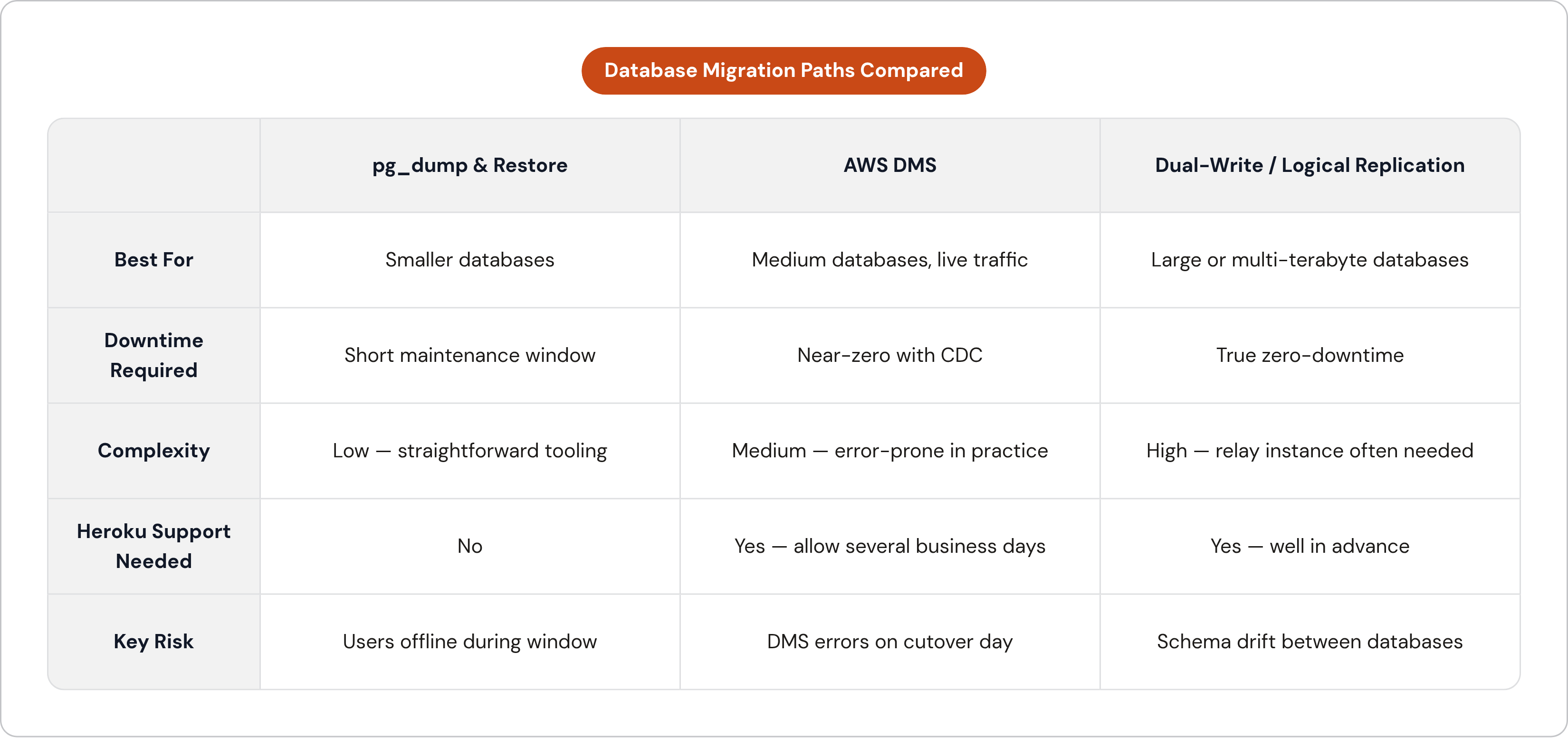
There are three real paths here, and picking between them comes down to two questions: how big is your database, and how much downtime can your users actually tolerate?
Path 1: pg_dump and restore. This is the simplest option, and it fits smaller databases where a short maintenance window is acceptable. You dump from Heroku Postgres and restore into RDS. One team I know of scheduled a 30-minute window and only needed about 10 minutes of actual downtime. If your data fits comfortably in memory and your users won't riot over a scheduled few minutes of downtime, this is your path.
Path 2: AWS Database Migration Service (DMS). This gives you continuous replication from Heroku Postgres into RDS while your app stays live and serving traffic. The catch: you need to contact Heroku Support to get WAL access credentials, and that takes several business days, so build the lead time into your calendar now, not the week you want to cut over. Checkly's engineering team found DMS error-prone in real use. That's a reason to run several dry runs before the actual production cutover, because you want to hit those errors in a rehearsal, not on migration day.
Path 3: Dual-write or logical replication. This is the true zero-downtime option, and it's built for the largest databases. Your app writes to both databases at once during the transition. PostgreSQL's native logical replication (available since version 10) or the pglogical extension streams row-level changes between the two. For multi-terabyte databases, one workable approach uses an intermediate EC2 Postgres instance as a relay, replicating first from Heroku to EC2, then from EC2 to Aurora. It sounds like an extra hop for no reason, but it's how you get near-zero downtime even at serious scale. The constraint that shapes all of this: Heroku Postgres doesn't natively support external logical replication subscriptions, so this route also needs Heroku Support involved, well in advance.
Across all three paths, the same operational habits apply. Overprovision your RDS instance during the migration; it's far easier to scale down after two weeks of clean baseline data than to fight performance problems on cutover day. Keep the Heroku database live and reachable for at least a week after switchover, purely as a fallback. And run at least two full dry runs of whatever path you pick before you touch production for real.
Executing the database migration and reaching a verified replication steady state
If you're on pgdump and restore: capture a backup with heroku pg:backups:capture, download it, then restore into RDS with pgrestore against the correct endpoint and SSL flags. Before you move forward, check row counts and sequence values match across your key tables. Don't eyeball this; actually query it.
If you're on DMS or logical replication, there are two phases. The full-load phase seeds RDS with a point-in-time snapshot. Then comes ongoing change data capture (CDC), where replication lag should drop to near zero within a matter of hours if things are healthy. Watch that lag number continuously; if it keeps growing instead of shrinking, your target can't keep up, and that has to get fixed before you go anywhere near cutover. Validate row counts, foreign key constraints, index presence, and sequence values, same as the simpler path, just with more moving parts to check.
During this whole window, freeze non-essential schema changes. Anything you absolutely must apply to Heroku Postgres has to get mirrored on RDS too. Run strong_migrations in CI so lock-heavy migrations get caught before they ever reach production. Every schema change during this stretch needs to work with both the current and next version of your app, meaning additive only: new columns nullable, new indexes built concurrently.
Before you move to DNS cutover, confirm every item on this list:
- Replication lag sitting at or near zero
- RDS answering test queries with the data you expect
- The Rails app on ECS Fargate connecting to RDS and serving requests correctly
- Sidekiq workers connecting to ElastiCache and draining queues without errors
- Any background jobs that ran during the replication window reconciled and accounted for
Cutting over traffic with a blue-green switch and DNS update
Blue-green is the model to hold in your head: Heroku (blue) stays fully live and untouched while AWS (green) runs in parallel, fully operational. Traffic switches all at once through DNS, as a single, deliberate flip rather than a gradual code rollout.
Before you touch DNS at all, lower Heroku's DNS TTL to the minimum allowed, and do it 24 to 48 hours ahead so the change has actually propagated by the time you need it. Confirm your ACM SSL certificates on the AWS side are validated and attached to the load balancer. Confirm your ECS target group health checks are green. And write down, in plain steps, exactly how you'd roll back: which DNS records to revert, how fast you can put Heroku back as primary. You want this documented in a way that takes five minutes to execute, not reconstructed from memory while your error rate climbs.
The cutover itself goes like this. Put Heroku into maintenance mode so in-flight requests drain cleanly, connection draining is what prevents mid-request failures here. If you're on DMS or logical replication, pause writes, confirm lag has hit zero, then point the Rails database URL at RDS. Update your DNS records to send the custom domain to the AWS load balancer. Turn write traffic back on, now flowing to AWS. And keep your old Heroku DNS records saved somewhere obvious; if you need to revert, you want one command, not a scavenger hunt through your notes.
If your team is risk-averse or running at real scale, canary routing, sending a small slice of traffic to the green environment through a service mesh or weighted DNS, lets you validate with actual users before flipping everything. Make sure the GitHub Actions pipeline on the AWS side is deploying the exact same commit Heroku was running. Parity between the two is what makes the switch clean instead of chaotic.
Done right, the active cutover window, from flipping on maintenance mode to DNS propagation finishing, should run under 15 minutes for most Rails apps. All the real work happens in the days of preparation before that window opens.
Validating the AWS environment and decommissioning Heroku safely
In the first 30 minutes after cutover, smoke test every critical flow: login, payments, data writes, background job dispatch. Confirm Sidekiq is draining queues against your new ElastiCache-backed Redis, not the old Heroku Redis add-on out of habit or a missed environment variable. Check CloudWatch logs against the request volume and error rates you expect. And make sure Active Storage or Carrierwave is actually writing to S3 and not some leftover Heroku-local path.
Set a hard threshold for error rate and latency. If errors climb past that line within the first hour, roll back. Don't debate it in the moment; decide the threshold ahead of time so nobody's negotiating with a dashboard at 2 a.m.
Keep Heroku running for at least a week after cutover. The Heroku database is your recovery point of last resort during that stretch, so resist the urge to clean house early. Don't delete add-ons, dynos, or the Postgres instance until RDS has a full, clean week of production data behind it.
Before you actually cancel Heroku, run through this:
- Every DNS record confirmed pointing to AWS
- SSL certificates live on ACM, not Heroku's managed certs
- Every secret migrated to Secrets Manager, with no leftover references to Heroku Config Vars anywhere in the codebase
- Scheduled jobs from Heroku Scheduler rebuilt as ECS scheduled tasks or EventBridge rules
- Alerting and on-call runbooks updated to point at CloudWatch instead of Heroku's metrics
Take one final pg_dump from Heroku Postgres before you close the account. It costs you nothing and it's cheap insurance against discovering a data discrepancy three weeks later with no way to check the source.
When a managed migration platform removes most of this complexity
Everything above is executable by a small engineering team with a calendar and some patience. I've walked through it because it's honest work, and understanding it makes you a better operator of whatever you end up running. There's also often little reason to do it entirely by hand if your team's time is better spent on product.
Some managed platforms run inside your own AWS account, so you get the ECS Fargate architecture described above without personally writing the Terraform, wiring up the VPC, or hand-rolling the CI/CD pipeline from scratch. You keep ownership of your infrastructure and your data, while the platform handles the scaffolding that turns "we have an AWS account" into "we have a production-ready environment." For a five-person engineering team without a dedicated infra hire, that's the difference between a two-month migration and a two-week one.
The database migration paths in this guide, pg_dump, DMS, logical replication, don't disappear with a managed platform. Someone still has to pick the right one and watch the replication lag. What changes is everything around it: the container setup, the secrets management, the deploy pipeline, the health checks. That's the part worth automating. The database migration is worth doing carefully, by hand, with your own eyes on the numbers, no matter which platform you choose.