Migrating a Django App from Heroku to GCP Without Downtime
A step-by-step guide to moving Django from Heroku to GCP without service interruption.

I've done this migration twice: once for a Django shop pulling around 200k requests a day, once for a smaller team that just wanted out before their next Heroku invoice hit five figures. It's solvable, but it is not a weekend project. You map your services, pick a compute layer, move the database, run migrations at the right moment, and cut DNS over with your hands steady. None of it needs a dedicated platform team, just someone willing to sequence the work instead of winging it, and I've watched teams wing it.
Heroku's reliability took a real hit in 2024 and 2025, with multiple outages stretching most of a day and no lever for customers to pull when it happened; you just waited. Salesforce has also parked Heroku in sustaining mode: keep the lights on, ship almost nothing new, and enterprise deals aren't even on the table anymore. Pricing moved the wrong direction too, with basic dyno costs jumping several times over in 2024, and once you're running at real scale, the bill lands in the tens of thousands a month. Then there's the stuff that never shows up on a pricing page: ephemeral storage that wipes anything written to disk on restart, a hard timeout on HTTP requests in the Common Runtime you can't touch, compliance features that require bolting on paid add-ons from other vendors. Stack it all up and you get a platform that costs more and does less than it used to.
How Heroku's primitives map to GCP services before a single line of code changes
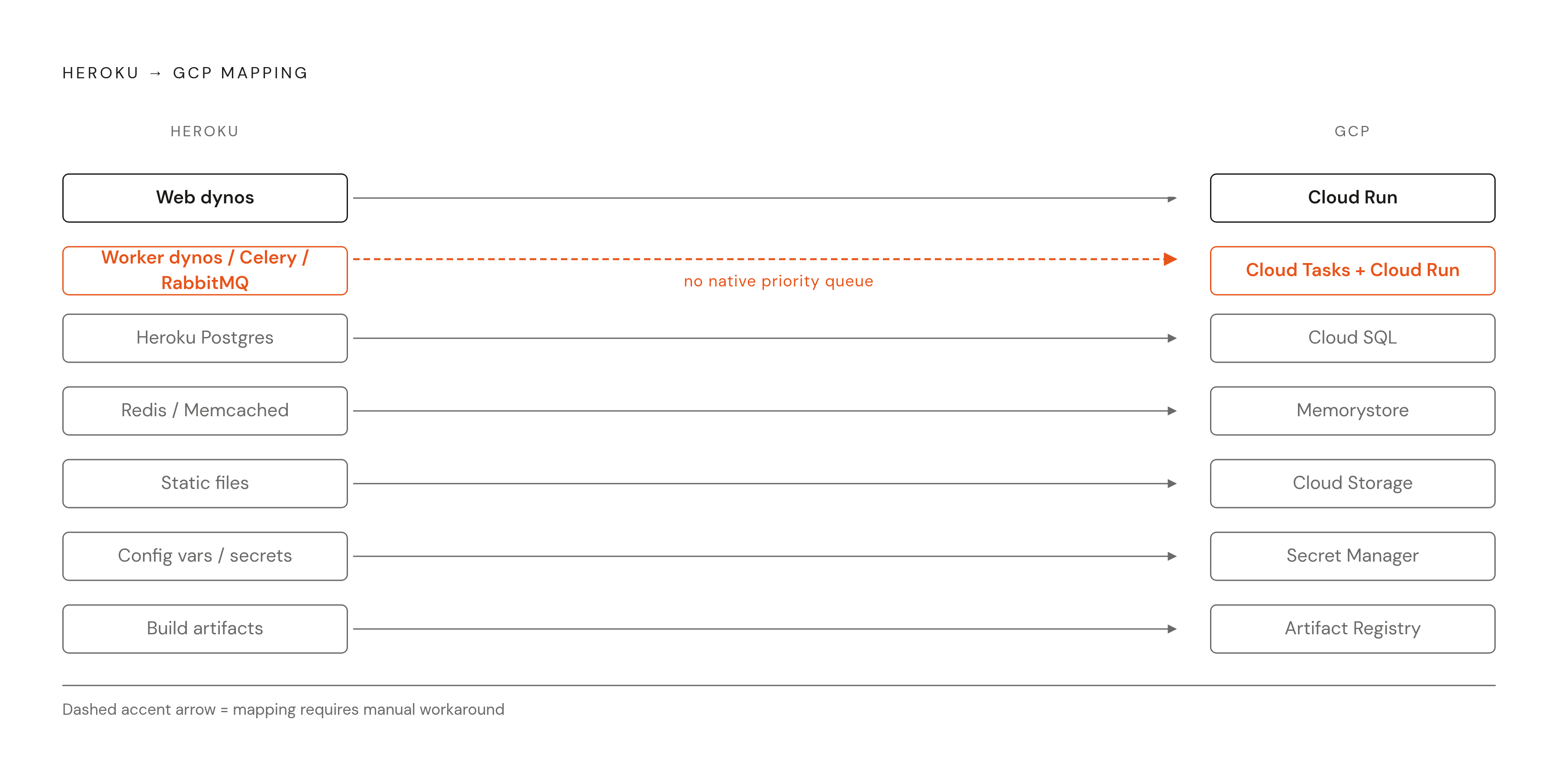
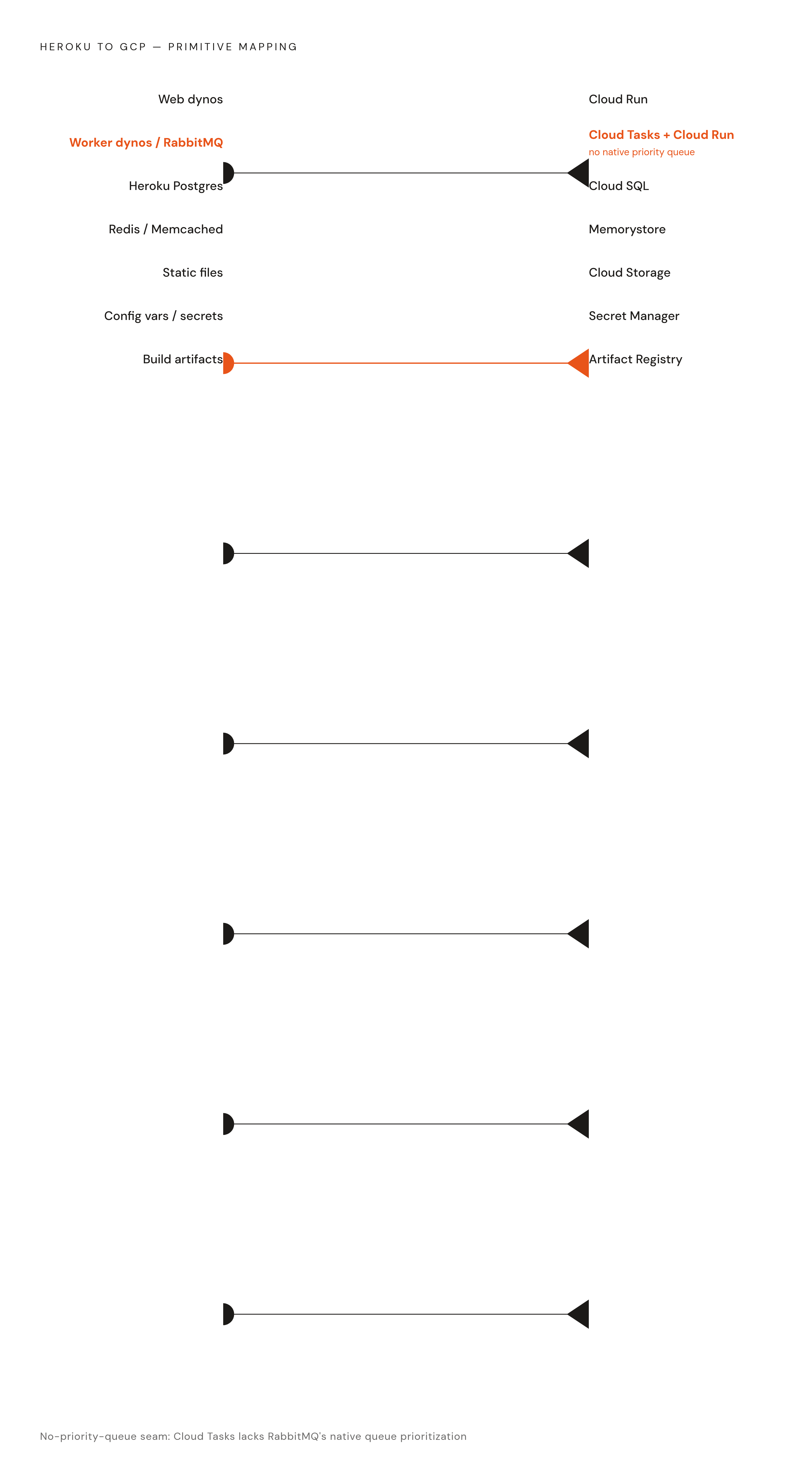
Map every Heroku primitive to its GCP counterpart before you touch any code, since this is where the hidden dependencies show up, and you want to find them now, not mid-cutover with production traffic on the line.
The mapping is close to one-to-one, but a couple of the "equivalents" have real seams in them:
- Web dynos → Cloud Run. Serves HTTP traffic, runs in a container, nothing to patch or size.
- Worker dynos, Celery, RabbitMQ → Cloud Tasks with Cloud Run. Async job processing without babysitting a Celery cluster. The seam: Cloud Tasks has no native priority queue like RabbitMQ. Teams get around it by tuning the release rate and max concurrent tasks per queue. It's not identical behavior, but it's close enough that nobody notices after a couple weeks.
- Heroku Postgres → Cloud SQL. Managed Postgres, version-compatible, and the tools you already know still work.
- Redis or Memcached → Memorystore. Same protocol; someone else manages it now.
- Static files → Cloud Storage. Gunicorn was never built to serve static assets, and Cloud Storage does it right.
- Config vars and secrets → Secret Manager. Keeps credentials out of settings.py and out of your shell history.
- Build artifacts → Artifact Registry. Your container images live here, and both Cloud Run and GKE pull from the same registry, which matters once you get to the hybrid setup below.
Two starting points are worth reading before you write anything custom: the Django-on-Cloud-Run codelab and the Django-on-GKE tutorial. The GKE tutorial assumes Django 5 and Python 3.10 or newer, so check version compatibility now instead of finding out the hard way, three hours into a deploy, that your Python is too old.
Choosing between Cloud Run and GKE before the migration begins
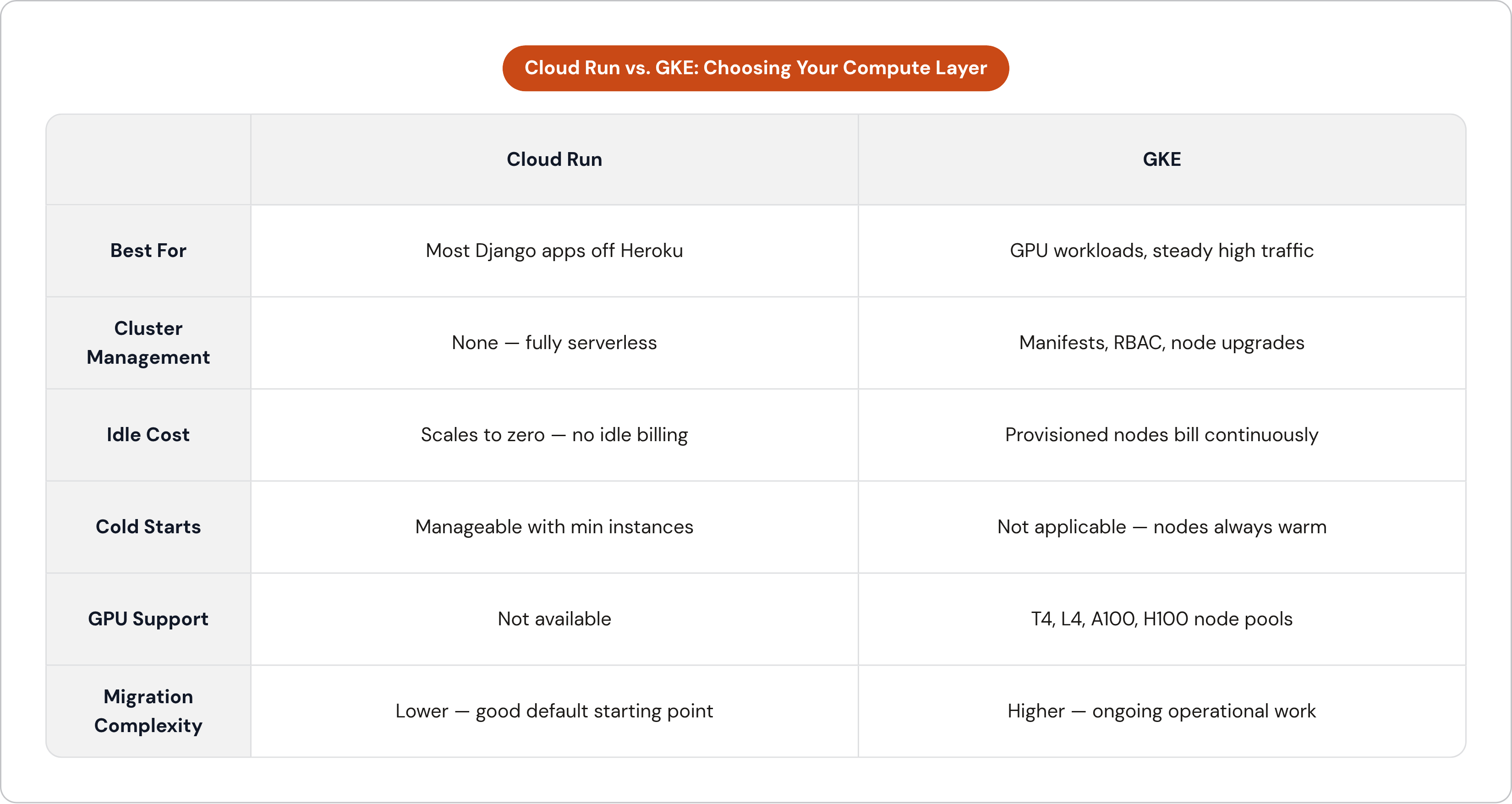
This one decision ripples into everything downstream: how you build CI/CD, what your cost model looks like, how much operational work your team signs up for. Get it right early and you skip months of arguing with yourself later.
For most Django apps coming off Heroku, Cloud Run is the right default. It's serverless, so there's no cluster to size, patch, or upgrade, and it scales to zero, which kills the idle-cost problem Heroku sticks you with when it bills you for dynos sitting around doing nothing. Rolling deployments are zero-downtime out of the box, and Cloud Run halts a rollout automatically if the new revision fails to start. Cold starts are a real concern, though a manageable one: set a minimum instance count and they go away for latency-sensitive endpoints, and Startup CPU Boost speeds up the ones you still hit. Most of the friction after migration is tuning, not architecture, since autoscaling needs adjustment and database connections behave differently than what you're used to on Heroku Postgres, so watch your connection counts for the first few weeks. I've had a service look totally healthy on day one and start dropping connections on day four because nobody set a max pool size.
GKE earns a look when you hit a specific, hard limit. Running GPU workloads, like vLLM, TGI, or Ollama containers, means you need GPU-attached node pools, and GKE gets you NVIDIA T4, L4, A100, and H100 hardware that Cloud Run doesn't offer at all. If your traffic runs steady and high around the clock, provisioned nodes end up cheaper than per-request billing, and if you need long-lived connections or persistent local state, Cloud Run's stateless model won't hold up. But GKE's cost isn't only compute; it's Kubernetes manifests, RBAC configuration, node upgrade planning, resource request tuning, and cluster debugging when something breaks at 2 a.m. For a small team, that's ongoing work, not a setup task you finish once and forget.
Here's what takes the pressure off the decision: Cloud Run and GKE pull from the same Artifact Registry images, so a service can move from one to the other without touching your CI pipeline or rebuilding anything. Dev and staging can run on Cloud Run, scale-to-zero and cheap, while production runs on GKE if it actually needs to. My advice for anyone leaving Heroku: start everything on Cloud Run, and only graduate a service to GKE once you've hit one of the hard limits above.
Migrating the database without taking the application offline
This is the step where mistakes get expensive. Almost everything else in this migration can be undone mid-flight, but a botched database cutover usually can't be, and that asymmetry should shape how careful you are here.
The clean theoretical path, streaming replication straight from Heroku Postgres into Cloud SQL and then promoting the replica, is blocked at the source: Heroku Postgres won't grant external followers the replication privileges they need. So you're choosing between two real paths, and the choice comes down to how much downtime you can stomach.
Path A: logical replication, near-zero downtime. Heroku doesn't expose replication slots directly, but you can set up Postgres logical replication outside Heroku's managed layer with a third-party tool. The Konigle team, who build a Django SaaS product, wrote up their process using Londiste as the replication tool, and it's the most thorough public account I've found of solving this exact problem. Once replication runs, it just keeps running in the background, and the cutover becomes a DNS and traffic switch instead of a bulk data copy, which is what keeps downtime close to zero.
Path B: pgdump export and import, with a maintenance window. Export from Heroku Postgres with pgdump, upload the dump to Cloud Storage, import into Cloud SQL. Works across compatible Postgres versions, and works fine when your destination version is newer than your source. The hard rule: no schema changes while the data migration runs. Fine for smaller datasets, or for teams that can schedule a short window and actually tell their users about it.
Whichever path you pick, don't start the clock until Cloud SQL is fully provisioned and you've tested a real connection from a real client, not a ping. After cutover, check row counts against the source, check that sequence states haven't drifted, and confirm foreign key integrity before a single production request touches the new database.
Running Django migrations safely during the application cutover
Schema migrations are a different problem than data portability, and mixing the two up is where teams get burned. Migrations get handled at deploy time, never folded into the database transfer.
I watched a team add a model with a foreign key constraint, run makemigrations locally, and never actually commit the migration file to version control before CI/CD kicked off. The container image got rebuilt without it. Production came up, threw an error looking for a table that didn't exist, and the site sat down for about twenty minutes while someone traced what had gone missing. It's a dumb way to lose twenty minutes, and it happens more than people admit. The fix: migration files are deployment artifacts. Commit them, version-control them, check them before any new image gets promoted to production.
On GKE, blue-green deployment is the pattern that works: run migrations as a Kubernetes Job before the new deployment gets promoted, so the schema updates while the old version keeps serving live traffic. This only holds up if your migrations stay backward-compatible with whatever's still running. Add new columns as nullable, and never drop a column in the same release where you remove its last reference in code. Readiness probes gate traffic, so a new pod doesn't get requests until it passes its health check, and maxSurge and maxUnavailable on the Deployment control how fast old pods get swapped out. If you roll back a bad deployment, the migration Job doesn't roll back with it, so design schema changes to be safe in either direction, always.
Cloud Run makes this simpler, since rollouts are zero-downtime by default and stop on their own if a new revision fails to start, and the same rule still applies: migrations run before traffic shifts, never after.
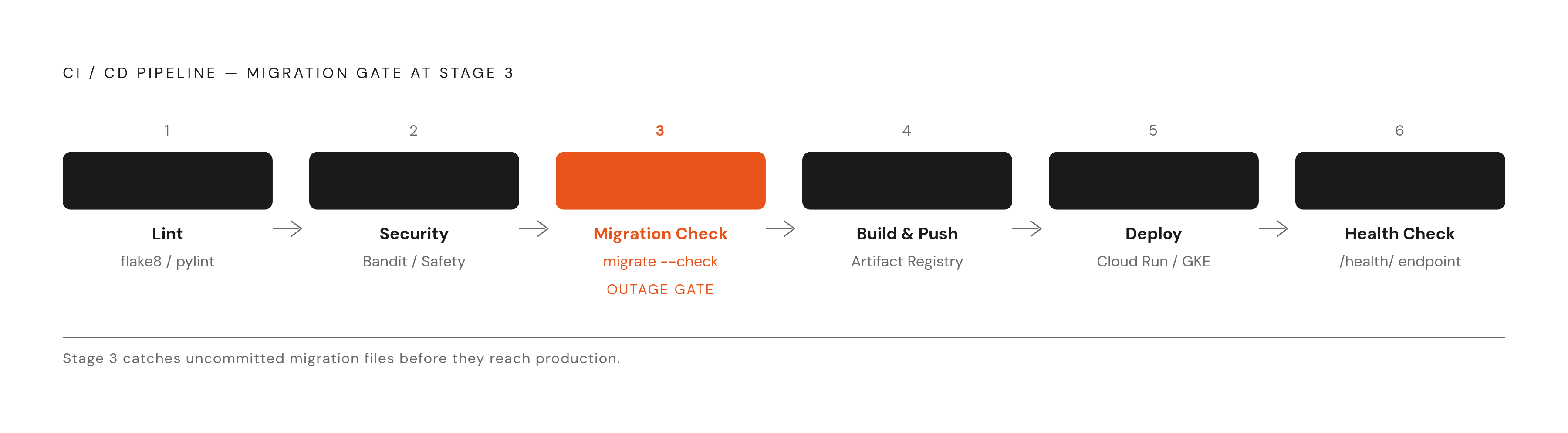
One line catches a lot of trouble before it ships: add python manage.py migrate --check as a gate in CI. It fails the pipeline outright when unapplied migrations are sitting around, uncommitted, and that single line would've stopped the twenty-minute outage above before it started.
The CI/CD pipeline that keeps deployments repeatable after the migration
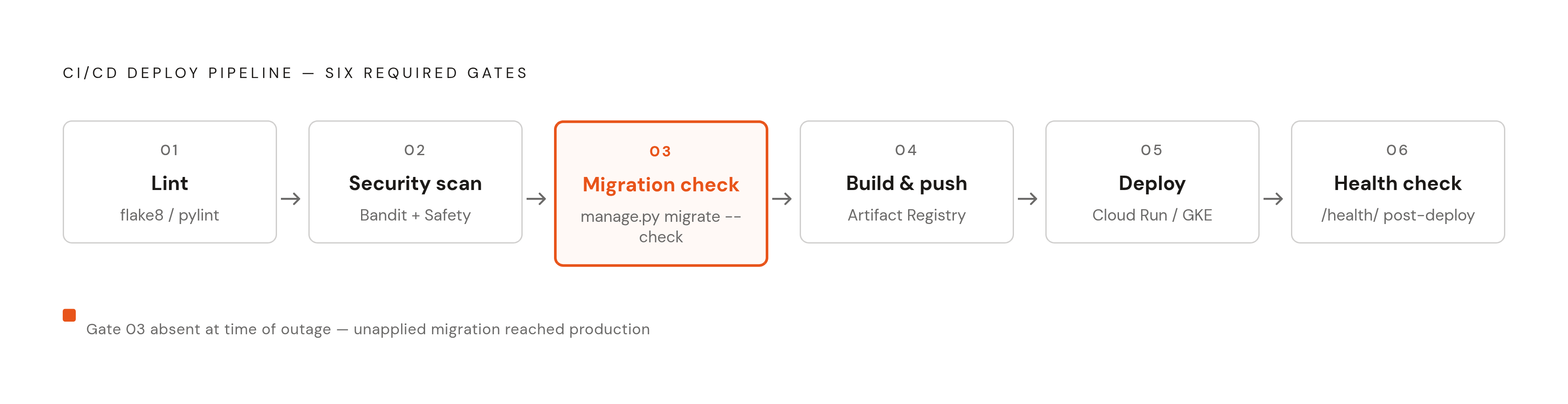
GitHub Actions is where most teams coming off Heroku land, since the workflow files sit right in the repo next to the application code, so there's nothing extra to reason about.
The GCP pattern: GitHub Actions triggers Cloud Build, Cloud Build builds the container image using buildpacks (no Dockerfile needed for a standard Django app), and the image gets pushed to Artifact Registry. Both Cloud Run and GKE deploy from that same image, so if a service moves between the two later, your CI pipeline doesn't change.
A pipeline that's actually ready for production runs these stages, in this order:
- Lint with flake8 or pylint, catching obvious mistakes before a build even starts.
- Security scan with Bandit for the Python code and Safety for dependency vulnerabilities.
- Migration check, the
migrate --checkgate from above. - Build and push the image to Artifact Registry.
- Deploy to Cloud Run or GKE.
- Health check against the
/health/endpoint after deploy, before the pipeline tells anyone it worked.
One thing that's easy to skip but matters for supply chain security: pin your GitHub Actions to a specific commit SHA, not a mutable tag like @v4 or @main. Mutable tags can get hijacked, and when that happens, arbitrary code runs inside your pipeline with your credentials attached.
Wire monitoring into the tail end of the pipeline too. Error rate, latency, and startup success should report back right after deploy, so a regression shows up on your dashboard in minutes, not in tomorrow's support queue after users have already noticed. The migration only lasts as long as the release process you build to follow it.
Cutting over DNS and validating the migration before decommissioning Heroku
The cutover itself is one moment, while everything before it is prep and everything after it is checking your work, and keeping those two phases separate stops you from rushing the part that actually matters.
Before you touch DNS, confirm:
- Every environment variable and secret lives in Secret Manager, and the new service's service account can actually read them.
- Cloud SQL connectivity works with a real query returning real data, not a ping.
- Static files load from Cloud Storage correctly, and the new service passes its health check in staging against production data.
- You've written down the exact rollback steps: if traffic cuts over and something breaks, how do you send it back to Heroku right now, without improvising on the spot?
Lower your DNS TTL well before the cutover date, since a shorter TTL means a shorter wait if you need to roll back, and waiting on DNS caches to expire while your site is down is a bad way to spend an afternoon.
Shift traffic gradually instead of flipping a switch. Cloud Run supports traffic splitting by revision percentage, so you can send a small slice of real traffic to the new environment and watch it before committing fully. On GKE, a weighted ingress or load balancer rule does the same job. Keep Heroku running the whole time, and don't decommission it until the new setup has handled real traffic cleanly for a stretch you're actually comfortable with, not just a quiet few minutes.
Once traffic is flowing, run smoke tests: login and authentication, database writes, background job enqueue and completion, static asset delivery. Only decommission Heroku after the new setup has run clean under production load for at least one full traffic cycle, meaning it's seen your normal daily and weekly patterns, not just a slow Sunday afternoon. And cancel Heroku add-ons explicitly, since they bill on their own schedule, separate from your dyno subscription, and they'll keep charging you quietly if you forget them.
What the cost and operational picture looks like after the migration
Cloud Run's scale-to-zero billing is where the savings start. Heroku bills you for dynos whether they're doing anything or not; Cloud Run doesn't charge for idle time, and for most apps with any daily traffic swing, that difference shows up fast, sometimes in the first billing cycle.
GCP's Committed Use Discounts apply across GKE and Compute Engine, and they're more flexible than AWS Reserved Instances since you're not locked into a specific instance type. A one-year commitment brings CPU and memory costs down meaningfully; a three-year commitment brings them down further. GCP also applies sustained use discounts to Compute Engine automatically, no reservation needed, so there's a baseline saving that costs nothing to claim. Teams making this move at scale report their monthly infrastructure spend dropping hard, in some cases a large chunk of the bill gone within the first cycle after cutover.
Operationally, Cloud Run asks for zero cluster management, while GKE Standard asks more of you, though GKE Autopilot cuts down a lot of the node-level decisions that used to need someone watching them full time. What's left, container builds, CI/CD upkeep, rotating secrets in Secret Manager, planning Cloud SQL version upgrades, is real work. It's work a small engineering team can absorb without hiring a dedicated DevOps person just to keep the lights on, though nobody should pretend it's zero work either.
If wiring all this together yourself sounds like more plumbing than your team wants to own, some tools deploy into your own GCP account so you keep the cost structure and control of running things yourself, while handling the platform layer underneath: automatic CVE patching, one-click SOC 2 compliance, the stuff that otherwise eats a week of an engineer's time every quarter. Leaving Heroku means landing on infrastructure that scales with your product, and that's a different bar than infrastructure that just keeps the lights on.