GitHub Actions CI/CD Pipeline for Kubernetes Deployments
Split your CI/CD pipeline into three files to keep staging and production separate.
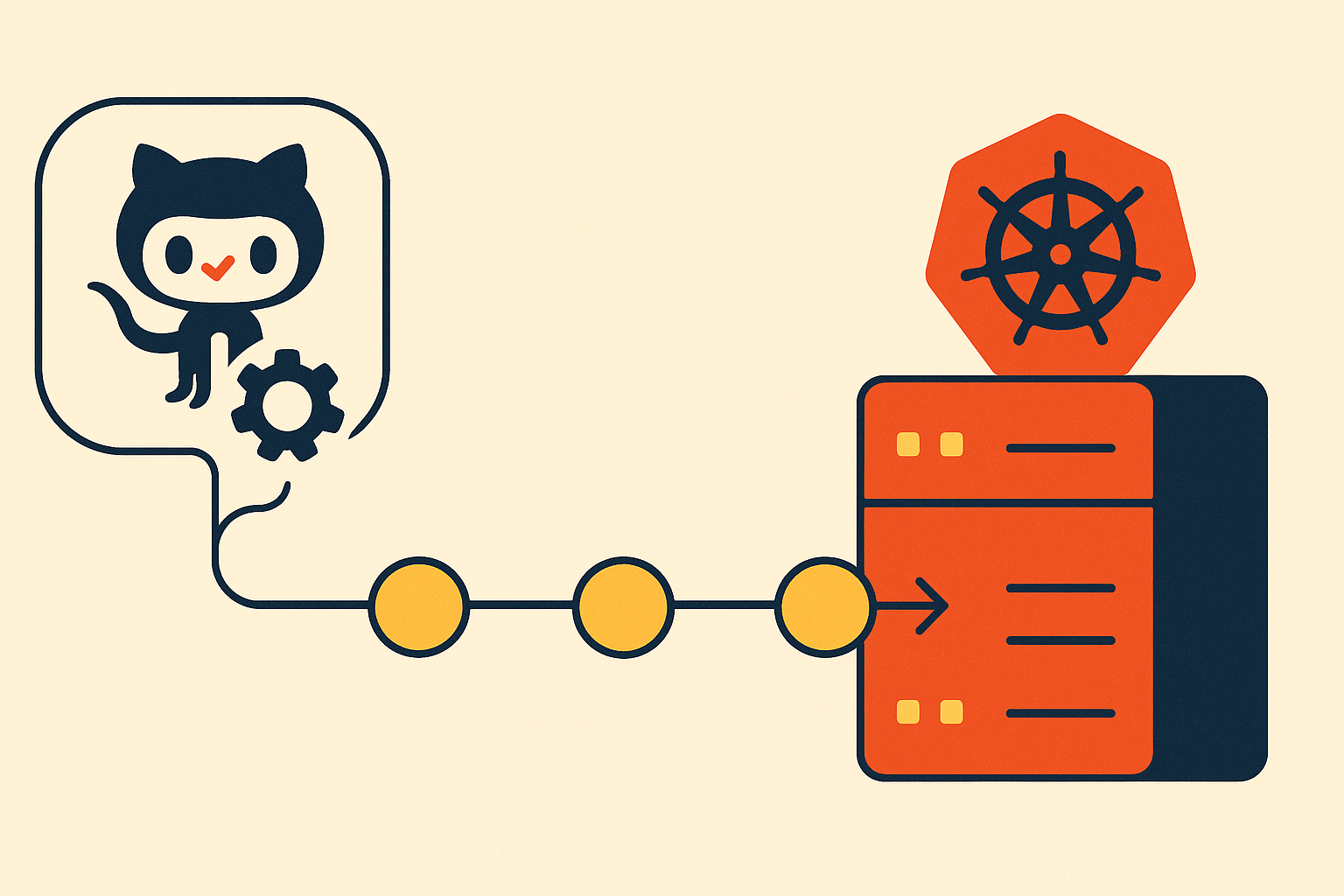
The pattern that holds up in production is three files: ci.yml for tests and linting, build.yml for Docker image construction and registry push, and deploy.yml for applying changes to the cluster via kubectl or Helm. Most teams start with one monolithic workflow file. That works until it doesn't, and then debugging it becomes an exercise in untangling unrelated concerns you never meant to couple in the first place.
Split the pipeline into three files: ci.yml for tests and linting, build.yml for Docker image construction and registry push tagged with ${{ github.sha }}, and deploy.yml for applying changes to the cluster via kubectl or Helm. Each file carries its own secrets scope, which is the structural mechanism that keeps staging and production credentials separate. GitHub Environments enforce that separation: a secret stored at the production Environment level is inaccessible to jobs linked to staging, and that boundary is enforced by the platform, not by convention. Link each deploy job to its Environment using the environment: key, and the job inherits that Environment's access model and protection rules automatically.
The teams that split early rarely regret it. The teams that wait until their single file is 400 lines long spend a painful week refactoring what should have been a one-afternoon decision.
Each file can be triggered independently, reviewed in isolation during code review, and carry its own secrets scope — which matters when you're managing separate credentials for staging and production clusters. A single file that conflates building and deploying means a change to your test configuration sits in the same pull request as a change to your deployment logic. Those are different conversations.
GitHub Environments are the structural mechanism that separates staging from production. Each Environment carries its own secrets, its own protection rules, and its own deployment history. When you link a job to an Environment using the environment: key, that job inherits the Environment's access model and triggers its protection rules. Everything the approval gate section covers is built on top of this.
Reusable workflows extend this architecture across multiple repositories. GitHub supports up to 10 levels of nesting and 50 workflow calls per run. Compliance logic, mandatory scanning steps, audit logging can live in a single callable workflow rather than being copy-pasted across every service repository. When that logic needs to change, it changes in one place and propagates automatically — at ten services, that's the difference between a manageable codebase and a recurring maintenance burden.
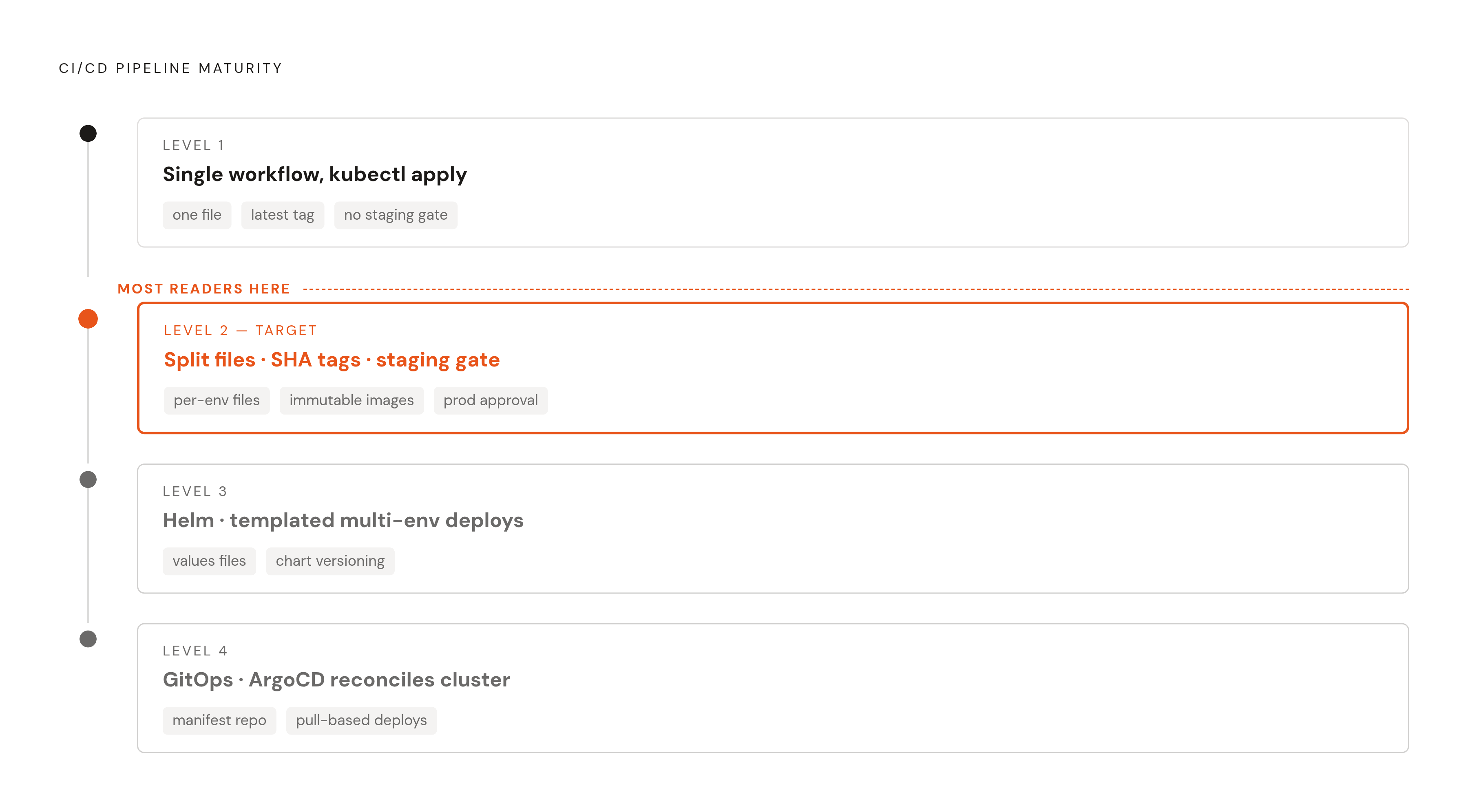
The maturity levels are worth naming because knowing where you are tells you what to build next. Level 1 is a single workflow file that builds and runs kubectl apply: functional, fragile. Level 2 is split files, SHA-tagged images, and a staging gate before production; this is where most teams should be aiming. Level 3 introduces Helm for templated multi-environment deploys, appropriate when the same application deploys across several environments with meaningfully different configurations. Level 4 is GitOps with ArgoCD, where GitHub Actions updates a manifest repository and the cluster reconciles itself. The pipeline stops running kubectl directly.
Most teams reading this sit between Level 1 and Level 2. Everything that follows is oriented toward making that jump concrete and durable.
Writing the Workflow File: Triggers, Jobs, and the Structure of a First Deploy
Trigger choices are the first real decision. push to main covers automated deploys on merge. pullrequest covers CI validation before merge: tests and linting before code reaches the branch that triggers a deploy. workflowdispatch adds a manual trigger, useful for promoting a known-good staging build to production without requiring a new commit. Each trigger has a distinct role, and conflating them produces a workflow that fires in unexpected contexts at inconvenient moments.
A minimal but realistic first workflow looks like this:
name: Build and Deploy

on:
  push:
    branches: [main]
  workflow_dispatch:

concurrency:
  group: deploy-${{ github.ref }}
  cancel-in-progress: true

jobs:
  build:
    runs-on: ubuntu-latest
    permissions:
      contents: read
      packages: write
    steps:
      - uses: actions/checkout@v4

      - name: Log in to GitHub Container Registry
        uses: docker/login-action@v3
        with:
          registry: ghcr.io
          username: ${{ github.actor }}
          password: ${{ secrets.GITHUB_TOKEN }}

      - name: Build and push image
        uses: docker/build-push-action@v5
        with:
          push: true
          tags: ghcr.io/${{ github.repository }}/app:${{ github.sha }}

  deploy:
    needs: build
    runs-on: ubuntu-latest
    environment: staging
    if: github.ref == 'refs/heads/main'
    steps:
      - uses: actions/checkout@v4
      - name: Deploy to cluster
        run: |
          kubectl set image deployment/app \
            app=ghcr.io/${{ github.repository }}/app:${{ github.sha }}
Several decisions in that file are deliberate. The needs: build keyword enforces job order: the deploy job cannot start until the build job completes successfully. The if: github.ref == 'refs/heads/main' guard prevents the deploy job from running on feature branches, even if someone manually triggers the workflow from one. The concurrency block with cancel-in-progress: true prevents two deploys from racing each other to the same cluster when pull requests merge in rapid succession.
What this workflow deliberately defers: rollback logic, security scanning, Helm templating, and multi-environment promotion. Those aren't omissions. They're the features the subsequent sections build on top of this foundation.
Tagging Docker Images with the Commit SHA and Why It Matters at Rollback Time
${{ github.sha }} as the image tag creates an immutable link between the running artifact and the exact source commit that produced it. This isn't a stylistic preference. It's the mechanism that makes rollback deterministic, and the difference becomes viscerally apparent at two in the morning when something is broken and you need to know precisely what's running in production.
The failure mode of :latest is concrete. Two simultaneous deploys can race to overwrite the same tag, leaving the cluster running an image that neither deploy intended to produce. Rolling back means re-tagging rather than pinning to a known-good artifact, which requires a rebuild or a manual registry operation under pressure. Audit logs lose traceability because :latest at deploy time and :latest at incident review time point to entirely different images. The tag looks stable; it isn't.
The practical pattern is to tag with the SHA for immutability, and optionally apply a mutable pointer like :stable or :production as a secondary tag for human reference. The critical rule: never deploy using the mutable tag. The mutable tag is for visibility; it has no place in cluster manifests.
Rollback with SHA tagging is straightforward. Reverting a deployment is a manifest update referencing an earlier SHA. No rebuild. No guessing about what was running before the incident. The SHA in the manifest is the SHA in the repository, which is the SHA in the registry. The whole chain is traceable from a single 40-character string.
Registry choice shapes your authentication model. GitHub Container Registry, ghcr.io, keeps images and workflow permissions inside the same access model you're already using. The GITHUB_TOKEN grants write access without additional secrets, which reduces configuration surface. ECR, GCR, and ACR each require their own authentication step. All are viable; the tradeoff is configuration complexity against organizational standardization.
Docker layer caching tied to the registry is worth configuring early because the time savings compound across a busy repository. Using cache-from and cache-to with the registry in the docker/build-push-action step means layer reuse persists across workflow runs rather than resetting on each job.
Authenticating to the Cluster Without Storing Long-Lived Credentials
The anti-pattern: storing a kubeconfig with cluster-admin credentials in GitHub Secrets. A compromised workflow token then has unrestricted cluster access, and that access persists until the credential is manually rotated.
The right model is a Kubernetes ServiceAccount scoped with RBAC to only the permissions the deploy workflow actually needs. For a typical deployment workflow, that's update on Deployments and get on Pods in a specific namespace. The RBAC manifest is three objects:
apiVersion: v1
kind: ServiceAccount
metadata:
  name: github-deploy
  namespace: app-production
---
apiVersion: rbac.authorization.k8s.io/v1
kind: Role
metadata:
  name: deployer
  namespace: app-production
rules:
  - apiGroups: ["apps"]
    resources: ["deployments"]
    verbs: ["get", "update", "patch"]
  - apiGroups: [""]
    resources: ["pods"]
    verbs: ["get", "list"]
---
apiVersion: rbac.authorization.k8s.io/v1
kind: RoleBinding
metadata:
  name: github-deploy-binding
  namespace: app-production
subjects:
  - kind: ServiceAccount
    name: github-deploy
    namespace: app-production
roleRef:
  kind: Role
  name: deployer
  apiGroup: rbac.authorization.k8s.io
Minimal surface. Concrete constraint. If the workflow token is compromised, the blast radius is bounded to deployment updates in one namespace. That's the difference between a bad afternoon and a catastrophic incident.
For managed clusters on GKE, EKS, or AKS, OIDC is the preferred authentication mechanism. The workflow exchanges a short-lived GitHub OIDC token for a cloud IAM credential. No stored secret. The token expires after the job completes. The trust policy on the cloud side restricts which GitHub organization, repository, and branch can assume the role, so a credential issued to a PR workflow cannot be used by a deploy workflow, and a credential scoped to one repository cannot be used from another. The cloud-specific Actions abstract the OIDC exchange: google-github-actions/auth, aws-actions/configure-aws-credentials, and azure/login are the right starting points per provider.
For cases where OIDC is unavailable, GitHub Secrets remain the appropriate fallback. Tokens are encrypted at rest, masked in logs, and scoped to the Environment or repository level. Environment-scoped secrets are stricter than repository-scoped secrets because they are only accessible to jobs linked to that specific Environment, which means the production cluster credential is inaccessible to a workflow running against a feature branch. That boundary is enforced by the platform, not by convention.
Deploying to the Cluster: kubectl, Helm, and When Each Is the Right Tool
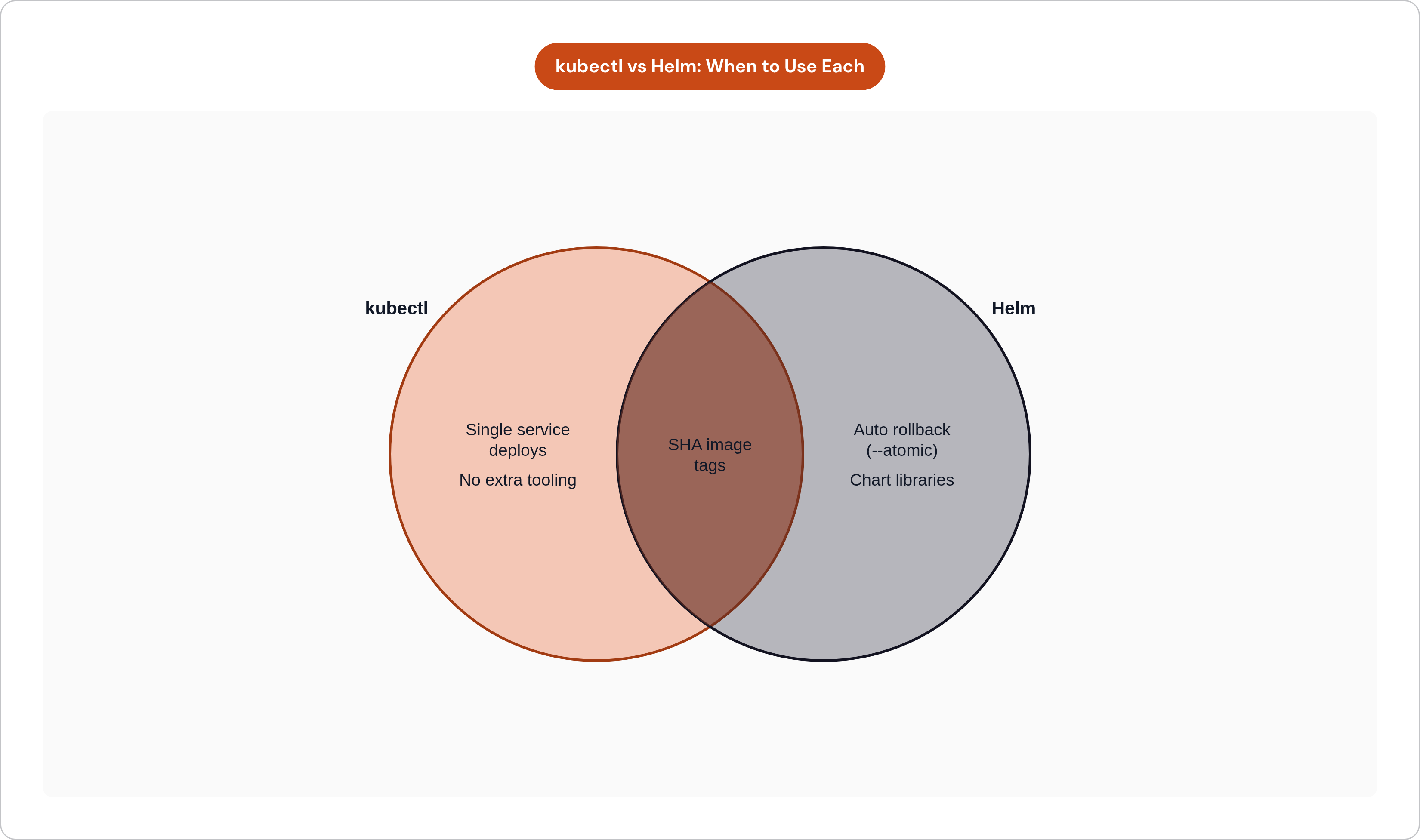
The kubectl path is appropriate for a single service with few configuration variables. kubectl set image updates a Deployment's image tag directly. kubectl apply -f on a manifest directory applies a set of YAML files from the repository. Neither requires additional tooling, and for a small number of services with stable configurations, neither should. Reaching for Helm before you need it is a real mistake; Helm introduces abstraction that costs you cognitive load every time you debug a rendering issue.
The image tag substitution pattern keeps manifests in the repository as source of truth:
export IMAGE_TAG=${{ github.sha }}
envsubst < k8s/deployment.yaml | kubectl apply -f -
Your manifest contains image: ghcr.io/org/app:${IMAGE_TAG} as a placeholder. envsubst replaces the variable before kubectl sees the file. The result is a manifest generated from a versioned template, not a one-off string assembled at deploy time.
The Helm path is appropriate when the same application deploys to multiple environments with meaningfully different configurations. Values files handle the differentiation cleanly:
helm upgrade --install app ./charts/app \
  --values charts/app/values-staging.yaml \
  --set image.tag=${{ github.sha }} \
  --namespace app-staging \
  --atomic \
  --timeout 5m
The --atomic flag makes Helm roll back automatically if the release fails. --timeout 5m gives pods time to reach Ready before Helm considers the release successful. Without --atomic, a failed deploy leaves a partial release state that requires manual cleanup.
Whether you use kubectl or Helm, rollout verification is not optional. After applying the manifest, kubectl rollout status deployment/app-name --timeout=5m waits for the rollout to complete and fails the workflow if pods don't reach Ready within the timeout. Without this step, the workflow reports success the moment apply returns, and a broken deployment goes undetected until a human notices.
Pair rollout status with an automatic rollback step:
- name: Verify rollout
  run: kubectl rollout status deployment/app-name --timeout=5m

- name: Rollback on failure
  if: failure()
  run: kubectl rollout undo deployment/app-name
The if: failure() condition ensures rollout undo only fires when a real failure is detected. Running rollout undo unconditionally, or without the status check, produces spurious rollbacks that are difficult to explain and harder to diagnose.
The Deployment spec and the pipeline share responsibility for uptime during deploys. The pipeline applies the manifest; the Deployment spec controls how the rollout proceeds. RollingUpdate strategy with maxUnavailable: 0 and maxSurge: 1 means new pods must come up before old pods come down. The pipeline can't substitute for this configuration, and the configuration does nothing to catch application failures without the pipeline's verification step. They're jointly necessary, not interchangeable.
How Do You Separate Staging from Production with Different Secrets per Environment?
GitHub Environments are the native mechanism for this separation. Each Environment carries its own secrets, its own protection rules, and its own deployment history. When a job references environment: production, it inherits the production Environment's access model. A secret stored at the production Environment level is inaccessible to jobs linked to staging. That's not a convention you have to maintain; it's enforced by the platform.
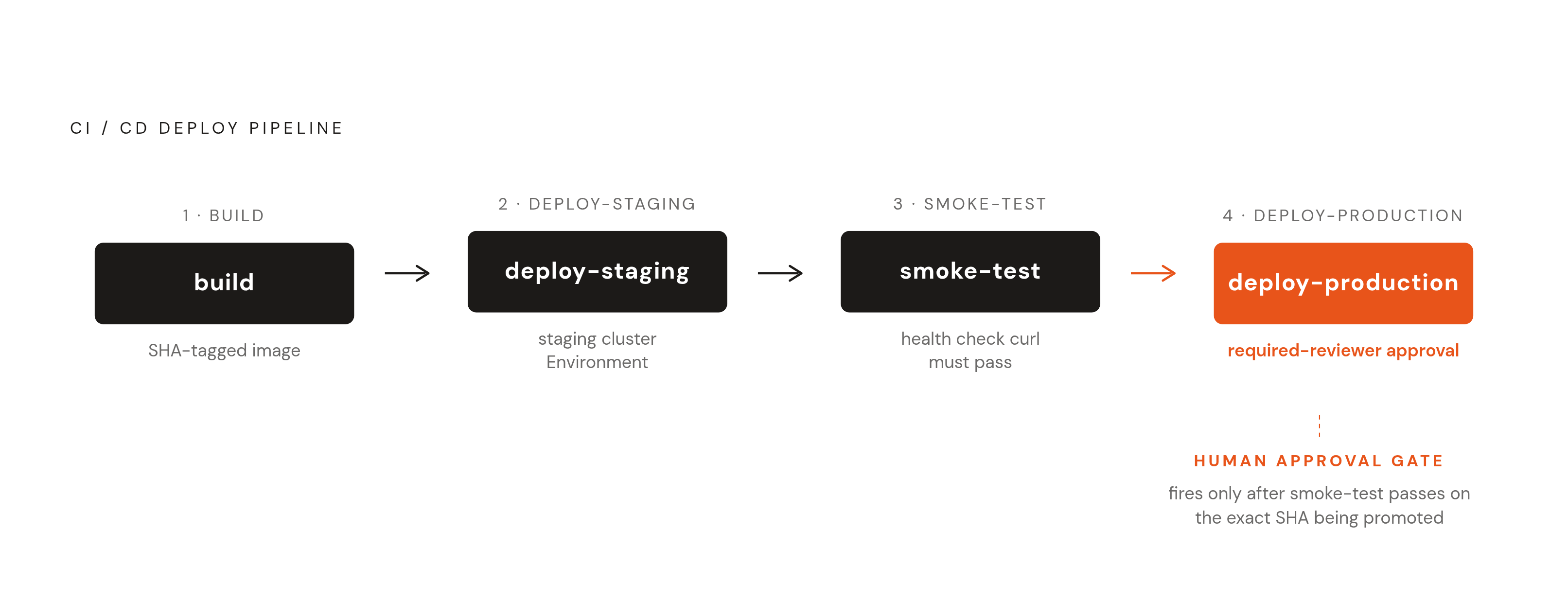
Required reviewers implement the approval gate. The production Environment can require one or more named GitHub users to approve before the deploy job proceeds. This answers the compliance question "who approved this deploy" without additional tooling. The approval is logged against the deployment event, with actor, SHA, and timestamp. For teams working toward SOC 2, this is the change control audit trail, and it costs nothing beyond what you're already using.
The wait timer adds a configurable delay between the staging deploy and the production promote. This gives automated smoke tests time to run and report before the gate opens, without requiring a human to manually monitor staging for the right interval.
The workflow structure that implements multi-environment promotion looks like this:
jobs:
  deploy-staging:
    environment: staging
    needs: build
    runs-on: ubuntu-latest
    steps:
      # deploy to staging cluster

  smoke-test:
    needs: deploy-staging
    runs-on: ubuntu-latest
    steps:
      - name: Health check
        run: |
          curl --fail https://staging.yourapp.com/health

  deploy-production:
    environment: production
    needs: smoke-test
    runs-on: ubuntu-latest
    steps:
      # deploy to production cluster
deploy-production does not start until smoke-test passes. smoke-test cannot start until deploy-staging completes. The required reviewer approval on the production Environment fires before deploy-production runs, at which point a human can see that the smoke test passed on the same SHA being promoted. The sequencing makes the approval meaningful rather than perfunctory.
Practical staging validation worth including: a health endpoint check that fails the workflow on a bad response code, a short integration test suite run against the staging URL, and a manual review window configured through the Environment's wait timer. That combination — required reviewer plus Environment-scoped secrets plus deployment log — is the baseline for demonstrating change control in a SOC 2 audit without purchasing additional tooling.
Adding Security Scanning Without Making the Pipeline Slow or Noisy
A complete pipeline covers five scanning categories: secret detection, dependency scanning (SCA), static analysis (SAST), container image scanning, and license checking. Where you place each scan matters as much as whether you include it, because scans in the wrong position slow the pipeline without catching issues any earlier.
Secret detection and SAST belong in ci.yml, running on every push and pull request. These scans are fast and operate on source code before a build even starts. Catching a hardcoded credential in CI is categorically better than catching it after an image is pushed to a registry.
Container scanning belongs after the image is built and before the deploy job is allowed to proceed:
- name: Scan image for vulnerabilities
  uses: aquasecurity/trivy-action@master
  with:
    image-ref: ghcr.io/${{ github.repository }}/app:${{ github.sha }}
    severity: 'CRITICAL'
    exit-code: '1'
Block on critical CVEs. Warn on high. Ignore low by default, and adjust the threshold over time as the team develops capacity to remediate. A scanning configuration that fails on every informational finding is like a car alarm that goes off in a light breeze — everyone learns to ignore it, and it's silent when something real happens.
Dependency scanning and license checks can run on a schedule rather than on every push, because the dependency graph doesn't meaningfully change on every commit. A weekly cron against existing deployed images catches CVEs published after deployment without waiting for a code change to trigger the pipeline:
on:
  schedule:
    - cron: '0 6 * * 1'
GitHub's native tooling covers significant ground for teams already on GitHub Advanced Security: Dependabot for dependency alerts and CodeQL for SAST integrate without additional secrets or third-party accounts. Trivy is the container scanning option that pairs most naturally with GitHub Actions workflows; it has a maintained Action and handles most container formats without configuration.
The reusable workflow pattern elevates scanning from a per-repository decision to an organizational standard. Security scan logic in a pinned reusable workflow means all repositories calling it receive the same scan configuration. When a new CVE class requires a scanner update, it changes in one place and propagates automatically to every service.
Keeping Pipeline Costs from Growing with Build Volume
CI/CD compute typically accounts for 15 to 40% of overall cloud infrastructure spend, but it rarely receives the same scrutiny as production workload costs. The pattern that appears repeatedly across audits: builds taking 12 minutes that should run in 4, test suites running sequentially that should parallelize, caching not configured because no one has prioritized it. Across teams that have actually examined their CI spend, 40 to 60% of it is pure waste.
GitHub restructured its hosted runner pricing in January 2026. Prices dropped roughly 40%, and Linux runners now default to 4 vCPU and 16 GB RAM at prices previously associated with 2-vCPU machines. Teams operating on older pricing assumptions or older runner configurations should re-evaluate whether they're using the right runner tier.
The highest-impact cost levers, in priority order: Docker layer caching and dependency caching come first. Using actions/cache and the cache-from / cache-to flags in docker/build-push-action can cut build times 50 to 70%. Configure this before anything else. The return is immediate and requires no architectural change.
Conditional job execution comes next. Skipping deploy jobs when only documentation or non-application files change is achievable using path filters in the trigger configuration. Teams that implement this consistently report reducing total runner hours by roughly 35%. The configuration is a handful of lines:
on:
  push:
    paths-ignore:
      - 'docs/**'
      - '**.md'
Self-hosted runners on Spot instances are worth considering for teams above approximately 80,000 to 100,000 build minutes per month. Teams consistently report 70 to 90% cost reduction compared to managed runner pricing. The operational overhead is real; below that threshold, managed runners are the correct choice and the simplicity is worth the price differential.
Runner image choice is the lever most teams overlook. Switching from ubuntu-latest to a slimmer image has produced meaningful annual savings for teams with high build volume, with no workflow changes required. The savings are proportional to build frequency, so this is only worth investigating once you have volume.
The hybrid model for mid-size teams uses hosted runners for the long tail of slow jobs and pull request checks, and self-hosted runners for the hot paths that run constantly. This avoids over-engineering the runner infrastructure before build volume justifies it. GitHub's 10 GB per-repository cache limit has also been lifted, which matters for monorepos with large dependency trees that previously required workarounds.
Where This Pipeline Architecture Goes as the Team and Cluster Grow
The architecture described here scales in a predictable direction, and understanding that direction prevents you from building something you'll need to discard.
The first pressure point is multi-service complexity. A single application with one workflow file is manageable. Ten services, each with its own build and deploy logic, produces duplication that becomes expensive to maintain. Reusable workflows address this at the GitHub layer; Helm chart libraries address it at the Kubernetes layer. Both are worth introducing before the duplication is already entrenched. Retrofitting organizational standards into ten repositories that have already diverged is genuinely unpleasant work.
The second pressure point is deployment frequency. At low frequency, a workflow that runs kubectl directly is fine. At high frequency, the overhead of coordinating sequential deployments, managing concurrency, and tracking which version is running in which environment becomes significant enough that a dedicated GitOps tool justifies its operational cost. ArgoCD and Flux observe a manifest repository and reconcile the cluster continuously, moving the pipeline's responsibility from "apply changes to the cluster" to "update the source of truth." The cluster then manages its own state. GitHub Actions handles the integration side; the GitOps tool handles the delivery side. This is Level 4, and it's the direction most teams with growing deployment volume eventually move toward — not because it's theoretically elegant, but because the alternative stops scaling.
The third pressure point is organizational scale. Multiple teams deploying to a shared cluster need guardrails that a single repository's workflow files cannot reliably provide. Admission controllers, OPA/Gatekeeper policies, and namespace-level RBAC partitioning move the enforcement into the cluster itself rather than relying on workflow convention. At that point, the pipeline's job becomes delivering images and manifests that the cluster is already configured to accept or reject.
What doesn't change at scale: SHA-tagged images, scoped RBAC, Environment-based secrets, and staged deployment with approval gates. These patterns hold from a single engineer's first Kubernetes deployment through to a platform engineering team managing dozens of services. Build on them early, and the architectural migrations that follow are refinements, not rewrites.