Vercel Alternatives for Full-Stack Apps with Backend Workloads
Vercel works for frontends, not the backend workloads full-stack apps actually need.
Vercel is a frontend deployment tool that got treated like a backend platform. That mismatch is where full-stack teams start bleeding money and engineering time. The moment your app needs a background worker, a queue consumer, or a database that isn't bolted on through some third-party integration, you've hit the edge of what Vercel was ever built to do. I've moved three teams off Vercel over the past two years, and the root cause was always the same: Vercel being asked to do a job it never signed up for.
Their pitch makes sense once you see what it's optimized for: push to Git, get a deploy, get a preview URL, sit your assets on an edge CDN. For a Next.js marketing site, that flow is close to perfect. The bet Vercel made is that "backend" means small stateless functions that fire on an HTTP request and disappear. Fine for a contact form, fine for a lightweight API route, but it stops working the second something needs to keep running in the background.
No persistent workers exist, and no queue consumers sit around waiting for jobs, no cron process ticking along quietly. Execution time limits cap how much a function can do before it gets cut off mid-task, and there's no managed database or message queue living inside the platform itself. So you bolt on a Postgres instance from one vendor, a queue from another, maybe Redis from a third, each with its own login, its own network rules, its own bill arriving on its own schedule. A "full-stack app on Vercel" usually turns out to be a frontend on Vercel stitched to four or five outside services that all need separate babysitting. That stitching, more than any single missing feature, is the actual problem.
The cost and compliance problems that surface once traffic is real
Usage-based billing sounds fine right up until you're the one forecasting it. Bandwidth overages run $0.15/GB on Vercel, and that adds up fast once real traffic shows up, especially for anything media-heavy. Seat costs stack on top: a five-person team can hit $100 a month in seats alone before a single compute charge lands. Vercel offers spending alerts, but an alert only flags what already happened, and it doesn't forecast what's coming. Most teams find the ceiling when the invoice shows up, not from a warning on a dashboard.
Compliance is the harder wall, and it doesn't move. Enterprise plans give you VPC peering, but your containers still run on Vercel's shared-tenant servers, not yours. If you're chasing SOC 2, HIPAA, or any data sovereignty requirement, that's not a detail you can explain away. Auditors want to know exactly where data lives and who can touch it, and pointing to a vendor's shared infrastructure doesn't answer that question.
Here's the part that stings for early-stage teams specifically: if you're sitting on AWS, GCP, or Azure credits, none of it applies to Vercel. You're paying Vercel in real dollars while thousands in cloud credits sit untouched in an account nobody's using. Both problems, the billing surprises and the compliance ceiling, trace back to one fact: Vercel owns the infrastructure, and you don't.
How to read the alternatives landscape: three distinct categories with different tradeoffs
Once you start hunting for a replacement, the field splits into three real buckets. Most comparison posts flatten these into a single "alternatives to Vercel" list, and that's exactly why so many teams end up picking the wrong one.
Full-stack PaaS platforms run persistent services, managed databases, background workers, and cron jobs under one roof, one bill. For most teams leaving Vercel, this is the closest match to what they actually needed the whole time.
Then there's BYOC, bring-your-own-cloud: a control plane that deploys into your own AWS, GCP, or Azure account instead of a shared one. This is where compliance gets easier, and where those unused cloud credits finally start doing something.
Netlify and Cloudflare Workers sit in a third bucket, frontend-adjacent and edge-focused. Cloudflare's edge network spans 300-plus locations, which is genuinely impressive for static assets and lightweight functions. But structurally they share Vercel's exact gap on backend workloads, so I'm setting them aside here, since they're not a fix for the problem this piece is actually about.
The question underneath all of it: does the platform treat your backend as part of the architecture, or as something you're expected to go find somewhere else, on somebody else's dashboard, on somebody else's bill?
Render and Railway as the straightforward upgrade for teams coming off Vercel or Heroku
Render is probably the most direct answer for teams who just want the fragmentation to stop. Web services, background workers, cron jobs, managed Postgres and Redis, all on one platform. Pricing is flat: paid services start at $7 a month, Pro tier runs $19 per seat, no per-request billing waiting to surprise you. Render is also SOC 2 Type II certified, which closes a door Vercel structurally can't close at the shared-tenant level. Coming off Heroku specifically, Render accepts your buildpacks directly and maps Procfile processes, web and worker both, straight onto Render services. Long-lived WebSocket connections work out of the box, private networking is built in, and deploys typically land in one to three minutes.
Railway plays a different game: consumption-based, billed by the minute. If your traffic is spiky, that model means you stop paying for idle capacity nobody's using. Persistent volumes run $0.15/GB-month, which fixes the old Heroku headache of an ephemeral filesystem wiping data on every deploy. That bug cost me a full afternoon back in 2021, before I knew to check for it. Migrating a Heroku database over is a standard pgdump and pgrestore, nothing exotic, and env vars move through the Railway CLI without much fuss. Deploys land in 30 to 90 seconds, noticeably faster than Render. Railway's visual service canvas also shows how your services actually talk to each other, which becomes genuinely useful once you've got more than two or three pieces in the mix.
Steady, predictable traffic with compliance boxes to check? Render's flat billing and SOC 2 certification make it the safer call. Bursty traffic, early-stage, want to move fast without babysitting a bill? Railway fits better.
One more name worth knowing: Fly.io. It runs Docker containers on Firecracker micro-VMs across a global network, a strong pick for real-time or multi-region apps where latency actually affects the user. It's not cheap, though, and managed Postgres on Fly starts at $38 a month, so budget-conscious teams should walk in with eyes open.
What teams with compliance requirements or cloud credits actually need from a platform
Render and Railway fix the fragmentation problem. Ownership is a separate matter; your workloads still run on their servers, not yours, and that's the same ceiling Vercel has, just with better plumbing.
SOC 2 and HIPAA audits hinge on proving you control where data lives and who can touch it. Shared-tenant infrastructure makes that proof harder to produce, no matter how good the platform's own certifications look on paper. Cloud credits from AWS, GCP, or Azure can't be applied to a third-party vendor's servers either, so a team sitting on startup credits pays twice: once in unused credits, once in cash to whichever PaaS they picked. If you're in healthcare or fintech with real data sovereignty rules, shared infrastructure doesn't clear the bar. That's not a judgment call; it's just how the audit works.
BYOC exists to fix exactly this. A BYOC control plane deploys into your own cloud account, so you keep the Git-push deploys and the autoscaling and the managed CI/CD, but the compute sits in an AWS or GCP account that belongs to you. Compliance gets simpler because you point an auditor at your own account instead of narrating someone else's shared environment, and the credits finally apply to something real.
Some BYOC platforms deploy into your own AWS, GCP, or Azure account, so you own the VPC, the clusters, and the data. They offer paths toward SOC 2 and HIPAA compliance posture and handle CVE patching automatically, which quietly removes a DevOps chore most teams underestimate until they're the ones stuck doing it at 11pm. GPU workloads are supported on certain platforms as well, which matters if you're an AI startup running inference next to a normal web backend. Startup programs on some of these tools lower the cost of entry, and resource-based pricing means idle infrastructure doesn't rack up charges while nobody's watching. The full lifecycle, VPC setup, CI/CD, networking, autoscaling, can be covered without forcing you to hire a dedicated DevOps engineer just to keep the lights on.
BYOC asks for more setup up front than a fully managed PaaS, and I won't pretend otherwise. A three-person team with zero compliance obligations probably shouldn't bother yet, but if compliance or cloud economics are real constraints on the business, every hour of that setup pays for itself later.
Where open-source and self-hosted platforms fit, and when they're the wrong answer
Coolify deserves a mention. It's open-source, self-hosted, gives you a Vercel-like workflow on a server you control, and supports apps, databases, and services at close to zero licensing cost. No seat fees, no usage-based billing shocks, nothing sitting between you and your data.
Somebody has to own that server now, though. OS updates, security patches, uptime monitoring, disk space: all of it becomes your team's job instead of a vendor's. That cost is real even when it never shows up on an invoice.
Coolify makes sense for hobby projects and indie builds where cost is the binding constraint, or for a team with an engineer who genuinely enjoys running infrastructure and has time to do it properly. It stops making sense the moment engineering time becomes your scarcest resource, which describes most growth-stage startups I've worked with. And if you've got SLA or compliance obligations, self-managed infrastructure is a much harder thing to certify than a platform that's already walked through a SOC 2 or HIPAA audit before you signed up. You're trading platform cost for engineering overhead, and that trade only makes sense when the overhead is genuinely cheap for whoever's carrying it.
Matching the right alternative to the backend workload type
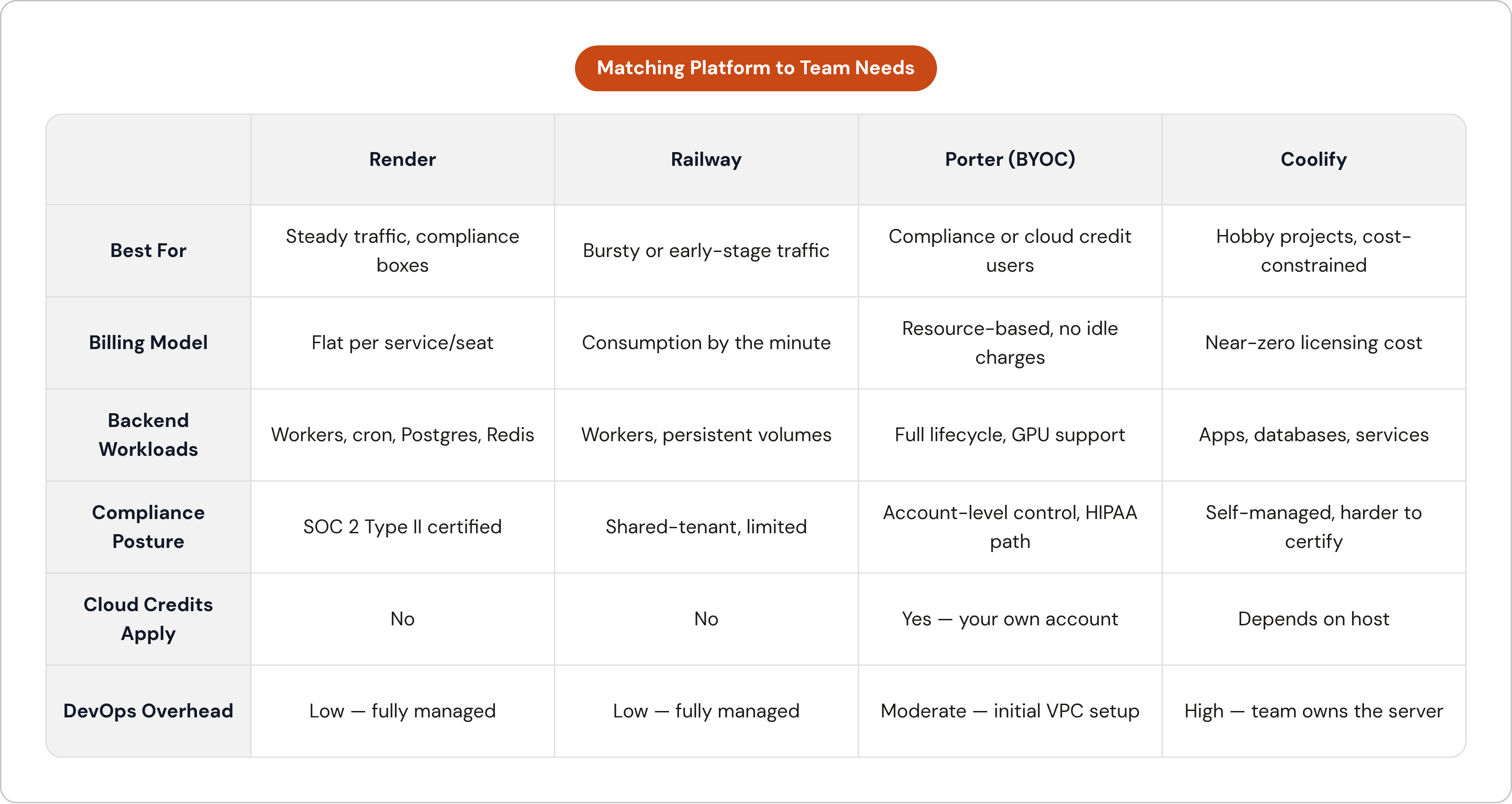
Three things decide the fit: backend complexity, compliance obligations, and how much DevOps bandwidth your team actually has, not the bandwidth you wish you had.
A thin backend, a simple API with no workers or queues, runs fine on either Render or Railway. Vercel's gap here is real but small enough to not matter much. A medium backend, one with workers, cron jobs, persistent storage, or WebSockets, is exactly the tier Render and Railway were built for. A heavy backend, long-running processes, GPU inference, complex job orchestration, needs container-first architecture, and that points you toward a BYOC platform if you need account-level ownership, or Fly.io if you don't.
On compliance: no requirements, any full-stack PaaS works. SOC 2 needs, Render's Type II certification covers you. HIPAA or data sovereignty needs push you toward BYOC specifically, since that's where you get the account-level control an auditor actually wants to see.
On team size: A solo founder or small team with no DevOps hire should stick with managed PaaS, such as Render or Railway, because self-hosting is a bad use of the one resource nobody has enough of. A team sitting on cloud credits with real scaling ambitions should look hard at BYOC, since it's the only model where those credits get spent on your own compute instead of a vendor's.
One case worth naming on its own: AI startups running inference alongside a normal web backend need GPU support built in, or at least a clean path to it. BYOC platforms with GPU workload support handle this directly, and they pair naturally with dedicated inference platforms like Modal or Baseten when the workload needs more specialized GPU infrastructure than a general-purpose PaaS gives you out of the box.
How a migration from Vercel actually runs in practice
Start with an audit, not a deploy script. Map every piece currently touching Vercel: the frontend, the API routes, any external databases already bolted on, your env vars, how the team uses preview environments, who has access to what. Get the full picture before you move a single service, since skipping this step is how migrations turn into three-week fire drills.
Treat it as a sequence, not a single cutover. Move backend services and databases first, while Vercel keeps serving the frontend exactly like it always has. DNS is the last domino, and it only falls once the new backend has proven itself stable for a few days, not a few hours.
Database migration is the step everyone dreads most, and it's genuinely just mechanical: pgdump and pgrestore for Postgres, same process whether you're headed to Render, Railway, or a BYOC setup. Env vars copy over through CLI tools or dashboard imports on nearly every platform mentioned here. Test everything in staging on the new platform before touching production DNS, and don't skip that to save an afternoon. I've seen that shortcut cost a team a Saturday.
Preview environments are worth protecting too. Vercel's branch-based preview URLs are a feature teams lean on daily without quite realizing it until it's gone, and Render, Railway, and Porter all support the same pattern. Just confirm it's actually wired up before you cut the cord on Vercel.
This migration carries less risk than it feels like from the outside, honestly. Most of the hard, stateful stuff, your databases, your queues, was probably already living outside Vercel to begin with. What you're really replacing is the frontend CDN layer and the serverless functions, and every platform here has a clean equivalent for both. For a standard full-stack app, moving to Render or Railway is realistically a day or two of focused work. A BYOC move takes longer up front, since you're standing up a VPC and a cluster for the first time, but startup programs on some BYOC platforms exist specifically to shrink that onboarding window down to something a small team can actually absorb.