open-source self-hosted PaaS options for multi-cloud deployments
Four architectural choices determine whether a self-hosted PaaS truly supports multi-cloud.
Open-source self-hosted PaaS platforms have become the default answer for teams trying to escape single-cloud lock-in, but the term "multi-cloud" hides four different architectures that behave nothing alike once you put them under load. Picking the wrong one does not fail loudly. It fails quietly, months later, when a team tries to move a workload off one cloud and discovers the platform never supported that.
Why Teams Are Looking at Open-Source Self-Hosted PaaS for Multi-Cloud
Most organizations do not run on one cloud anymore. Most organizations operate multi-cloud or hybrid estates, and when they run those estates without a deliberate plan, research on multi-cloud strategy puts the cost penalty at 15 to 30 percent above an equivalent single-cloud deployment. That penalty is what makes portable, cloud-neutral tooling valuable, and a single-vendor managed PaaS cannot give a team that no matter how good its developer experience looks.
A managed platform earns its ease of use by hiding the cloud underneath it. That is the entire pitch: push code, forget the servers. But the hiding only works in one direction. The networking model, the pricing structure, and the compliance posture all end up tied to whichever provider the platform was built on top of, and a team that signs up for the convenience signs up for the lock-in at the same time, usually without reading it that way.
Open-source self-hosted PaaS is the category that claims to answer this problem, and on the economics alone, the case looks settled. You can run a self-hosted platform on commodity VPS hardware for a fraction of what per-seat or usage-based commercial tools charge, and every major open-source platform in this space is free to run. But cost was never the hard part. The hard part is that "multi-cloud" is a set of architectural choices rather than one feature a platform either has or lacks, so two platforms can both claim multi-cloud support while meaning entirely different things by it. Before comparing any of them, it helps to know what to actually look for.
The four architectural axes that determine how well a self-hosted PaaS handles multi-cloud
A self-hosted PaaS has four decisions baked into its design that decide how ready it is for multi-cloud, and they compound. Get one wrong and the other three stop mattering.
The first is the orchestration layer. A platform built on Docker Swarm, one built on vanilla Kubernetes, and one built as a managed abstraction over Kubernetes all behave differently the moment a workload needs to move clouds. Swarm-based platforms tie clustering to the Swarm model itself, which keeps things simple but does not translate to a cloud provider's own Kubernetes service. Kubernetes-native platforms can target EKS on AWS, GKE on Google Cloud, AKS on Azure, or a self-managed cluster running anywhere, but they ask more of the team running them, since Kubernetes concepts have to be understood up front rather than abstracted away.
The second axis is whether the control plane itself is cloud-neutral. Some platforms are built assuming they own exactly one server. Some assume one cluster. Only some can federate across clusters sitting on different clouds from a single point of control. Dokku is a single-server platform, so it sits outside the multi-cloud conversation by design; spanning clouds from that architecture means bolting on a sidecar setup, not using anything native to the platform. When a platform can govern multiple clusters from one control plane, it is built for what multi-cloud needs.
The third axis is networking and ingress. Traffic has to get routed across nodes or clusters somehow, and how a platform does that decides whether the routing travels with the workload or stays behind on one cloud. A platform that hard-codes a cloud's own load balancer, AWS's ALB or GCP's Load Balancer, creates lock-in at the networking layer even when the containers themselves could run anywhere. A platform that routes through nginx or an equivalent provider-agnostic layer keeps that portability intact.
The fourth axis is the compliance surface: where audit evidence lives, who can see it, and whether the platform's tenancy model keeps workloads separated enough for regulated data. A shared cluster produces shared logs by default, and isolating one tenant's evidence from another's becomes something a team has to build on top rather than something the platform hands them. A dedicated-cluster-per-tenant model produces clean, per-tenant audit trails that line up directly with what SOC 2 and HIPAA ask for.
How the Leading Open-Source Platforms Score on the Four Axes
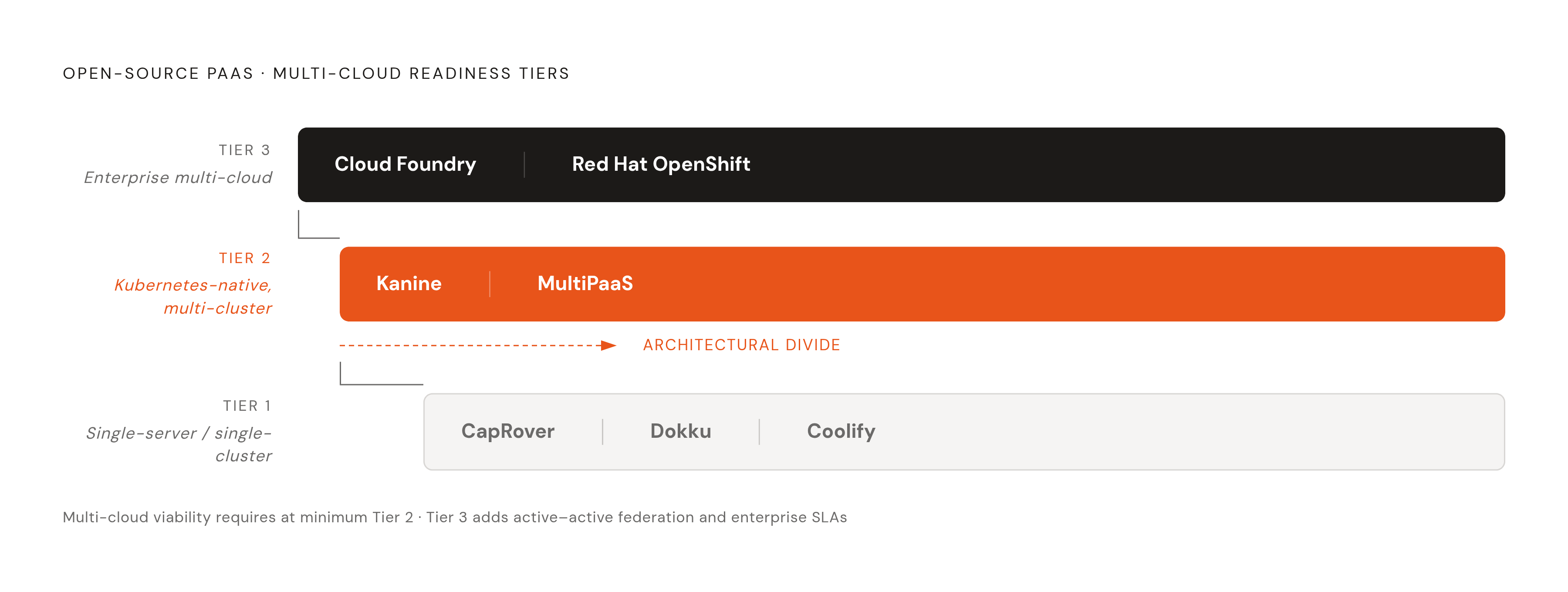
Running the current field of open-source platforms through those four axes sorts them into three tiers, and the tier tells you more about fit than any single feature on a landing page.
Tier 1: single-server or single-cluster, multi-cloud out of scope
CapRover runs on Docker Swarm with a web interface on top, and it supports clustering multiple servers inside a single Swarm. That Swarm, though, cannot span cloud providers without a team building substantial custom networking to connect it. CapRover sits in a comfortable middle ground between bare command-line tools and the heavier full-featured platforms, and it has years of production use behind it, so it has a rollback feature that lets you revert to a previous Docker image. It is a strong, lightweight layer for a team running on one cloud. Spanning clouds is not what it is built for.
Dokku, which multiple sources point to as the oldest and most battle-tested platform in this category, runs on a single server by default. An official k3s plugin added multi-node support starting in version 0.33.0, but if a team needs genuine multi-server or multi-cloud operation beyond that, the platform's own documentation sends them to other tools.
Coolify is the most built-out platform in this tier. It grew fast among self-hosted developers. It supports both Docker and Docker Compose, ships more than 280 one-click service templates, and costs nothing to run self-hosted. What it does not have is Kubernetes support or any enterprise compliance certification, and both of those gaps put a ceiling on how far it can go for multi-cloud or regulated workloads.
Tier 2: Kubernetes-native, multi-cluster, cloud-agnostic at the control plane
Canine installs via Helm onto any Kubernetes cluster a team already has running, and from there it connects to more than 230 cloud providers through one interface. The first cluster is free, and additional clusters carry a flat monthly fee with no per-seat charges. The free tier gives you unlimited projects and deployments, and SSL is handled automatically through Let's Encrypt. Canine also ships MCP server integration, so you can deploy and manage infrastructure from AI coding tools like Claude Code or Cursor. Because Canine sits on top of whatever Kubernetes cluster it is pointed at, multi-cloud support becomes a function of how many clusters a team connects to it. The control plane itself does not care which cloud any of those clusters live on.
MultiPaaS takes a more structural approach to the same problem. Its model is explicitly multi-tenant and multi-cluster: each workspace maps to one dedicated Kubernetes cluster, and the platform layers managed services on top, databases, messaging brokers, a private Docker registry, a private GitLab instance, centralized single sign-on through Keycloak, and distributed storage built on GlusterFS. It runs in two modes: MultiPaaS mode, which automates cluster provisioning and requires VirtualBox (a fit for teams running their own datacenter), and UniPaaS mode, which installs directly onto VMs or bare metal, including VMs on public cloud. One thing MultiPaaS is explicit about: it is not built to run on managed Kubernetes services like EKS, GKE, or AKS. It provisions vanilla Kubernetes on infrastructure the team controls directly. That dedicated-cluster-per-tenant design gives MultiPaaS the strongest isolation architecture for compliance purposes of any self-hosted option in this review, though the project itself is upfront that the codebase is still stabilizing, there are no tests yet, and the documentation is a work in progress. Treat it as a preview of where the architecture is headed rather than something to put into production today.
Tier 3: enterprise-grade, multi-cloud by design
Cloud Foundry is the closest thing this space has to a vendor-neutral standard. Its design lets a team push the same application artifact to AWS, Azure, Google Cloud, OpenStack, VMware vSphere, or on-premises hardware and get consistent behavior across all of them, without rewriting anything for the target. The cf push workflow hides every infrastructure decision from the developer: routing, scaling, and service binding are all handled by the platform. The cost of that is weight. Cloud Foundry carries a large operational footprint, and running it calls for a team prepared to operate it as a serious piece of infrastructure in its own right.
Red Hat OpenShift sits at the hardened end of the enterprise tier. It builds on open-source Kubernetes and adds Source-to-Image technology, an operator framework that automates Day 2 operations, and, through Red Hat OpenShift Platform Plus, Advanced Cluster Management for governing deployments spread across on-premises, edge, and hybrid cloud environments. Multi-cluster management is core to the platform, not bolted on, and the governance model is built with regulated industries in mind. The cost and the operational complexity both scale with that ambition. This is not a tier for a small engineering team without dedicated infrastructure staff to run it.
What the orchestration layer choice costs across clouds
The orchestration decision does not just set the ceiling on portability. The gap between reachable and unreachable cost-saving tools appears once a team is running across clouds, and it is large enough to show up on a budget.
ARM-based instances, AWS's Graviton4, Azure's Cobalt 100, Google's Axion, offer meaningfully better price-performance than comparable x86 instances for workloads already running on modern, portable runtimes. That advantage only materializes if the platform's orchestration layer can schedule workloads onto ARM instances without someone doing it by hand. Spot and preemptible instances work the same way: they come at a steep discount against on-demand pricing, and any Kubernetes-native platform with node group support can use them. A Docker Swarm-based platform can use spot capacity too, but it takes more manual setup to do it reliably, which is exactly the kind of overhead that erodes the savings. Plenty of cloud-native teams now run their entire CI/CD pipeline on spot capacity for this reason, because it cuts the cost of ephemeral build agents by a lot.
Google Cloud's Sustained Use Discounts kick in on their own once an instance runs past a minimum threshold each month, and you need no upfront commitment. A Kubernetes-native platform running long-lived workloads on GCP gets that discount without any platform-level configuration. There is a second-order benefit too: a team that can credibly move workloads between providers has real leverage when negotiating committed-use discounts, leverage a team locked to one provider simply does not have at the table.
A team that picks a Docker Swarm-based platform for its simplicity today is giving up the cost levers a Kubernetes-native platform exposes by default, and that gap widens as workloads grow rather than staying fixed.
The compliance objection to self-hosted multi-cloud
Compliance is the objection raised most often against self-hosted multi-cloud, and it deserves a straight answer, not a dismissal in either direction. Some of the objection holds. Most of it is narrower than it sounds once you trace it to the actual regulation and the actual part of the control chain it governs.
The hardest real blocker is HIPAA's business associate agreement requirement. HIPAA requires a signed BAA with any vendor that creates, receives, maintains, or transmits protected health information on a covered entity's behalf. Commodity VPS providers like Hetzner offer GDPR data processing agreements, not US HIPAA BAA programs, so a team whose compliance plan depends on a BAA running through the infrastructure vendor cannot run PHI workloads on that kind of VPS, full stop. That limitation sits underneath the PaaS platform entirely. No amount of platform configuration fixes a missing BAA, because it is a vendor relationship problem, not a software problem. The fix is to run the self-hosted platform on infrastructure from a cloud provider that does offer a HIPAA BAA, AWS, GCP, and Azure all do, and deploy the platform inside that account. This is exactly where Kubernetes-native platforms have the edge over platforms tied to one specific VPS provider, since they can sit on top of whichever cloud account already has the BAA in place.
Compliance practitioners tend to give a simple rule here: get to SOC 2 Type I, or get partway through the observation window, on a managed platform before migrating infrastructure. Controls carry over to new infrastructure, but only if they already exist before the move happens. Trying to build the controls at the same time as the migration is where most of this goes wrong.
But self-hosting does have one real advantage, and the compliance conversation often skips past it. Audit evidence is something a team can reach directly. Six months of SSH logs, the kernel version on every node, proof that a CVE was patched inside the SLA window: on infrastructure a team runs itself, you get that with a shell command. On a managed PaaS, you get the same evidence only by filing a support ticket or taking the provider's own SOC 2 report at face value.
The DevSecOps path is what makes this manageable at scale rather than a manual burden on every audit cycle. Security checks run inside CI/CD on every pull request and every build: code scanning, dependency checks, infrastructure-as-code checks, container image scanning. Policy enforcement blocks a deployment outright if encryption is disabled, if a storage bucket is left public, if a critical vulnerability turns up, or if a secret is detected in the code. Built this way, SOC 2 and HIPAA controls no longer need a separate evidence-collection project, because every build produces the evidence as a side effect of running.
Where the BYOC model fits into this landscape
Bring-your-own-cloud platforms sit in a different spot than the fully self-managed tiers above or a traditional managed PaaS do. The infrastructure runs inside the team's own cloud account, on AWS, GCP, or Azure, which keeps the HIPAA BAA chain intact and keeps audit evidence directly reachable the same way self-hosting does. What changes is who carries the operational weight of the Kubernetes layer itself. A platform that assumes a team owns the cluster also hands that team the patching schedule, the CVE remediation, and the autoscaling logic that come with running Kubernetes well. Porter takes a different approach: it runs production Kubernetes directly inside a team's own AWS, GCP, or Azure account, but handles cluster operations as part of the service rather than leaving them to the team. That sits on the orchestration axis described earlier as Kubernetes-native with a managed control plane, which is the combination that tends to carry the lowest ongoing operational cost of the architectures covered here, without giving up the account-level ownership that compliance and multi-cloud portability both depend on.
The architecture a team picks here determines, months later, whether moving a workload to a second cloud is a weekend project or a rewrite.