Preview Environments for Pull Requests on Kubernetes
Kubernetes namespaces make per-PR preview environments cheap, isolated, and fast to spin up.

Preview environments for pull requests are not a luxury feature for well-staffed platform teams. They are the structural fix for one of the most persistent inefficiencies in software delivery: the gap between writing code and seeing it run somewhere realistic. On Kubernetes, that fix is genuinely achievable without a dedicated DevOps function, because namespaces give you exactly the isolation primitive the pattern requires. This piece walks through how to build it, end to end.
Before any of the architecture matters, it helps to agree on what a preview environment actually is. It is an ephemeral, isolated deployment created automatically when a pull request opens. It gets its own URL, its own database, its own running instance of every service the application needs. When the PR is merged or closed, the environment is destroyed. No developer intervention required, in either direction.
The problem that motivates this is concrete. One shared staging environment means only one feature can be meaningfully tested at a time. Concurrent PRs stomp on each other's data, their migrations conflict, and the team starts serializing work that should run in parallel. Beyond that, code review alone cannot catch a broken onboarding flow, a design regression, or a performance problem that only manifests under real conditions. Those things only surface in a running environment. The longer the gap between writing code and seeing it run, the more expensive the inevitable fix becomes. That is the feedback loop argument, and it is not theoretical.
Why Kubernetes Namespaces Are the Natural Boundary for Per-PR Environments
A Kubernetes namespace is, operationally, a virtual cluster. Resources inside one namespace are logically isolated from every other namespace on the same physical cluster. There are no name collisions. A Deployment named api in pr-142 is a completely distinct object from a Deployment named api in pr-143. Services, Ingress resources, PersistentVolumeClaims, all of it scoped to the namespace. One PR's environment cannot interfere with another's.
That isolation guarantee is what makes namespaces the correct primitive for this pattern. You are not working around the platform, but using exactly what the platform was designed to provide.
The cost characteristic follows from a simple reality: preview environments receive almost no traffic once they are running. They sit idle most of the day. That usage profile means dozens of them can share a single cluster node without contention. This is fundamentally different from spinning up a separate virtual machine or dyno per branch, where you pay for the compute regardless of whether anyone is actively using the environment. Shared nodes with idle namespaces are cheap; per-branch VMs are not.
Startup time, once container images are cached in the cluster, is typically measured in tens of seconds to a couple of minutes. The namespace lifecycle matches the PR lifecycle almost perfectly: cheap to create, cheap to destroy, and aligned with events the developer is already generating.
Four Architectural Patterns Teams Use, and What Drives the Choice Between Them
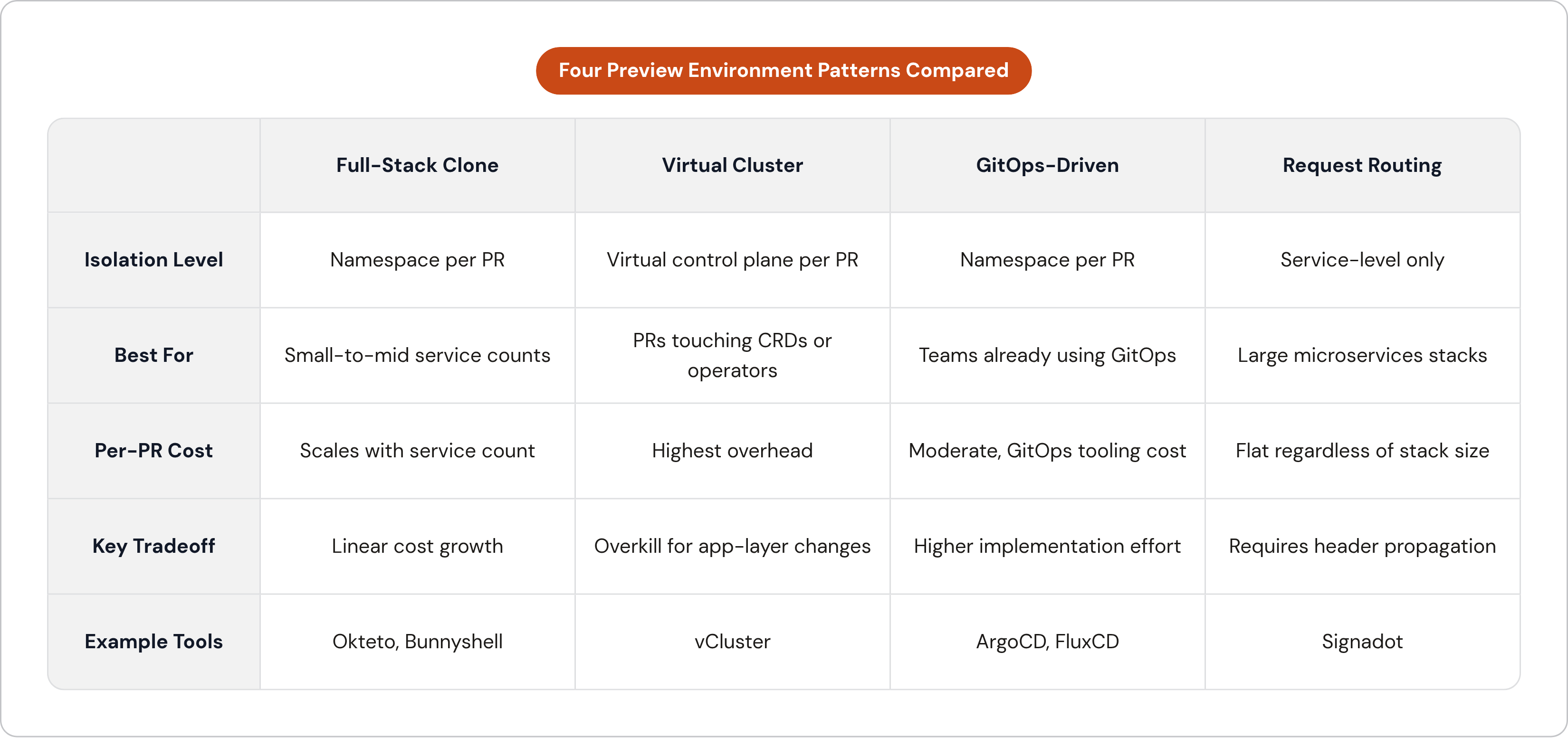
The pattern you choose depends on four variables: how many services your stack has, whether PRs ever touch cluster-level configuration like operators or CRDs, whether your team already runs GitOps, and how much spin-up latency is acceptable. Get those four answers and the decision largely makes itself.
Pattern 1: Full-stack namespace clone. Every PR gets a complete copy of the entire stack in its own namespace. This is the simplest mental model and the closest analog to a real production environment. Okteto and Bunnyshell both take this approach. The tradeoff is that cost scales linearly with the number of services and the number of open PRs. It is the right choice when the service count is manageable and reviewers need the complete environment to do meaningful QA.
Pattern 2: Virtual cluster per PR. Each PR gets its own virtual Kubernetes control plane via a tool like vCluster. The isolation is stronger than namespace isolation, which matters when a PR modifies operators, CRDs, or anything at the cluster level. That strength comes with overhead. For the vast majority of application-layer changes, this is overkill.
Pattern 3: GitOps-driven namespaces. CI creates or deletes namespace resources by committing to Git; a GitOps controller like ArgoCD or FluxCD reconciles the desired state. This approach offers maximum auditability and fits naturally into teams already invested in GitOps workflows. The implementation cost is higher than a managed platform, but the operational coherence is real.
Pattern 4: Request-level routing on a shared baseline. Rather than cloning the entire stack, only the changed service is forked into a preview deployment. Traffic for unmodified services falls through to shared dependencies. Signadot takes this approach. Spin-up is fast, per-PR cost stays flat regardless of stack size, and you can support a large number of concurrent environments. The catch is that it requires request-header propagation across every service, which introduces architectural coupling. This pattern makes sense when the full-stack clone approach becomes prohibitively expensive because the microservices count is high.
How the Full-Stack Namespace Approach Works Step by Step
The trigger is a PR opened in GitHub, GitLab, or Azure DevOps. That event fires a webhook or CI pipeline run.
The first step in the pipeline creates a namespace named after the PR number or a sanitized branch slug. Something like pr-142 or feature-login-redesign. Inside that namespace, the CI process or GitOps controller provisions a set of resources: Deployments built from the PR's container image, Service objects wiring internal traffic between components, an Ingress resource with a generated hostname, TLS certificates issued by cert-manager, and PersistentVolumeClaims for any stateful services.
Database isolation runs as a Kubernetes Job. The Job connects to an admin database, creates a per-PR database named after the PR, and runs migrations. An alternative is to share a single database instance across all preview environments but use per-PR schemas. Lower resource cost, but schema isolation needs to be enforced strictly or a bad migration in one PR can affect the others.
On each subsequent push to the PR branch, the pipeline triggers a rolling update to the existing namespace rather than a full teardown and rebuild. Faster, and it preserves any state the reviewer has already created in the environment.
After provisioning, a bot posts the preview URL as a comment on the PR; reviewers get one-click access with no need to hunt for anything.
Auto-sleep handles the idle cost problem. Pods scaled to zero on a schedule, waking on first request. Bunnyshell has reported this produces cost reductions in the range of 60 to 70 percent for environments that are only active during working hours. The math makes sense: if the environment is only needed eight hours a day, you are eliminating roughly two-thirds of the compute spend.
Teardown runs on PR merge or close. The namespace is deleted, PVCs are released, the DNS entry is removed. No manual cleanup steps for the developer.
The GitOps Path: ArgoCD ApplicationSet and the Manatal Real-World Case
Manatal migrated from Heroku to AWS EKS. They were already using ArgoCD for GitOps in production. The migration went smoothly until they tried to replicate Heroku's Review Apps feature and discovered there was no direct equivalent in their new setup.
Their solution was ArgoCD's ApplicationSet PullRequest generator. The generator watches a repository for open PRs and automatically generates an ArgoCD Application resource per PR. No separate preview-environment tooling required. The tooling they already trusted handled it.
What ArgoCD provisions per PR is the standard namespace set: Ingress, Service, Deployment, all managed as ArgoCD Application resources and visible in the same GitOps dashboard the team already uses for production. Preview environments are not a separate operational surface; they are part of the same observable graph.
A critical implementation detail in Manatal's setup is label-gating. Environments only provision for PRs carrying a specific label, something like "preview." This prevents runaway resource creation on every draft PR, dependency bump, or documentation change that opens as a pull request. Only intentional preview requests trigger provisioning.
For cost control, Manatal runs preview workloads on spot instances. Preview environments are non-critical and tolerate interruption. Spot pricing, relative to on-demand, represents a significant reduction in per-environment cost as the number of open PRs grows.
One senior engineer completed the full implementation in under two months. That is an important data point, since the GitOps path is genuinely achievable for a small team without a dedicated platform engineering function.
Teardown is handled by the reconciliation loop. When a PR is merged or the "preview" label is removed, ArgoCD reconciles desired state against actual state and deletes all resources for that environment automatically.
The FluxCD + Kustomize + GitHub Actions Alternative for Teams Not on ArgoCD
The setup is a base Kustomization for the application, with two overlays: one for the standard development deployment and one specifically for preview deployments. A wildcard TLS certificate is shared across all preview environments.
GitHub Actions drives the lifecycle events that FluxCD doesn't natively handle. On PR open, the Actions workflow renders the preview overlay with the PR number substituted as a variable, commits the rendered manifests to a preview branch or path, and FluxCD reconciles that state into the cluster. On PR close, the workflow deletes the preview branch or manifest path, and FluxCD removes the namespace. A bot step posts the generated preview URL as a comment.
The honest assessment of this path is that the GitHub Actions layer is the fragile component. Unlike ArgoCD's PullRequest generator, FluxCD does not natively watch for PR events. Actions bridges that gap, which means Actions is what you maintain when something breaks. That is an acceptable tradeoff for teams that are already deeply invested in FluxCD for production deployments and want their preview environments to live inside the same GitOps graph rather than introducing a second controller.
This pattern runs on Kubernetes v1.32 and FluxCD v2.5.1 as of early 2025, for teams who want a concrete compatibility reference.
Ingress, TLS, and DNS: How the URL-per-PR Pattern Actually Gets Wired Up
The URL pattern is deterministic. The CI pipeline constructs the preview hostname from the PR number or branch slug before it provisions anything. Something like pr-142.preview.example.com. Because it is deterministic, the bot can post the correct URL to the PR comment without any lookup step. No state to query, no API to call.
A single wildcard DNS record at *.preview.example.com covers every preview environment the cluster will ever create. There is no per-PR DNS change. The record exists once and stays there.
Each namespace gets an Ingress object with a hostname matching the PR's slug. The Ingress controller (whether nginx-ingress or Traefik) reads that object and routes inbound traffic to the correct Service inside the correct namespace. The isolation model is the same regardless of which controller you choose; only the annotation syntax differs.
cert-manager issues TLS certificates against the wildcard domain. Every preview environment gets HTTPS automatically. No per-environment certificate request, no manual renewal, no configuration beyond the initial cert-manager setup.
One thing worth noting explicitly: preview URLs are typically unauthenticated by default. For most teams working on non-sensitive features, that is fine. For teams handling regulated data or previewing features behind authentication, adding basic auth or IP allowlisting at the Ingress layer is the straightforward mitigation.
Database and Stateful Service Isolation Without Cloning a Production Database
Stateless services are trivial to isolate; each namespace gets its own Deployment and that is the end of it. Databases are a different problem. A per-PR database needs to exist, carry the correct schema, and have enough data seeded to make the environment useful for review. Getting that right is most of the implementation work for stateful preview environments.
The cleanest approach is a Kubernetes Job that runs on namespace creation. The Job connects to an admin database or a database operator, creates a new database named after the PR, and runs migrations against it. On teardown, a second Job or a finalizer drops the database. The Job can also load a fixture dataset or a sanitized snapshot, which keeps the preview environment realistic without copying production personally identifiable information into an environment that may be accessible to external reviewers.
The lighter alternative is a shared database with per-PR schemas. All preview environments share a single database instance; each gets its own schema. Resource cost is lower and migrations still run per PR against the per-schema target. The risk is that schema isolation requires enforcement: a poorly written migration in one PR should not be able to affect another PR's schema. In practice, most teams find this acceptable with a small amount of discipline around migration tooling.
PersistentVolumeClaims for any stateful services are provisioned automatically by a StorageClass and deleted when the namespace is torn down. No manual volume cleanup. The PVC lifecycle is bound to the namespace lifecycle.
For stateful services beyond databases (Redis being the most common example), a fresh empty instance is almost always sufficient for preview purposes. The environment is for functional and visual review, not for replicating production state.
Cost Controls That Keep a Fleet of Preview Environments From Becoming a Budget Problem
The utilization reality is favorable. Preview environments are idle for most of their existence; that is precisely the usage profile where cost controls are most effective.
Auto-sleep is the highest-leverage control. Scale pods to zero on a schedule aligned with working hours, wake them on first request. Bunnyshell's documented experience with this is a 60 to 70 percent cost reduction for teams whose environments are only active during the workday.
Spot instances are the second lever. Preview workloads are interruptible by definition; they are throwaway environments. Running them on spot or preemptible nodes captures meaningful savings relative to on-demand pricing for workloads that can tolerate the occasional restart.
Namespace TTLs prevent the accumulation of zombie environments. Any namespace that has been open for more than a configurable number of days without a new commit can be auto-deleted or hibernated. Stale previews are a real problem on active teams where PRs sometimes stay open for weeks.
Label-gating keeps the fleet from growing unbounded in the first place. Only PRs with an explicit "preview" label trigger environment creation. Draft PRs, automated dependency updates, and documentation-only changes should not provision compute.
Resource quotas on preview namespaces ensure a misconfigured preview cannot consume node capacity needed by other workloads. These are boring to configure and essential to maintain.
For teams running large microservices architectures where the full-stack clone approach starts to cost real money, the architectural answer is the request-routing pattern: deploy only the changed service and route traffic through shared dependencies for everything else. Cost stays flat as the service count grows. The tradeoff is the architectural coupling that header propagation introduces, which is why the decision to adopt it is not purely a cost calculation.
What Teams Migrating From Heroku Specifically Need to Replicate
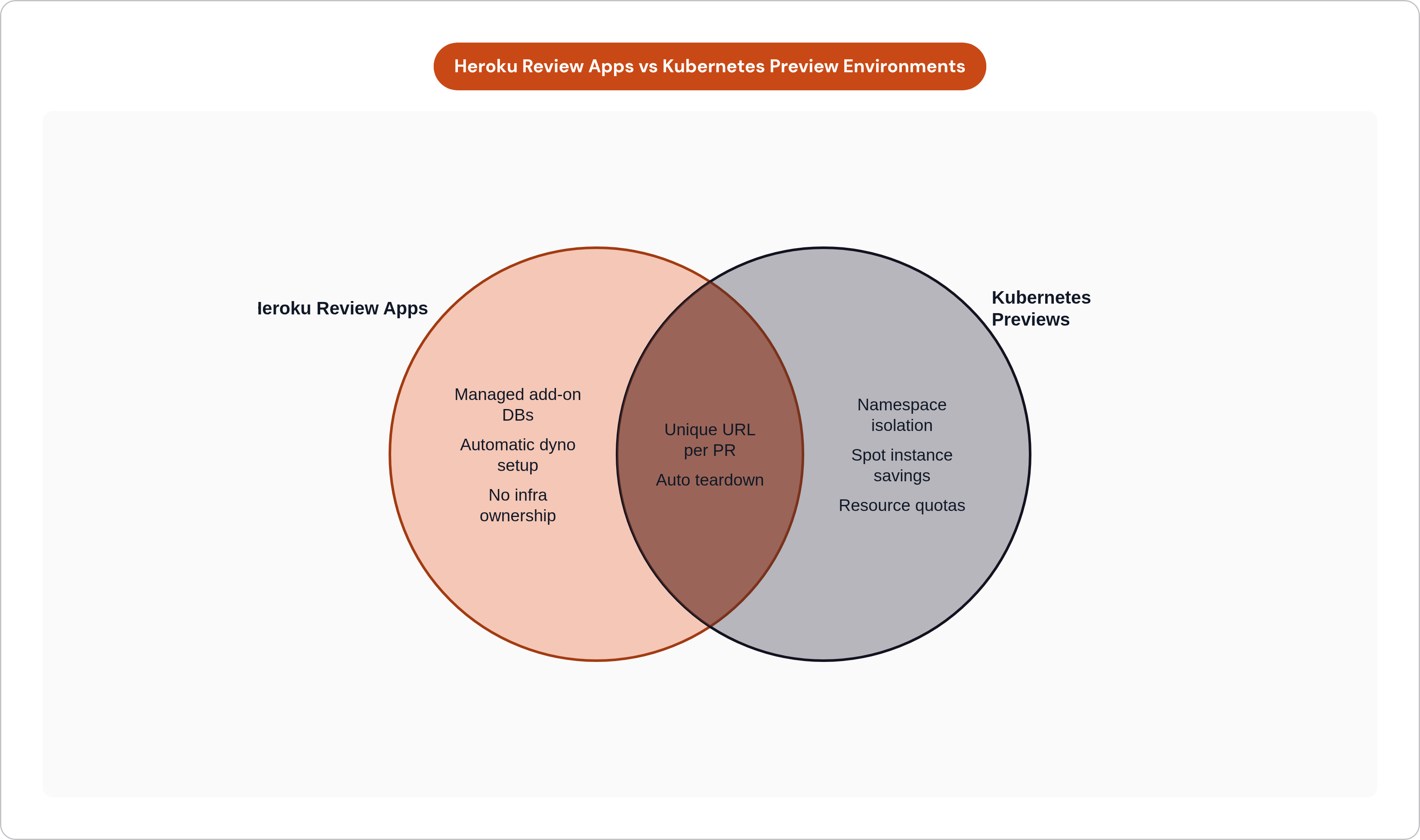
Heroku's own documentation describes Review Apps as disposable applications that run the code from any GitHub pull request in a complete, isolated app with a unique URL. That is the exact capability teams lose when they leave the platform. Replicating it is the migration's most emotionally significant step, because Review Apps changed how those teams did code review and they felt its absence immediately.
Heroku's current trajectory makes migration a practical necessity for growing teams. As of early 2026, Heroku entered a sustaining engineering model: no new features and no new Enterprise contracts for new customers. For teams that need to scale, staying is not a stable long-term position.
What Heroku handled invisibly, and what Kubernetes requires you to handle explicitly, breaks down into four components.
The dyno-to-Deployment mapping is straightforward. Procfile commands map to container entrypoints, and dynos map to Deployments with resource requests. This is mechanical work, not conceptual work.
The add-on database is more consequential. Heroku Postgres was provisioned and connected automatically. On Kubernetes, the options are a managed external database from a provider like Neon or Supabase, the cloud provider's native managed relational database service, or the in-cluster Job-based provisioning pattern described earlier. The right choice depends on the team's existing cloud relationships and operational comfort level.
The automatic Review App URL is replicated by the wildcard DNS setup combined with the CI bot comment. Functionally identical to what Heroku provided, but you own the infrastructure.
The automatic teardown on PR close is replicated by the teardown step in the CI workflow or the ArgoCD and FluxCD reconciliation loops. Again, functionally identical, but the mechanism is yours to maintain.
The migration sequence is sequential and manageable: export the Procfile, environment variables, and add-on configuration; dump the PostgreSQL database; map dynos to Deployment manifests; configure DNS and TLS; import the database; and finally wire up the preview environment CI steps using whichever of the three patterns (full-stack namespace with CI, ArgoCD ApplicationSet, or FluxCD with GitHub Actions) fits the team's existing tooling.
What Kubernetes gives Heroku migrants that Heroku never could is granular control. Resource quotas, node selection, custom networking rules, and the ability to run preview environments on the same cluster as production rather than on a separate managed platform. That control comes with operational surface area to maintain. The teams that make this transition successfully are the ones who acknowledge that tradeoff clearly at the start, and then build the automation to close the gap, which is the work Porter, a bring-your-own-cloud PaaS that deploys and manages applications directly inside a team's own AWS, GCP, or Azure account, handles by default for teams that want Kubernetes-level control without staffing a platform engineering function.